How To Reduce Largest Contentful Paint
How To Reduce Largest Contentful Paint: A Friendly Guide
Are you finding your website speed scores dragging down, especially when measuring Core Web Vitals? If so, you've likely encountered the term Largest Contentful Paint (LCP). LCP is one of the most critical metrics for determining user experience, measuring how quickly the largest image or text block becomes visible to the user. A slow LCP can frustrate visitors and even hurt your search rankings.
The good news is that tackling LCP issues doesn't require magic—just a strategic approach to performance optimization. This guide will walk you through actionable steps on how to reduce Largest Contentful Paint effectively, turning those sluggish load times into lightning-fast experiences for your users.
Understanding Largest Contentful Paint (LCP) and Why It Matters
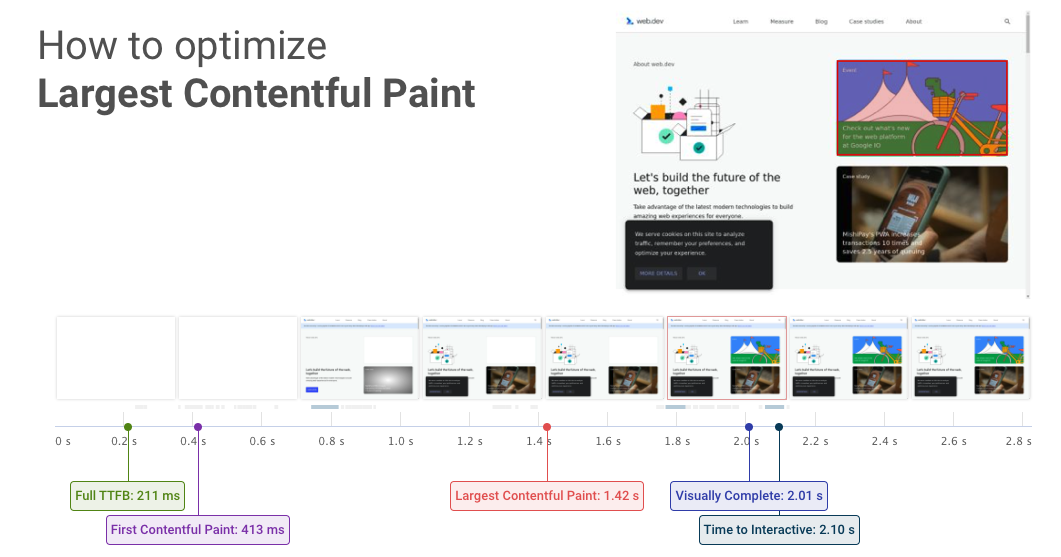
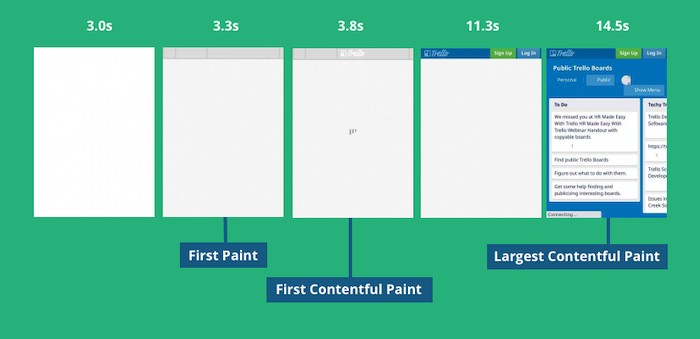
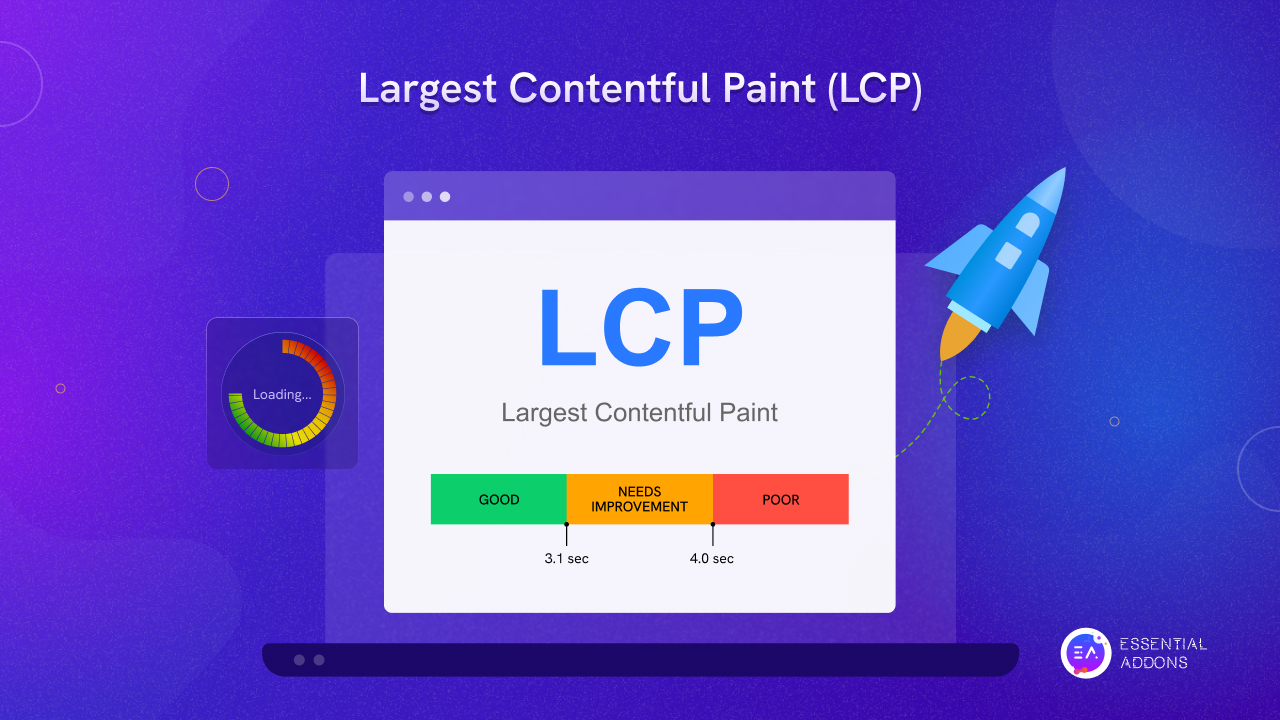
LCP essentially measures load speed from the user's perspective. It reports the render time of the largest image or text block visible within the viewport when the page first starts loading. Google considers a good LCP score to be 2.5 seconds or less. Anything above 4.0 seconds is considered poor.
Why is this metric so important? Because LCP is a direct indicator of whether your users feel like your site is fast. If they click a link and the main content takes too long to appear, they might bounce—leading to lost conversions and engagement. Furthermore, LCP is one of the three metrics that constitute Google's Core Web Vitals, making it essential for SEO success.
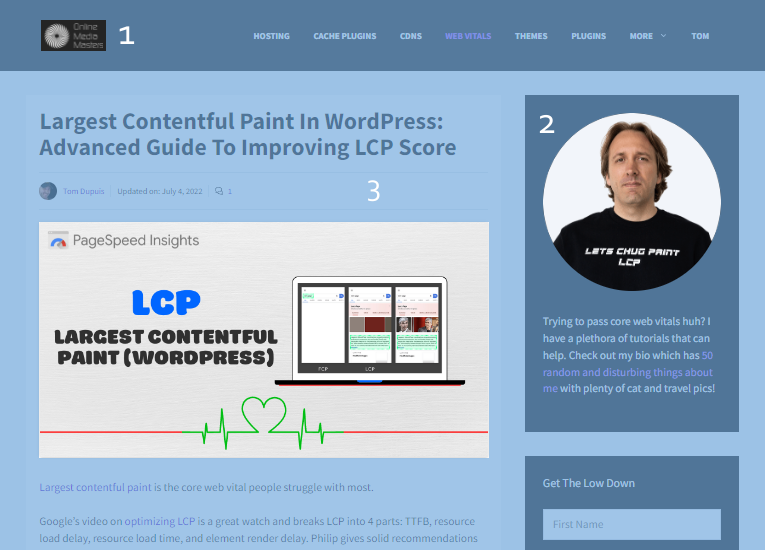
When looking at how to reduce Largest Contentful Paint, remember that the LCP element itself can be highly variable. It might be a hero image, a background image, or a large heading block. Knowing *what* your LCP element is is the first critical step toward fixing it.
Initial Steps to Diagnose and Optimize LCP
Before implementing any fixes, you must identify the bottlenecks. Tools like PageSpeed Insights, WebPageTest, and Chrome DevTools are your best friends here. These tools will tell you exactly which element is being measured as the LCP and why it's taking so long to load.
Most LCP delays boil down to four main factors:
- Slow server response times.
- Render-blocking CSS and JavaScript.
- Slow resource load times (especially images).
- Client-side rendering issues.
Let's tackle the foundational optimizations first, starting with the server and the critical rendering path.
Optimizing Your Critical Rendering Path
The critical rendering path (CRP) is the sequence of steps a browser goes through to convert HTML, CSS, and JavaScript into pixels on the screen. The faster you can get the necessary files to the user and render the LCP element, the better your score will be.
One huge factor in CRP efficiency is Time To First Byte (TTFB). A high TTFB means your server is slow to respond, which delays everything else. Here's how you can immediately improve TTFB:
- **Choose a Better Host:** Invest in high-quality, reliable hosting.
- **Utilize Server-Side Caching:** Implement strong server-side caching mechanisms (like Varnish or Redis) to avoid recalculating the page on every request.
- **Keep Database Lean:** Optimize your database queries and remove unnecessary data or plugins if you're using a CMS like WordPress.
Prioritizing LCP Resources
If you know your LCP element is a specific image, tell the browser to grab it *right now*! You can use resource hints to ensure essential resources are loaded as quickly as possible, dramatically helping to reduce Largest Contentful Paint time.
The two main resource hints you should utilize are:
<link rel="preload">: Use this for the specific LCP image or essential fonts needed for the LCP text block. Preloading ensures the browser fetches this resource earlier than it otherwise would.<link rel="preconnect">: Use this if your LCP resource is hosted on a third-party domain (like a CDN). This tells the browser to set up the connection early, saving hundreds of milliseconds.
Remember, only preload elements that are genuinely critical. Over-preloading can defeat the purpose and slow down other assets.
Effective Image Optimization for LCP Reduction
In the vast majority of cases, the LCP element is an image. If your LCP image is huge, uncompressed, or loaded inefficiently, your LCP score will suffer. Image optimization is non-negotiable if you want to know how to reduce Largest Contentful Paint successfully.
Start with these essential image tactics:
- **Compression and Formats:** Compress images without losing quality. Serve images in modern formats like WebP or AVIF. These formats are significantly smaller than traditional JPEGs or PNGs.
- **Serve the Right Size:** Avoid serving a massive 4000px image if the user's viewport only displays it at 800px. Use responsive images (`<img srcset>` and `<picture>` tags) to deliver the optimal file size based on the user's device.
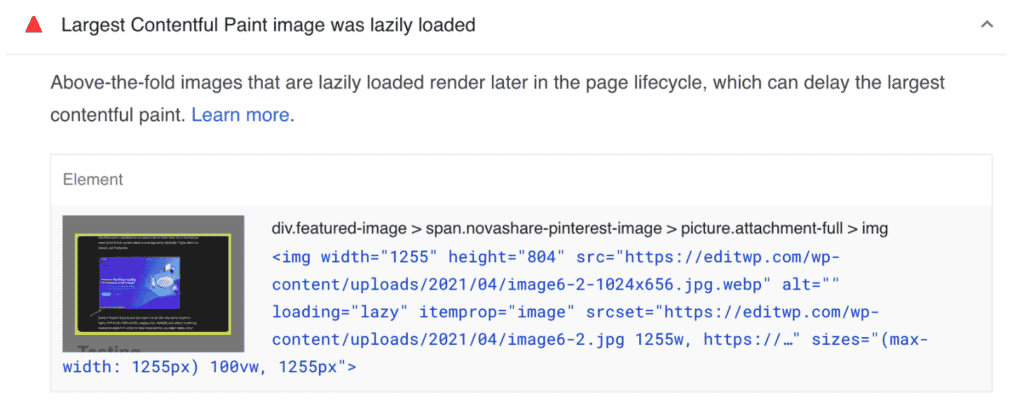
- **Critical vs. Non-Critical:** Only non-critical images (those below the fold) should use lazy loading. If your LCP image is being lazy-loaded, you are actively slowing down your LCP score! Ensure the LCP image is loaded immediately.
Advanced Techniques to Further Reduce Largest Contentful Paint
Once you've addressed server speed and primary asset optimization, it's time to look deep into your code structure. Render-blocking resources often cause the biggest LCP delays because the browser must pause rendering until these files are fully processed.
Minimizing Render-Blocking CSS and JavaScript
Every time the browser encounters external CSS or unoptimized JavaScript in the document head, it stops rendering the page. This dramatically increases the time it takes for the LCP element to appear. To combat this, you need surgical precision in how you load these assets.
Follow these steps to minimize render-blocking:
- **Minification:** Compress (minify) all CSS and JS files by removing unnecessary characters, comments, and white space.
- **Defer Non-Critical JS:** Use the
deferattribute for JavaScript that isn't needed immediately for display (e.g., analytics scripts). This ensures the script is fetched but executed only after the HTML parsing is complete. - **Async vs. Defer:** Use the
asyncattribute for scripts that are independent of the DOM structure (like ad scripts). Be cautious withasyncon scripts that manipulate the page structure. - **Extract Critical CSS:** Only inline the CSS required for the above-the-fold content (the "Critical CSS"). The rest of the stylesheet can be loaded asynchronously, allowing the browser to paint the LCP element quickly.
By effectively managing your scripts, you ensure the browser spends its energy on painting pixels, not waiting for large file downloads.
Leveraging Browser Caching and CDNs
While the first visit is important, speeding up repeat visits is also crucial, and this is where robust caching comes in. Browser caching ensures that static resources (images, fonts, CSS files) are stored locally on the user's device, so they don't have to be re-downloaded on subsequent page views.
Set appropriate expiration headers (like Cache-Control) for your static assets. Longer expiration times mean faster repeat visits. If you are struggling with global traffic, a Content Delivery Network (CDN) is a must. A CDN stores copies of your content on servers worldwide, ensuring that users access resources from the server geographically closest to them, significantly lowering latency and improving asset load times—a huge factor in reducing Largest Contentful Paint.
Implementing a high-quality CDN also helps manage traffic spikes and further reduces the strain on your primary hosting environment.
Time to Improve Your Largest Contentful Paint Score
We've covered everything from optimizing server response and prioritizing resources to sophisticated code minimization. Remember that improving LCP is an ongoing process, not a one-time fix. The goal is to make sure your LCP element loads within that crucial 2.5-second window.
To summarize how to reduce Largest Contentful Paint effectively, focus on these three core areas:
- Drastically reduce server response time (TTFB).
- Ensure the LCP asset (usually an image) is perfectly sized, compressed, and preloaded.
- Eliminate render-blocking resources by deferring non-critical CSS/JS and utilizing Critical CSS.
By committing to these optimization steps, you'll not only see better LCP scores but also enjoy improved SEO rankings and happier visitors who stick around longer.
Frequently Asked Questions About Largest Contentful Paint
- What is considered a good Largest Contentful Paint score?
- Google considers an LCP score of 2.5 seconds or less to be "Good." Scores between 2.5 and 4.0 seconds need improvement, and anything over 4.0 seconds is considered "Poor."
- How do I know which element is my LCP?
- You can use tools like Google PageSpeed Insights or Lighthouse. When running an audit, these tools will explicitly identify the element (usually an image or block of text) that the browser marked as the Largest Contentful Paint.
- Should I lazy load my hero image?
- Absolutely not. If your hero image is the Largest Contentful Paint element, lazy loading it will severely delay its appearance, significantly worsening your LCP score. Only lazy load images that are below the initial viewport (below the fold).
- Does server speed really affect LCP?
- Yes, massively. The first step in the LCP timeline is the server responding (TTFB). If your TTFB is 1.5 seconds, your LCP can never be better than 1.5 seconds, regardless of how optimized your front-end code is. Optimizing server speed is the most foundational step in how to reduce Largest Contentful Paint.
How To Reduce Largest Contentful Paint
How To Reduce Largest Contentful Paint Wallpapers
Collection of how to reduce largest contentful paint wallpapers for your desktop and mobile devices.

Stunning How To Reduce Largest Contentful Paint Abstract for Mobile
This gorgeous how to reduce largest contentful paint photo offers a breathtaking view, making it a perfect choice for your next wallpaper.

Lush How To Reduce Largest Contentful Paint View Nature
A captivating how to reduce largest contentful paint scene that brings tranquility and beauty to any device.

Stunning How To Reduce Largest Contentful Paint Image for Desktop
A captivating how to reduce largest contentful paint scene that brings tranquility and beauty to any device.

Vivid How To Reduce Largest Contentful Paint Artwork for Mobile
Transform your screen with this vivid how to reduce largest contentful paint artwork, a true masterpiece of digital design.

Serene How To Reduce Largest Contentful Paint Picture in HD
Explore this high-quality how to reduce largest contentful paint image, perfect for enhancing your desktop or mobile wallpaper.

Spectacular How To Reduce Largest Contentful Paint Photo in 4K
Immerse yourself in the stunning details of this beautiful how to reduce largest contentful paint wallpaper, designed for a captivating visual experience.
Amazing How To Reduce Largest Contentful Paint Scene for Desktop
Explore this high-quality how to reduce largest contentful paint image, perfect for enhancing your desktop or mobile wallpaper.
Stunning How To Reduce Largest Contentful Paint Design Illustration
Immerse yourself in the stunning details of this beautiful how to reduce largest contentful paint wallpaper, designed for a captivating visual experience.
Beautiful How To Reduce Largest Contentful Paint Moment Concept
Transform your screen with this vivid how to reduce largest contentful paint artwork, a true masterpiece of digital design.
Beautiful How To Reduce Largest Contentful Paint Scene Collection
Experience the crisp clarity of this stunning how to reduce largest contentful paint image, available in high resolution for all your screens.
Amazing How To Reduce Largest Contentful Paint View in 4K
Explore this high-quality how to reduce largest contentful paint image, perfect for enhancing your desktop or mobile wallpaper.

Vibrant How To Reduce Largest Contentful Paint Photo Illustration
Explore this high-quality how to reduce largest contentful paint image, perfect for enhancing your desktop or mobile wallpaper.
Vivid How To Reduce Largest Contentful Paint Background Illustration
Explore this high-quality how to reduce largest contentful paint image, perfect for enhancing your desktop or mobile wallpaper.

Breathtaking How To Reduce Largest Contentful Paint Moment in HD
Discover an amazing how to reduce largest contentful paint background image, ideal for personalizing your devices with vibrant colors and intricate designs.

Spectacular How To Reduce Largest Contentful Paint Scene Photography
A captivating how to reduce largest contentful paint scene that brings tranquility and beauty to any device.

Beautiful How To Reduce Largest Contentful Paint Capture Art
Explore this high-quality how to reduce largest contentful paint image, perfect for enhancing your desktop or mobile wallpaper.
Detailed How To Reduce Largest Contentful Paint Design Collection
Transform your screen with this vivid how to reduce largest contentful paint artwork, a true masterpiece of digital design.
Breathtaking How To Reduce Largest Contentful Paint Background Art
Discover an amazing how to reduce largest contentful paint background image, ideal for personalizing your devices with vibrant colors and intricate designs.
Spectacular How To Reduce Largest Contentful Paint Scene Collection
Find inspiration with this unique how to reduce largest contentful paint illustration, crafted to provide a fresh look for your background.

Mesmerizing How To Reduce Largest Contentful Paint Capture for Desktop
Experience the crisp clarity of this stunning how to reduce largest contentful paint image, available in high resolution for all your screens.
Download these how to reduce largest contentful paint wallpapers for free and use them on your desktop or mobile devices.