What Is Car Wash Mode On Tesla,
What Is Car Wash Mode On Tesla, And Why Do You Absolutely Need To Use It?
Picture this: You just pulled your beautiful Tesla Model 3 or Model Y up to an automatic car wash. You slide the car into neutral, release the brake, and BAM! Before you can even react, the windshield wipers engage automatically, Sentry Mode starts recording frantic videos, and you hear a little click—the charging port door might have just popped open.
This panic is real for many new Tesla owners. Since these cars are essentially computers on wheels, they have sophisticated settings that can wreak havoc in a high-pressure, wet environment. Thankfully, Tesla, being Tesla, designed a brilliant and necessary solution: Car Wash Mode.
Car Wash Mode (CWM) is much more than just a fancy setting; it's a critical digital shield that prepares your vehicle for automated washing systems, protecting sensitive components and preventing annoying features from activating at the wrong time. If you own a Tesla, knowing how and when to use this feature is non-negotiable.
The Essential Breakdown: What Car Wash Mode Actually Does
At its core, Car Wash Mode transforms your high-tech vehicle into a temporarily 'dumb' car, allowing it to navigate the mechanical chaos of a car wash safely. It manages several systems simultaneously, which, if left unchecked, could result in expensive damage or simply drain your battery unnecessarily.
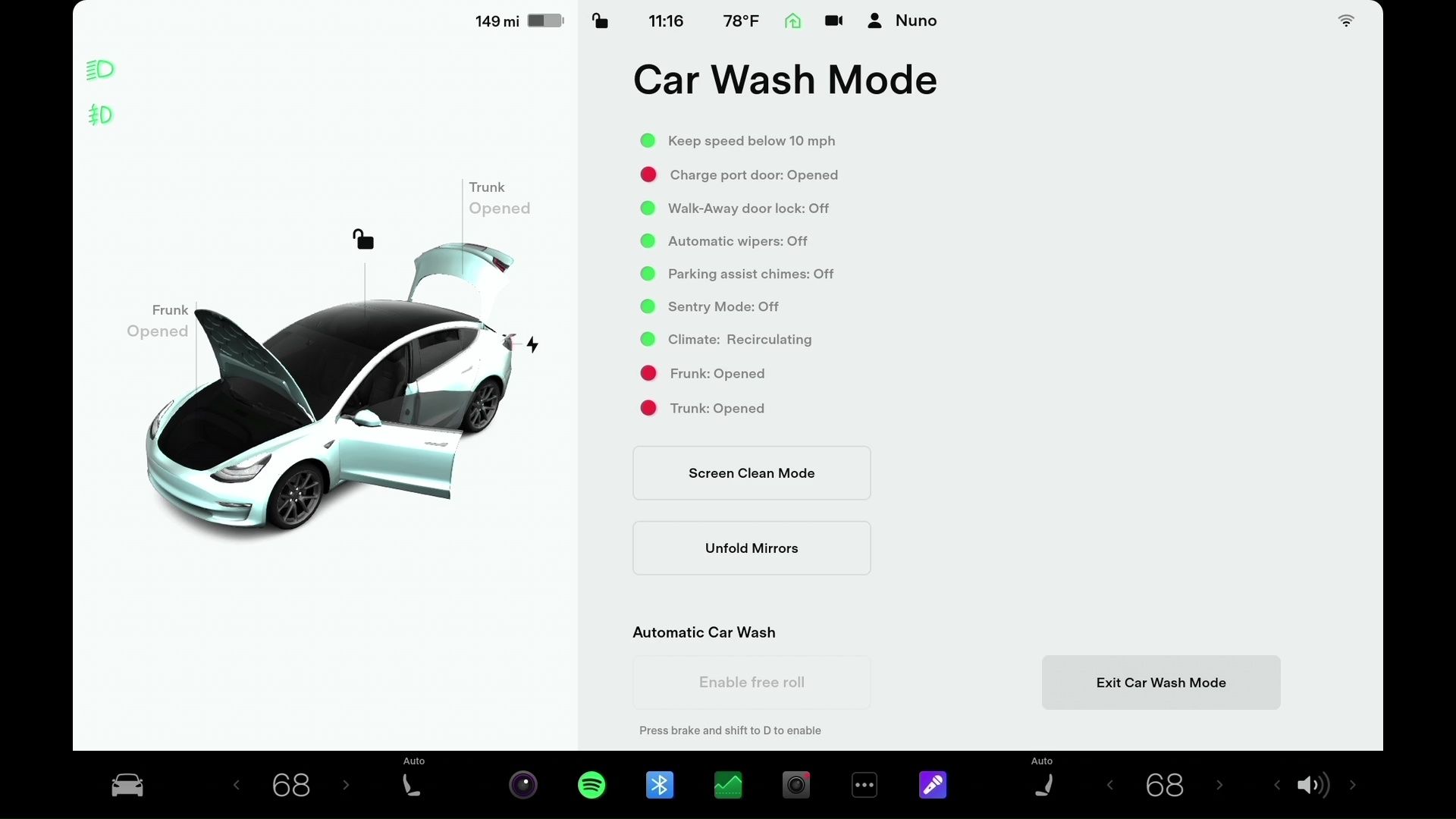
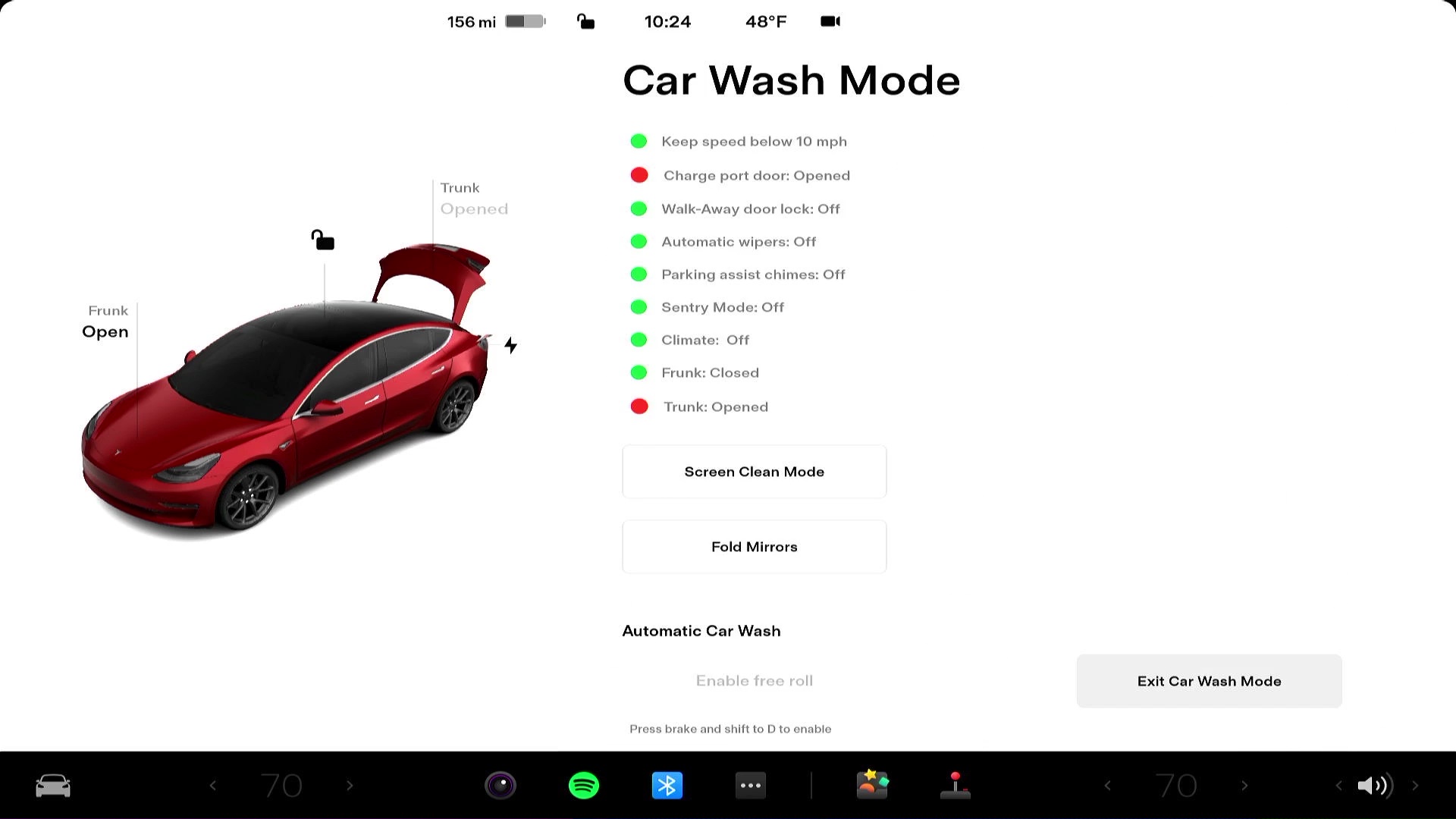
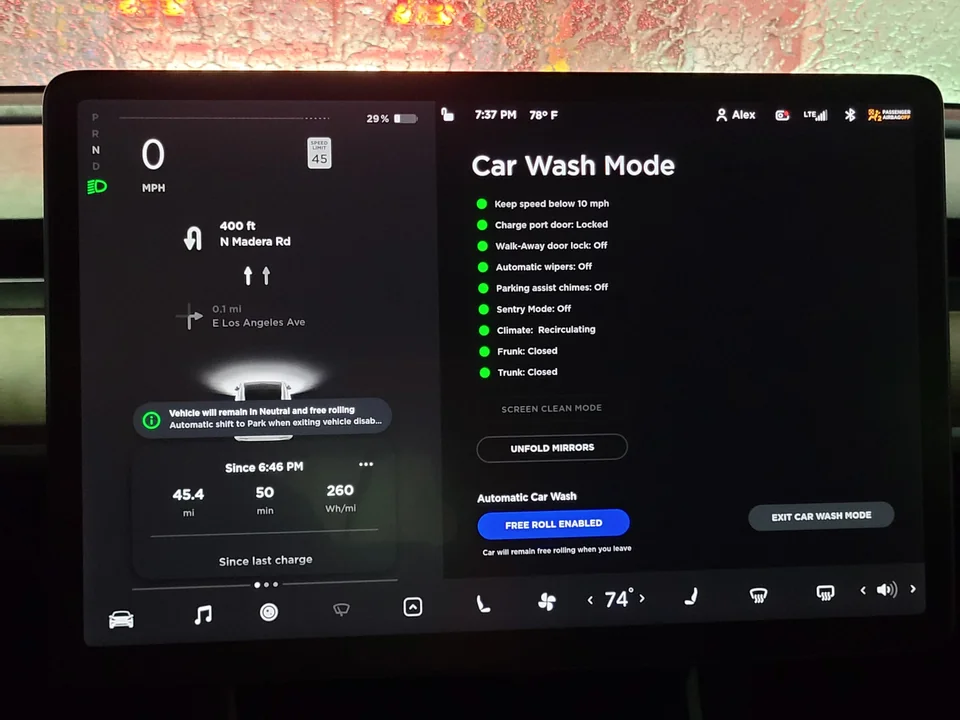
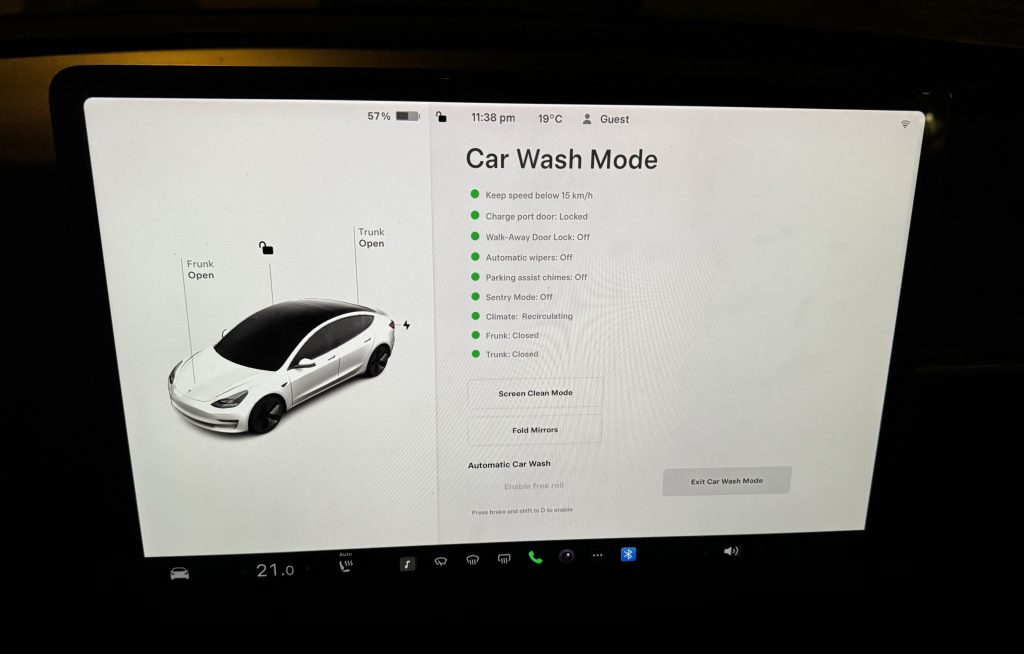
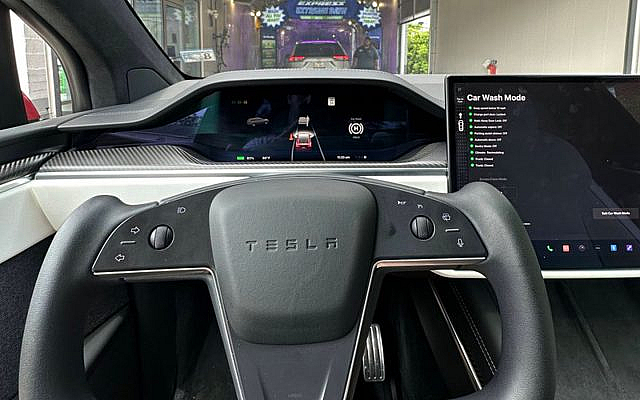
When you activate CWM via the massive central touchscreen display, the vehicle runs a pre-wash checklist that locks down key functions. This is absolutely vital whether you are using a standard roll-through automatic wash or even a modern touchless high-pressure system.
Here are the primary functions Car Wash Mode instantly disables or modifies:
- Locks the Charging Port: This is arguably the most crucial feature. High-pressure water jets finding their way into the charging port housing is a recipe for disaster. CWM ensures the port door is locked shut and cannot be accidentally opened by sensors or water pressure.
- Disables Auto Wipers: Tesla's rain-sensing automatic windshield wipers are highly sensitive. Even a slight mist or spray from the car wash environment can trigger them, potentially causing the blades to catch on the wash equipment or damaging the wiper motor if they activate while being pressured by a brush.
- Deactivates Sentry Mode: Sentry Mode, which uses all external cameras to record suspicious activity, consumes significant power and generates massive amounts of video data. While in a car wash, Sentry Mode would constantly trigger due to water, soap, and movement, unnecessarily filling your storage and draining your battery.
- Disables Auto Lock/Walk-Away Locking: If you step out of the car (as required in some washes) or simply open the door, CWM ensures the car does not attempt to lock itself or automatically roll up windows while sensors detect obstacles.
- Puts the Car in Neutral (N): While you must manually select Neutral, CWM keeps the car in Neutral and prevents it from automatically shifting back into Park (P), which is common for safety on Tesla vehicles when the driver seatbelt is undone or the driver steps out. This is critical for washes with conveyor belts.
- Parks the Mirrors: CWM automatically folds the side mirrors inward, protecting them from high-pressure brushes and reducing the overall width of the vehicle.
Think of Car Wash Mode as a full-system hibernation that only affects the external sensors and motors needed for protection. It's peace of mind wrapped up in a simple software toggle.
Step-by-Step Guide: How to Activate and Use Car Wash Mode
Using Car Wash Mode is incredibly straightforward, but timing is important, especially if you are entering an automated track system.
Step 1: Park Your Vehicle
Pull your Tesla into the car wash bay or just before the entrance, and put the car into Park (P).
Step 2: Access the Service Menu
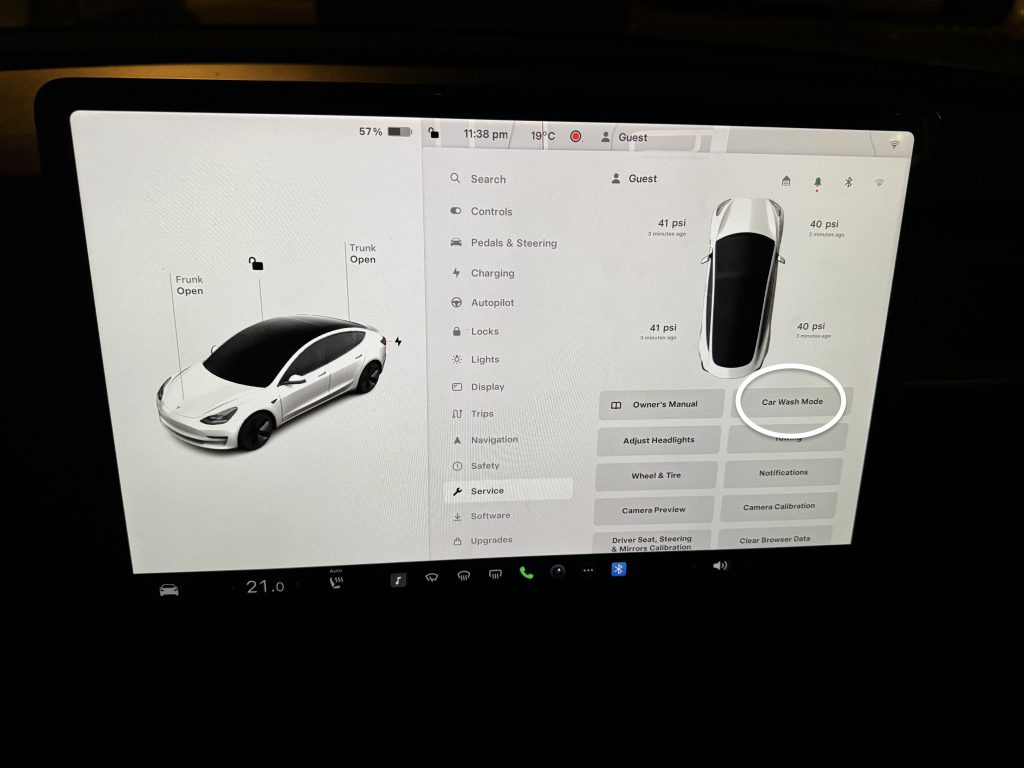
On your central touchscreen display, navigate to the main vehicle controls. Look for the "Controls" icon, typically a car silhouette at the bottom corner.
Within the Controls menu, locate and tap "Service."
Step 3: Initiate Car Wash Mode
Inside the Service menu, you will see the option clearly labeled "Car Wash Mode." Tap to activate it.
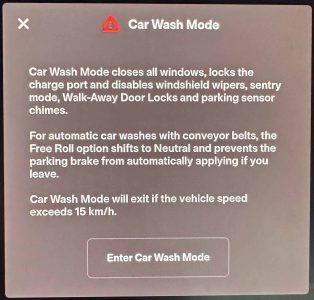
A confirmation message will appear, detailing exactly what the mode is doing (e.g., Folding mirrors, disabling Sentry Mode). The charging port will lock immediately.
Step 4: Prepare for the Conveyor (If Applicable)
If you are in a touchless wash where you stay parked, you are done. If you are entering a wash that requires the wheels to be placed on a moving conveyor belt, you must now shift into Neutral (N).
- Press and hold the brake pedal.
- From the Drive stalk (the right stalk), briefly nudge it up or down to select Neutral (N).
- Once Neutral is selected, the car will display a warning confirming that the vehicle is ready to roll.
Pro Tip: Most car wash conveyors are designed to be smooth, but always ensure your wheel position aligns perfectly with the tracks to prevent wheel or tire damage.
Step 5: Exiting the Wash and Deactivation
Once you exit the wash bay and you are safely stopped, Car Wash Mode must be deactivated.
You can exit CWM in three easy ways:
- Tap the "Exit" prompt on the touchscreen display.
- Shift the car into Drive (D) or Park (P).
- Exceed a speed of 10 mph (the car will automatically disable CWM).
Once deactivated, Sentry Mode will re-engage, mirrors will unfold, and the automatic functions will return to normal operation. It's smart engineering at its best.
Important Considerations: Do's, Don'ts, and Protecting Your Tesla
While Car Wash Mode solves the majority of problems associated with washing a Tesla, there are still a few best practices that any meticulous owner should follow to ensure the longevity of their vehicle's exterior and complex systems.
Automatic vs. Touchless Car Washes
While Car Wash Mode makes automatic (friction) washes safe for the internal electronics, many experienced Tesla owners still prefer touchless car washes or hand washes.
- Touchless Washes: These are the safest option. They rely purely on high-pressure water and cleaning chemicals. Car Wash Mode is still highly recommended here to prevent the charging port from opening due to excessive pressure or sensor misinterpretation.
- Automatic (Friction) Washes: The large rotating brushes used in these washes can sometimes cause micro-scratches (swirl marks) on the vehicle's clear coat, regardless of the car brand. If you must use a friction wash, ensure the brushes look clean and well-maintained.
Check the Windows Before Activation
Tesla vehicles have frameless windows, and when you open the doors, the window drops slightly to clear the seal (auto-presenting windows). Before activating Car Wash Mode, always ensure all windows are fully sealed. Car Wash Mode locks the door handles, so the car won't be able to drop the window slightly if someone tries to open a door while the wash is running.
Understanding the Gear Shift Lock (If You Stop Mid-Wash)
Remember that when you are in Car Wash Mode and Neutral (N), there is no gear lock mechanism holding the car still. If you must stop the vehicle while on a conveyor track, gently apply the brake pedal.
Crucial Warning: Do not engage the Parking Brake (P) while on a conveyor belt! If the parking brake is engaged, the wheels will lock, potentially causing damage to the suspension or the conveyor system itself.
Interior Cleaning Considerations
Car Wash Mode only affects the vehicle's exterior functions and sensors. If you have any sticky residue or heavy grime on the interior screens, be extremely gentle.
The vast 15-inch (or larger) center display screen is essentially the control panel for the entire car. Use only approved screen cleaners and soft microfiber cloths. Avoid harsh paper towels or chemical sprays that might drip into the screen edges.
Protecting the Paint: Ceramic Coating
For those frequently using automatic car washes, many Tesla enthusiasts highly recommend applying a high-quality ceramic coating or Paint Protection Film (PPF). These barriers offer an extra layer of defense against abrasive brushes and harsh chemicals, further preserving the sleek, glossy finish that Car Wash Mode helps protect internally.
In summary, Car Wash Mode is a simple but sophisticated function that highlights Tesla's commitment to detail. It saves you the headache of unexpected wipers, charging port failures, and full hard drives from Sentry Mode recording soap bubbles. Utilizing this mode correctly ensures that your high-tech electric vehicle handles the mundane task of getting clean with the utmost safety and efficiency.
Next time you see that foaming brush coming, just activate CWM, relax, and let your Tesla glide through the wash worry-free.
What Is Car Wash Mode On Tesla,#
What Is Car Wash Mode On Tesla, Wallpapers
Collection of what is car wash mode on tesla, wallpapers for your desktop and mobile devices.
Serene What Is Car Wash Mode On Tesla, Moment for Mobile
Experience the crisp clarity of this stunning what is car wash mode on tesla, image, available in high resolution for all your screens.

Vivid What Is Car Wash Mode On Tesla, Picture Photography
Transform your screen with this vivid what is car wash mode on tesla, artwork, a true masterpiece of digital design.
Vibrant What Is Car Wash Mode On Tesla, Photo for Mobile
Explore this high-quality what is car wash mode on tesla, image, perfect for enhancing your desktop or mobile wallpaper.
Amazing What Is Car Wash Mode On Tesla, View Illustration
Experience the crisp clarity of this stunning what is car wash mode on tesla, image, available in high resolution for all your screens.
Spectacular What Is Car Wash Mode On Tesla, Wallpaper for Your Screen
Find inspiration with this unique what is car wash mode on tesla, illustration, crafted to provide a fresh look for your background.
Artistic What Is Car Wash Mode On Tesla, View Digital Art
This gorgeous what is car wash mode on tesla, photo offers a breathtaking view, making it a perfect choice for your next wallpaper.

Dynamic What Is Car Wash Mode On Tesla, Scene Illustration
Find inspiration with this unique what is car wash mode on tesla, illustration, crafted to provide a fresh look for your background.

Lush What Is Car Wash Mode On Tesla, Abstract Concept
This gorgeous what is car wash mode on tesla, photo offers a breathtaking view, making it a perfect choice for your next wallpaper.
Vibrant What Is Car Wash Mode On Tesla, Moment Concept
Experience the crisp clarity of this stunning what is car wash mode on tesla, image, available in high resolution for all your screens.

Dynamic What Is Car Wash Mode On Tesla, Wallpaper Digital Art
This gorgeous what is car wash mode on tesla, photo offers a breathtaking view, making it a perfect choice for your next wallpaper.
Beautiful What Is Car Wash Mode On Tesla, Picture for Your Screen
Explore this high-quality what is car wash mode on tesla, image, perfect for enhancing your desktop or mobile wallpaper.

Lush What Is Car Wash Mode On Tesla, Wallpaper in HD
Immerse yourself in the stunning details of this beautiful what is car wash mode on tesla, wallpaper, designed for a captivating visual experience.

Mesmerizing What Is Car Wash Mode On Tesla, Landscape Art
Experience the crisp clarity of this stunning what is car wash mode on tesla, image, available in high resolution for all your screens.
Captivating What Is Car Wash Mode On Tesla, Abstract Digital Art
Find inspiration with this unique what is car wash mode on tesla, illustration, crafted to provide a fresh look for your background.

Detailed What Is Car Wash Mode On Tesla, Abstract for Desktop
Discover an amazing what is car wash mode on tesla, background image, ideal for personalizing your devices with vibrant colors and intricate designs.

Amazing What Is Car Wash Mode On Tesla, Capture Art
Discover an amazing what is car wash mode on tesla, background image, ideal for personalizing your devices with vibrant colors and intricate designs.
Crisp What Is Car Wash Mode On Tesla, Capture Illustration
Immerse yourself in the stunning details of this beautiful what is car wash mode on tesla, wallpaper, designed for a captivating visual experience.

Beautiful What Is Car Wash Mode On Tesla, Landscape for Your Screen
Transform your screen with this vivid what is car wash mode on tesla, artwork, a true masterpiece of digital design.

Artistic What Is Car Wash Mode On Tesla, Background Nature
Find inspiration with this unique what is car wash mode on tesla, illustration, crafted to provide a fresh look for your background.

Exquisite What Is Car Wash Mode On Tesla, Design in 4K
Immerse yourself in the stunning details of this beautiful what is car wash mode on tesla, wallpaper, designed for a captivating visual experience.
Download these what is car wash mode on tesla, wallpapers for free and use them on your desktop or mobile devices.