Exploring MotionCtrl: A Revolutionary Unified Framework for Video Motion Control on arXiv
Exploring MotionCtrl: A Revolutionary Unified Framework for Video Motion Control on arXiv
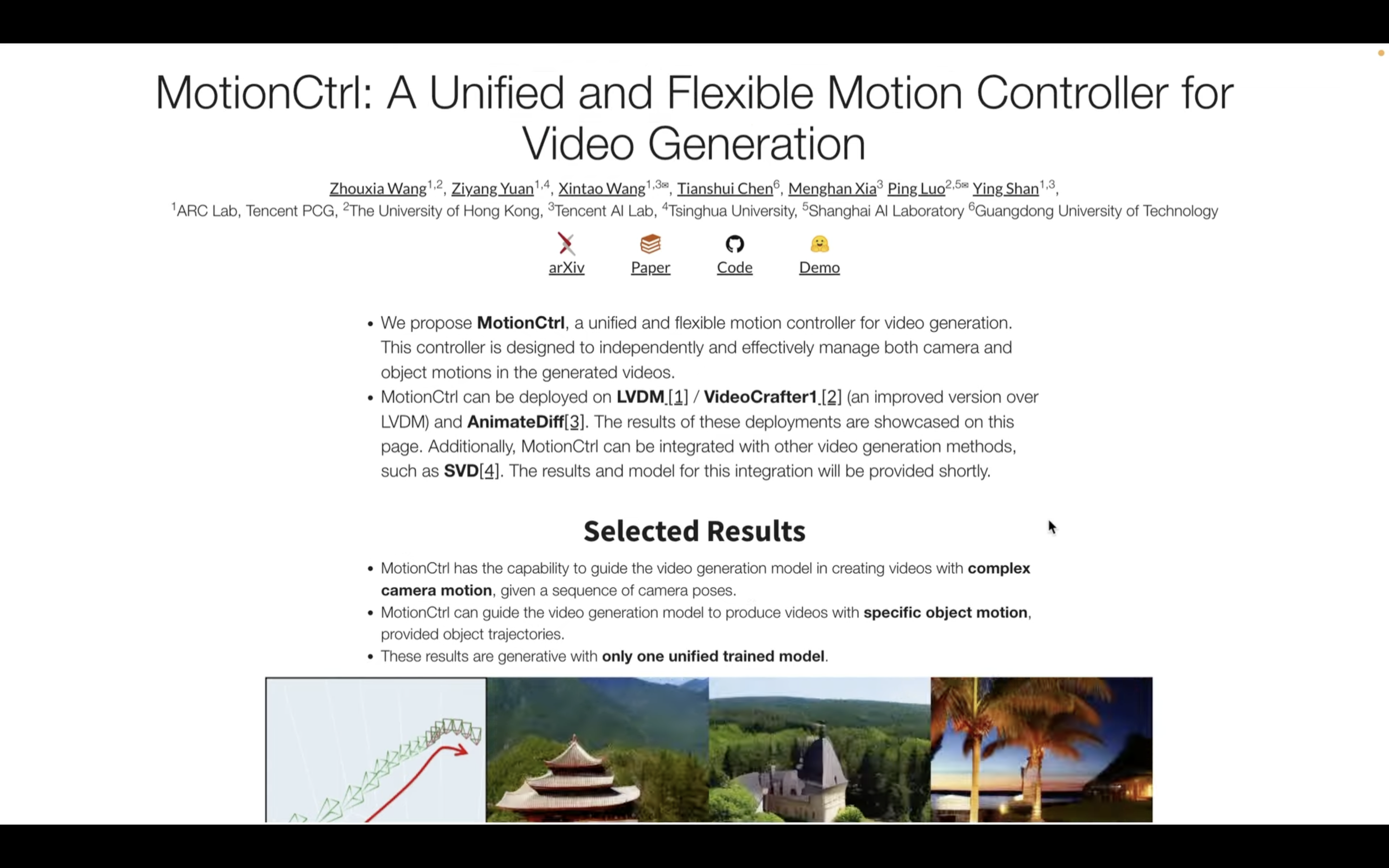
The landscape of artificial intelligence has shifted dramatically from static image generation to the dynamic world of video synthesis. While tools like Sora, Runway, and Pika have showcased the potential of AI-driven cinema, a persistent challenge remained: precise control. Most early models suffered from "random" movements where the camera or objects drifted unpredictably. Enter MotionCtrl, a groundbreaking research paper hosted on arXiv that introduces a unified and flexible motion controller for video generation. This framework allows creators to dictate exactly how the camera moves and how objects traverse the frame, bridging the gap between AI automation and professional cinematography.
What is MotionCtrl? Understanding the arXiv Breakthrough
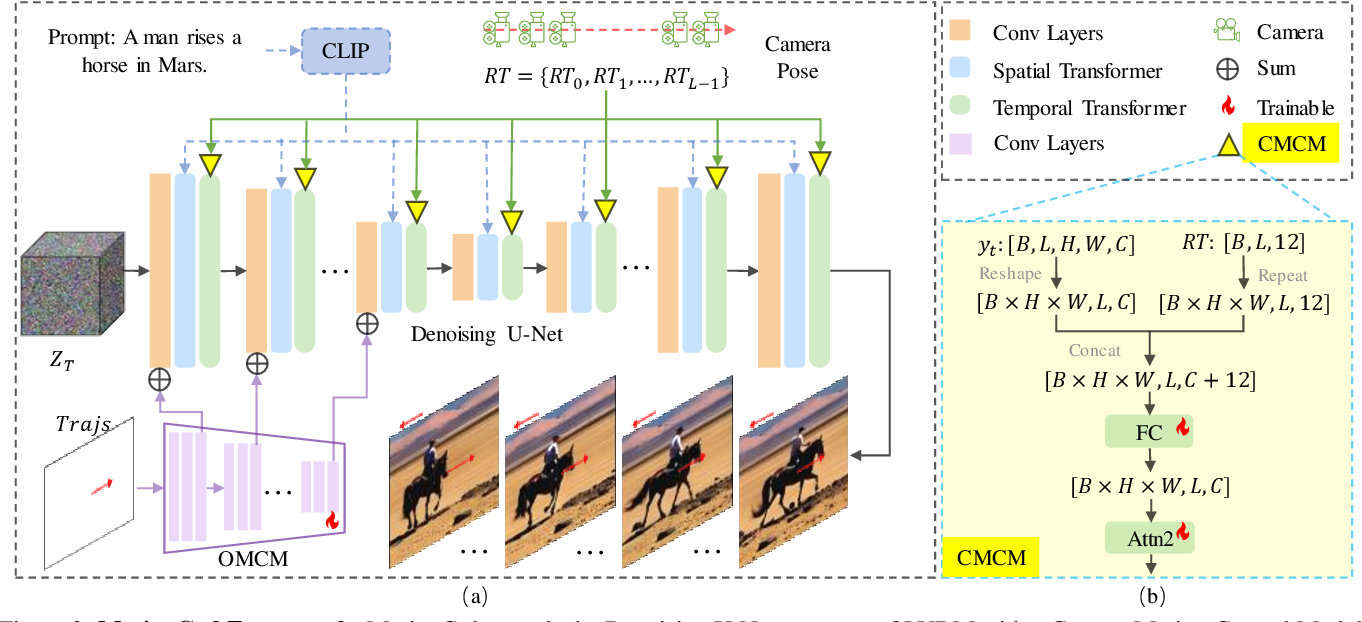
MotionCtrl is a specialized architecture designed to augment existing text-to-video (T2V) diffusion models. According to the research published on arXiv, the primary goal of MotionCtrl is to provide a "unified" solution. Prior to its development, researchers often had to choose between models that controlled camera movement (like zooming or panning) or models that controlled object trajectories (like a person walking from left to right). MotionCtrl integrates both into a single, cohesive pipeline.
The researchers identified that video motion is essentially composed of two components: the global movement caused by the camera's perspective and the local movement of specific entities within the scene. By disentangling these two elements and then controlling them simultaneously, MotionCtrl allows for a level of directorial precision that was previously unattainable in open-domain video generation. This makes it a vital tool for filmmakers, animators, and game developers looking to harness AI for production-grade content.
The Technical Architecture: How MotionCtrl Masterminds Movement
The brilliance of MotionCtrl lies in its architectural strategy, which avoids the need for massive retraining of foundational video models. Instead, it introduces adaptable "control modules" that can be plugged into pre-trained models like AnimateDiff or Stable Video Diffusion (SVD).
1. Camera Motion Control (CMC)
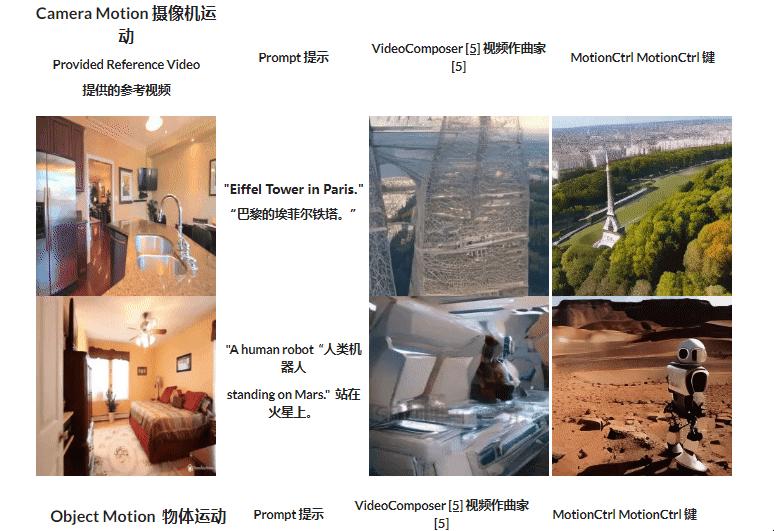
To control the camera, MotionCtrl utilizes camera extrinsic parameters. Unlike simple prompts like "zoom in," which the AI might interpret loosely, MotionCtrl uses mathematical matrices that define the camera's position and orientation in 3D space. This ensures that the generated video adheres to specific cinematic movements, such as a complex "Dolly Zoom" or a precise "Orbital Shot," with mathematical accuracy.
2. Object Motion Control (OMC)
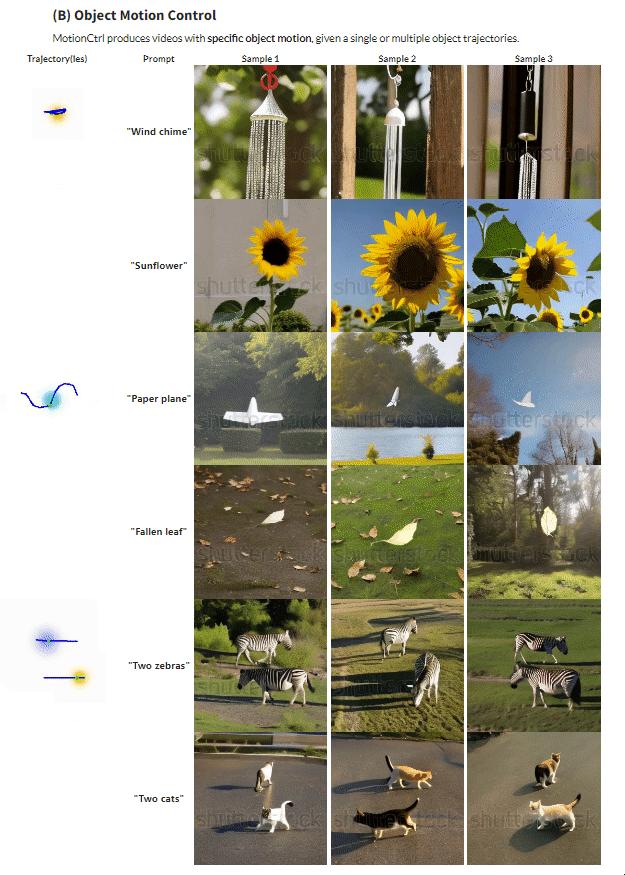
Object control is handled through trajectories. Users can define a path—represented as a series of coordinates or bounding boxes—across the temporal sequence of the video. The model then ensures that the primary subject follows this path while maintaining visual consistency. This is particularly difficult in diffusion models because the AI must "hallucinate" new pixels that don't yet exist while keeping the object's identity stable across 24 or more frames per second.
| Fitur/Aspek | Deskripsi (Technical Detail) |
|---|---|
| Unified Control | Manages both camera movement and object trajectories in a single framework. |
| Conditioning Method | Uses camera extrinsic parameters and coordinate-based trajectories for input. |
| Compatibility | Fully compatible with LDM-based video models like AnimateDiff and SVD. |
| Training Strategy | Utilizes a step-wise training approach to separate camera and object motion priors. |
| Output Quality | Maintains high temporal consistency without significant degradation in visual fidelity. |
Why MotionCtrl is a Game Changer for Video Generation
The significance of the MotionCtrl arXiv paper extends beyond academic interest. For the creative industry, this represents a shift from "prompt-and-pray" workflows to intentional design. In traditional AI video generation, you might type "a car driving through a city," and the AI would decide the angle and speed. With MotionCtrl, you can specify a low-angle tracking shot that follows the car at a specific speed through a specific curve.
Furthermore, the flexibility of MotionCtrl means it can be applied to various styles. Because it acts as a controller rather than a standalone model, it can be applied to photorealistic models, stylized 2D animation models, or even 3D-consistent synthesis. This "plug-and-play" nature ensures that as the underlying video models improve, MotionCtrl remains a relevant and powerful tool for guiding those improvements toward specific creative goals.
Integration with Modern AI Ecosystems
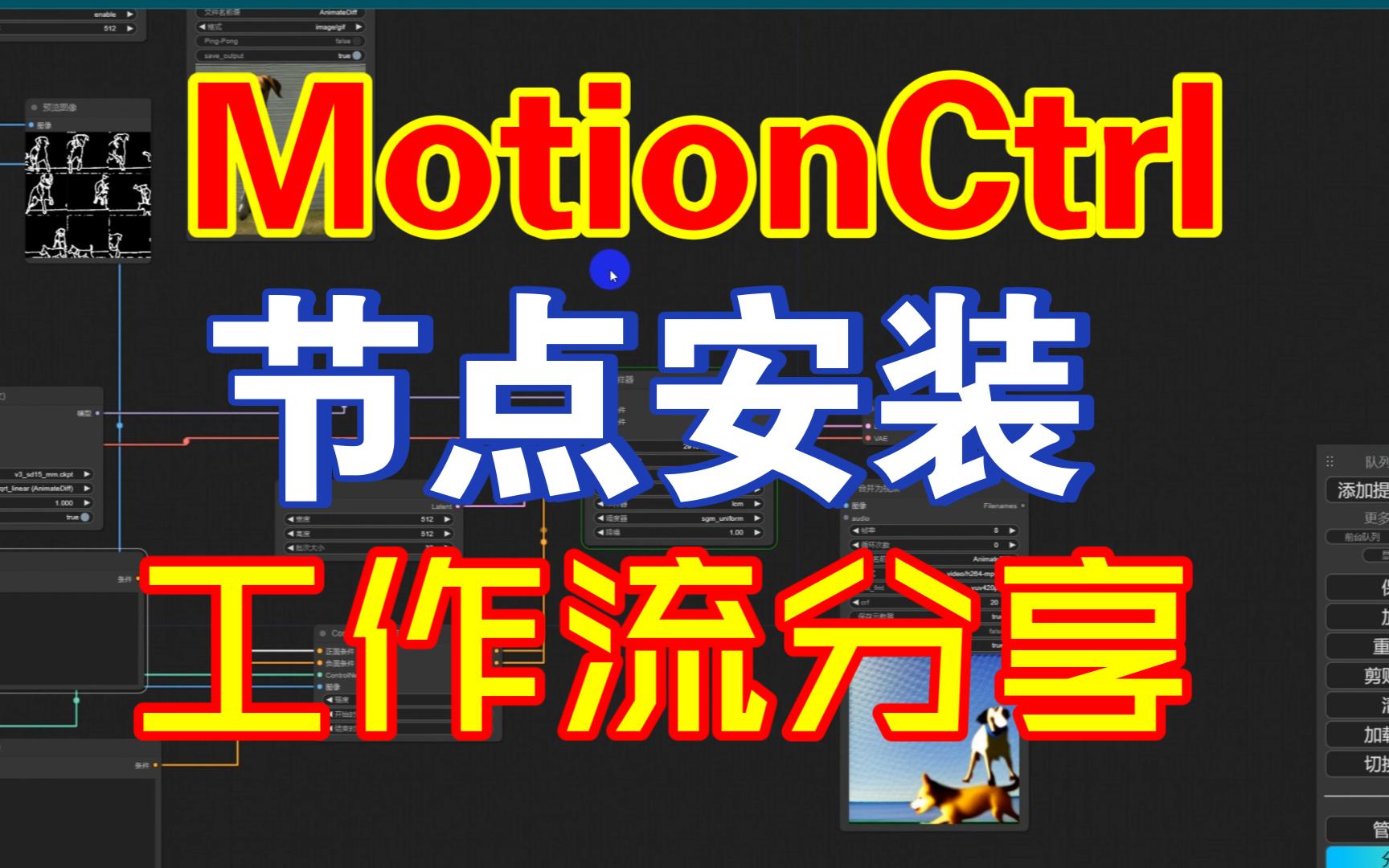
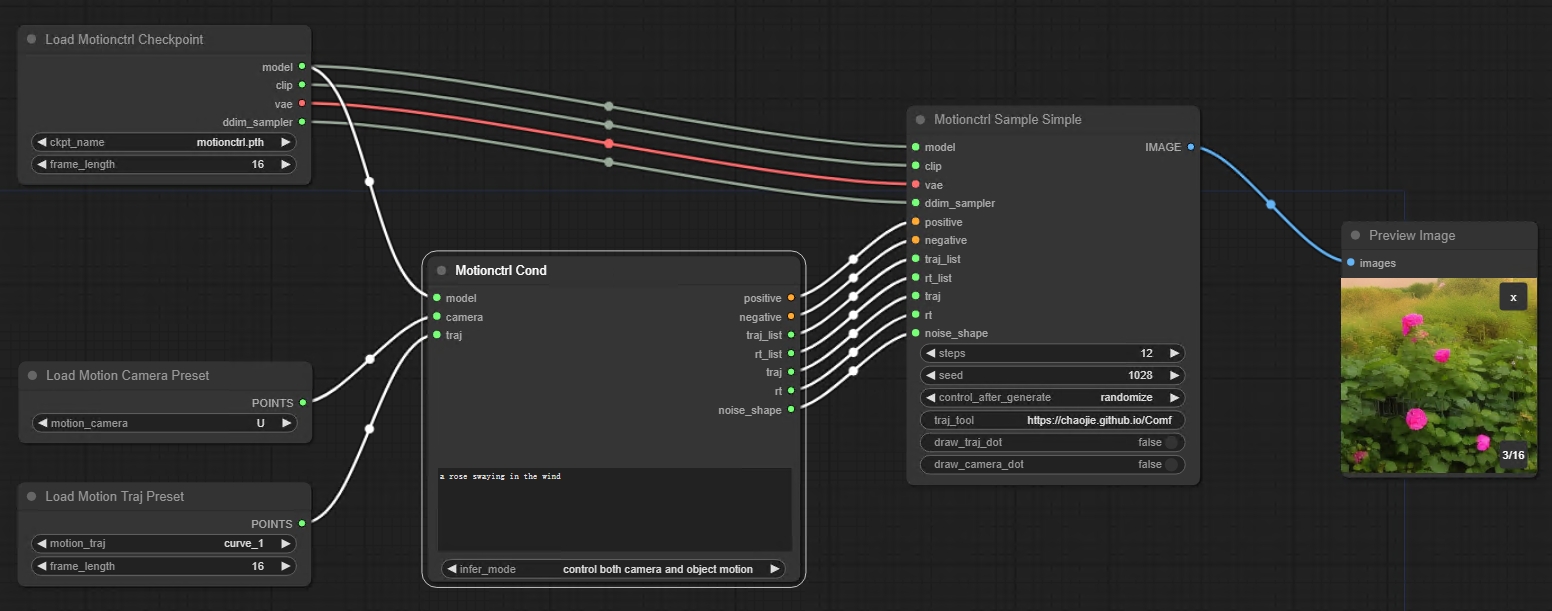
One of the most exciting aspects discussed in the MotionCtrl research is its adaptability. Developers have already begun integrating MotionCtrl into interfaces like ComfyUI and Automatic1111. This democratization allows hobbyists and professional artists to use complex camera matrices and trajectory paths via simple graphical interfaces.
The research also highlights the use of "Sparse Trajectories." Instead of needing to define every single frame's position, users can provide a few key points, and the MotionCtrl architecture interpolates the movement smoothly. This drastically reduces the workload for the user while maintaining a high level of control over the final output.
Comparison with Previous State-of-the-Art (SOTA) Models
Before MotionCtrl, models like VideoComposer or basic ControlNet adaptations attempted similar feats. However, they often struggled with "motion leakage," where object movement would inadvertently trigger camera movement or vice versa. MotionCtrl solves this through a curated training process on datasets that clearly distinguish between the two. By training on synthesized data where camera parameters were known and object paths were isolated, the researchers were able to create a model that understands the distinct "physics" of both global and local motion.
Frequently Asked Questions (FAQ)
1. Where can I read the full MotionCtrl paper?
The full research paper is available on arXiv under the title "MotionCtrl: A Unified and Flexible Motion Controller for Video Generation." It provides in-depth mathematical proofs and experimental results.
2. Is MotionCtrl free to use?
Most implementations of MotionCtrl are open-source. The code is typically available on GitHub, allowing developers to integrate it into their own video generation pipelines or use it within community tools like ComfyUI.
3. Does MotionCtrl work with Stable Video Diffusion (SVD)?
Yes, the framework was specifically designed to be compatible with popular Latent Diffusion Models (LDMs), including SVD and AnimateDiff, making it highly versatile for current AI video workflows.
4. Can I control multiple objects at once?
While the primary focus is on unified control, advanced implementations allow for multiple trajectories to be defined, though complexity increases with the number of moving entities in a single scene.
Conclusion: The Future of Directed AI Cinematography
The introduction of MotionCtrl on arXiv marks a pivotal moment in the evolution of generative AI. By solving the dual problem of camera and object motion control, it transforms video generation from a novelty into a precise craft. As we move forward, the techniques pioneered by the MotionCtrl team will likely become standard features in all high-end video synthesis tools. Whether you are a researcher looking into the mechanics of diffusion models or a creator seeking more influence over your AI-generated scenes, MotionCtrl offers a robust, flexible, and mathematically sound solution to the problem of motion. The era of truly controllable AI video is no longer a distant dream—it is here, documented and ready for implementation.
motionctrl arxiv
motionctrl arxiv Wallpapers
Collection of motionctrl arxiv wallpapers for your desktop and mobile devices.

Captivating Motionctrl Arxiv Background Nature
Immerse yourself in the stunning details of this beautiful motionctrl arxiv wallpaper, designed for a captivating visual experience.

Serene Motionctrl Arxiv View for Desktop
Transform your screen with this vivid motionctrl arxiv artwork, a true masterpiece of digital design.
Breathtaking Motionctrl Arxiv View Illustration
Explore this high-quality motionctrl arxiv image, perfect for enhancing your desktop or mobile wallpaper.
Lush Motionctrl Arxiv Image for Your Screen
A captivating motionctrl arxiv scene that brings tranquility and beauty to any device.

Crisp Motionctrl Arxiv Landscape in 4K
A captivating motionctrl arxiv scene that brings tranquility and beauty to any device.

Amazing Motionctrl Arxiv View Digital Art
Experience the crisp clarity of this stunning motionctrl arxiv image, available in high resolution for all your screens.

Stunning Motionctrl Arxiv Picture in HD
A captivating motionctrl arxiv scene that brings tranquility and beauty to any device.
Dynamic Motionctrl Arxiv Artwork for Mobile
Find inspiration with this unique motionctrl arxiv illustration, crafted to provide a fresh look for your background.
Detailed Motionctrl Arxiv Capture Nature
Explore this high-quality motionctrl arxiv image, perfect for enhancing your desktop or mobile wallpaper.
Detailed Motionctrl Arxiv Photo for Desktop
Discover an amazing motionctrl arxiv background image, ideal for personalizing your devices with vibrant colors and intricate designs.
Exquisite Motionctrl Arxiv Landscape for Your Screen
A captivating motionctrl arxiv scene that brings tranquility and beauty to any device.
Breathtaking Motionctrl Arxiv Moment in 4K
Explore this high-quality motionctrl arxiv image, perfect for enhancing your desktop or mobile wallpaper.
Serene Motionctrl Arxiv Landscape Illustration
Discover an amazing motionctrl arxiv background image, ideal for personalizing your devices with vibrant colors and intricate designs.

Beautiful Motionctrl Arxiv Design for Mobile
Explore this high-quality motionctrl arxiv image, perfect for enhancing your desktop or mobile wallpaper.

Mesmerizing Motionctrl Arxiv Artwork for Mobile
Transform your screen with this vivid motionctrl arxiv artwork, a true masterpiece of digital design.

Vivid Motionctrl Arxiv Capture Photography
Explore this high-quality motionctrl arxiv image, perfect for enhancing your desktop or mobile wallpaper.

Artistic Motionctrl Arxiv Picture for Desktop
A captivating motionctrl arxiv scene that brings tranquility and beauty to any device.

Amazing Motionctrl Arxiv Artwork for Mobile
Experience the crisp clarity of this stunning motionctrl arxiv image, available in high resolution for all your screens.

Spectacular Motionctrl Arxiv Artwork for Mobile
Find inspiration with this unique motionctrl arxiv illustration, crafted to provide a fresh look for your background.

Amazing Motionctrl Arxiv Moment for Desktop
Discover an amazing motionctrl arxiv background image, ideal for personalizing your devices with vibrant colors and intricate designs.
Download these motionctrl arxiv wallpapers for free and use them on your desktop or mobile devices.