How To Make A Pdf File On Android
Master Your Workflow: How to Make a PDF File on Android Devices Like a Pro
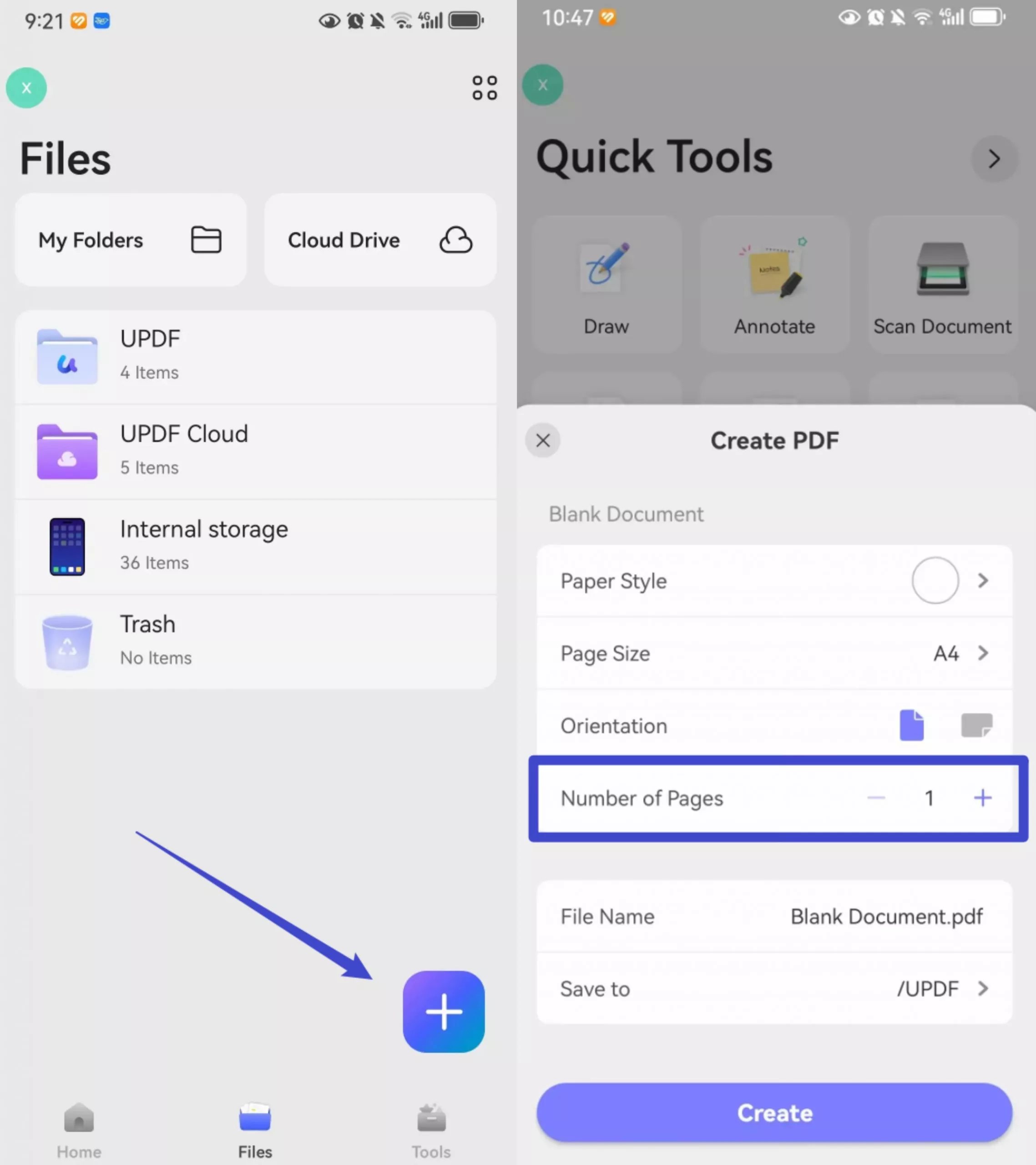
In today’s fast-paced digital era, the ability to handle documents on the go is no longer a luxury—it is a necessity. Whether you are a student submitting an assignment, a freelancer sending an invoice, or a corporate professional sharing a report, the Portable Document Format (PDF) remains the gold standard for document exchange. Its primary advantage is its ability to preserve formatting across different devices and operating systems. If you find yourself away from your computer and need to generate a document, knowing how to make a pdf file on android can save you time and stress. This comprehensive guide will walk you through various methods, from native system features to powerful third-party applications.
1. Using the Built-In "Print to PDF" Feature
Many Android users are unaware that their device comes with a "virtual printer" that can convert almost any digital content—webpages, emails, or notes—into a PDF file. This is perhaps the most versatile method because it doesn't require downloading any additional software.
How to Convert a Webpage or Document via the Print Menu:
- Open the file, image, or webpage you wish to convert.
- Tap the three-dot menu icon (usually in the top right corner).
- Select the "Share" or "Print" option.
- If you chose "Share," look for the "Print" icon in the sharing tray.
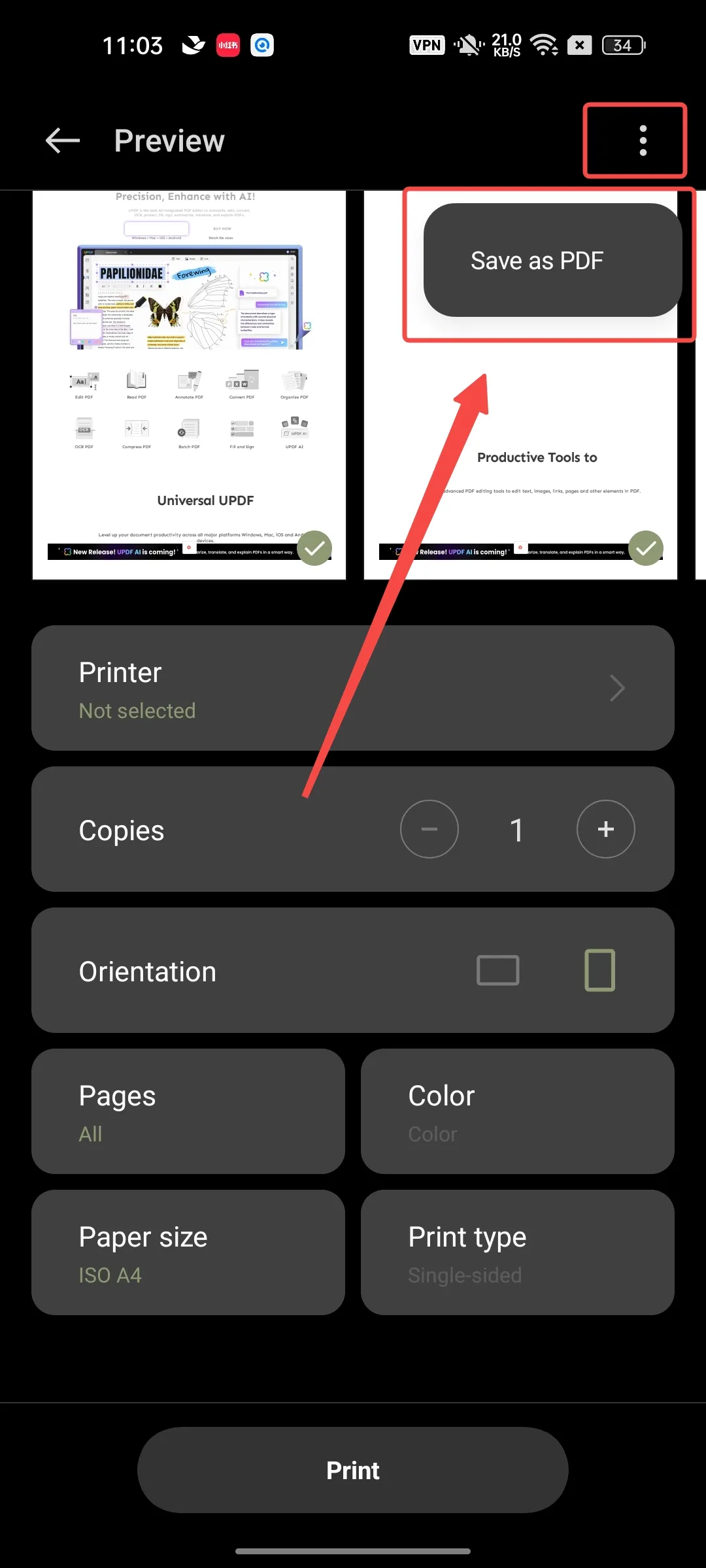
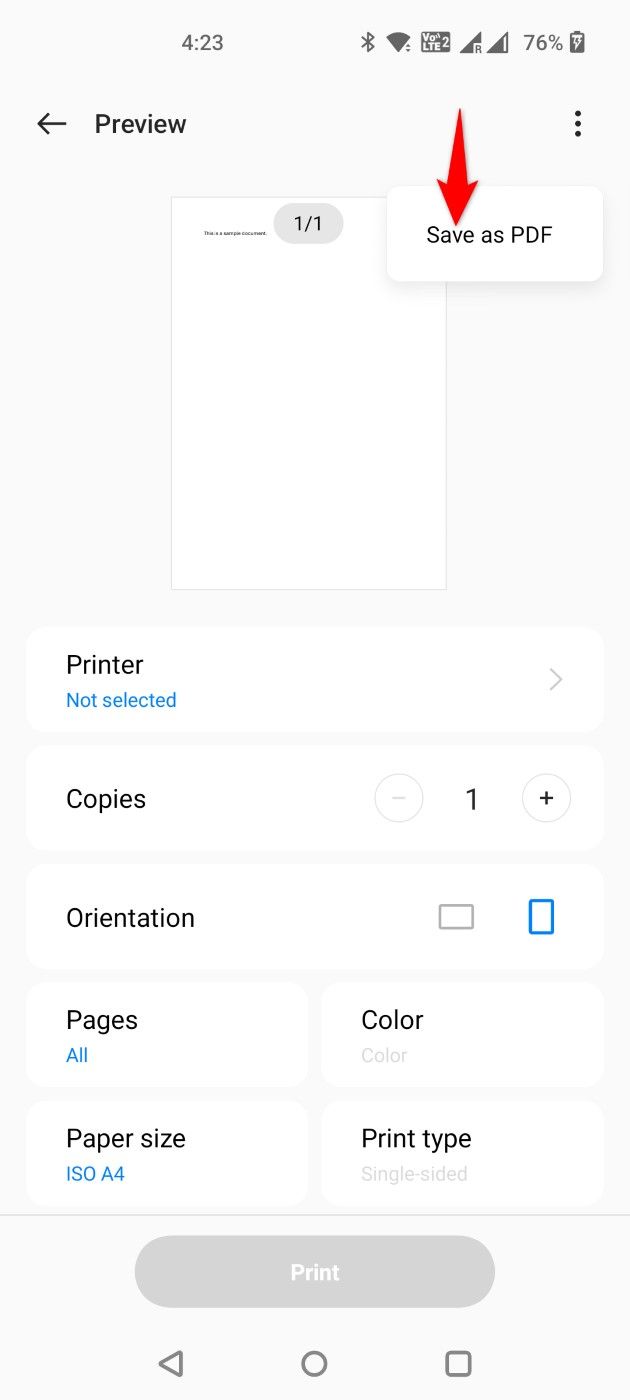
- At the top of the print preview screen, tap the dropdown menu and select "Save as PDF".
- Tap the circular PDF download icon.
- Choose the destination folder on your Android device and tap "Save".
This method is highly effective for saving flight tickets, receipts, or online articles for offline reading. Since it uses the system’s native print engine, the resulting PDF is usually lightweight and compatible with all PDF readers.
2. Creating PDFs from Google Drive and Google Docs
Since Android is a Google-developed ecosystem, most devices come pre-installed with the Google Workspace suite. Google Drive and Google Docs offer seamless ways to create and convert documents into PDF format.
Converting an Existing Document:
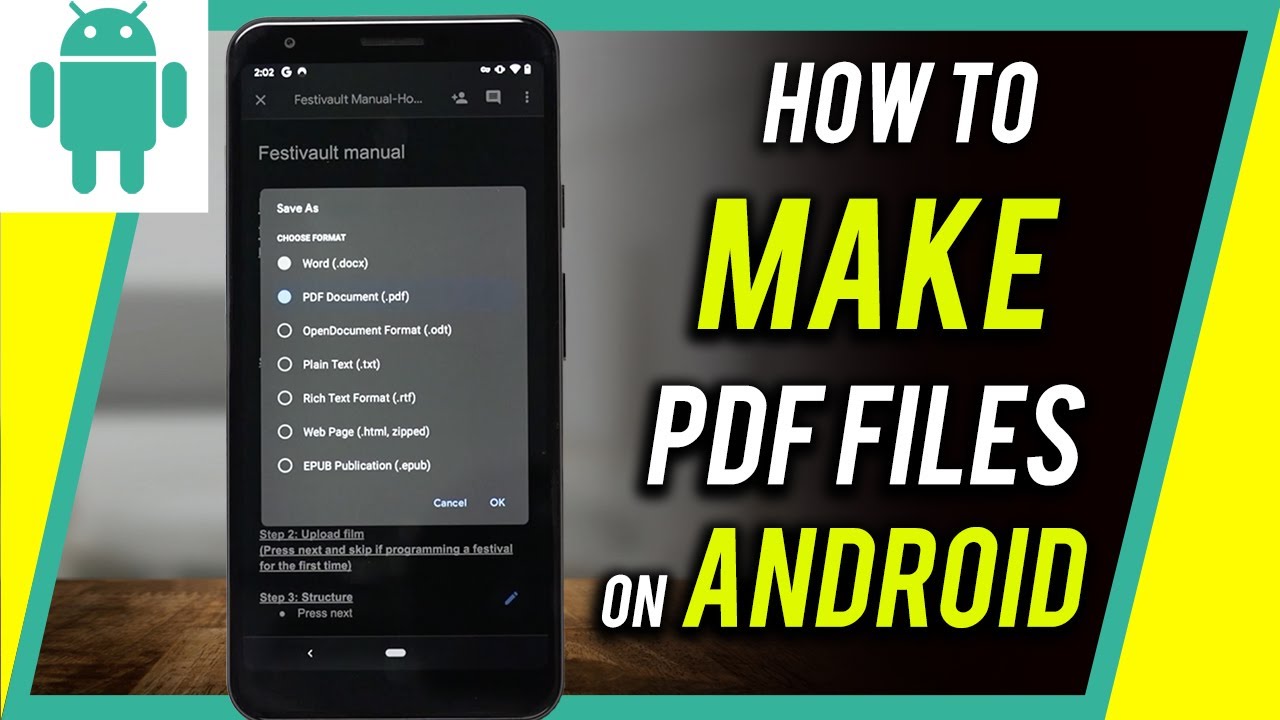
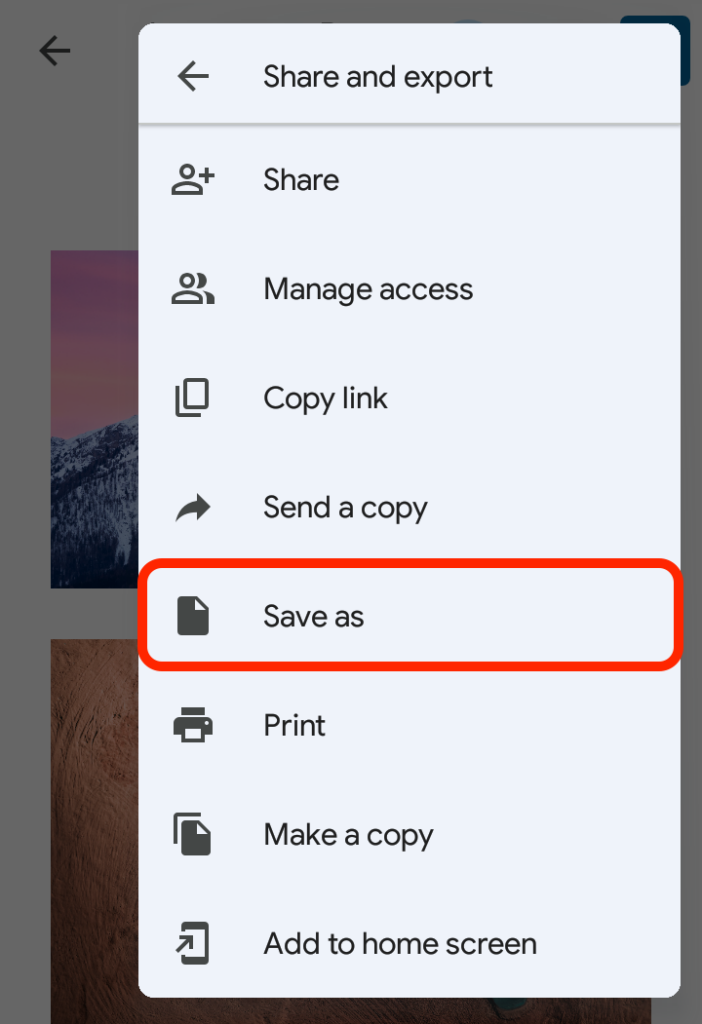
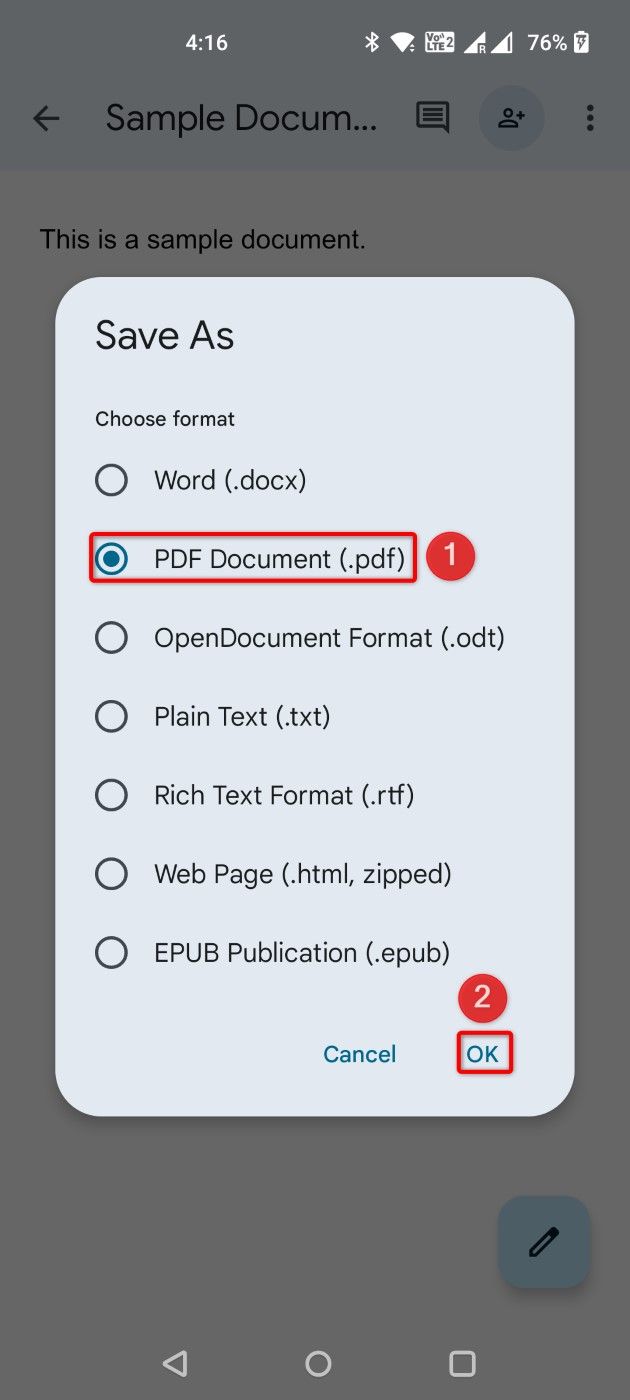
If you have a .docx or .txt file in Google Drive, you can easily transform it. Open the document in Google Docs, tap the three dots in the upper right corner, go to "Share & export," and select "Save as." From the list of formats, choose "PDF Document (.pdf)" and hit OK. The app will generate a PDF version while keeping your original file intact.
Scanning Physical Documents:
Google Drive also features a powerful built-in scanner. This is ideal for turning physical paperwork into digital PDFs. Open the Google Drive app, tap the "+" (Plus) button in the bottom right, and select "Scan." Take a photo of your document. You can crop, rotate, or add multiple pages to the same file. Once finished, tap "Save," and your document will be uploaded as a PDF directly to your cloud storage.
| Method/Tool | Best For |
|---|---|
| System Print Feature | Quickly saving webpages, emails, and notes. |
| Google Drive Scanner | Converting physical paper documents into digital files. |
| Microsoft Lens | High-quality document scanning with OCR capabilities. |
| Online Converters | One-time conversions without installing apps. |
| Adobe Acrobat Mobile | Professional editing, signing, and annotating PDFs. |
3. Using Specialized Third-Party Apps
While native tools are great, third-party applications often provide more "muscle" for complex tasks like Optical Character Recognition (OCR), merging multiple files, or adding electronic signatures. Here are the top contenders for Android:
Microsoft Lens
Formerly known as Office Lens, this app is a powerhouse for anyone in the Microsoft ecosystem. It excels at capturing whiteboards and documents. It automatically trims shadows and straightens tilted images, making the final PDF look like it was processed by a professional flatbed scanner.
Adobe Acrobat Reader & Scan
Adobe, the creator of the PDF format, offers a mobile app that allows you to create PDFs from scratch or from images. The Adobe Scan app is particularly useful because it can recognize text automatically, allowing you to search for words within your scanned PDF later—a feature missing in many basic scanning tools.
SmallPDF or ILovePDF
If you need to merge three different images and two Word documents into a single PDF, these apps are your best bet. They offer a "toolbox" approach, allowing you to compress, merge, split, and convert files with a few taps. Most of these services also have web versions that you can access via the Chrome browser on your Android phone.
4. Turning Photos and Images into PDFs
Many users want to know how to make a pdf file on android using photos already stored in their gallery. This is common for sending ID cards or project photos. The easiest way to do this without a third-party app is through the Google Photos app.
- Open Google Photos and select the image you want to convert.
- Swipe up on the photo or tap the three dots.
- Find and tap the "Print" icon.
- Select "Save as PDF" from the printer selection.
- Tap the PDF save button.
If you have multiple images, it is often better to use an app like "Image to PDF Converter" from the Play Store, which allows you to bulk-select images and arrange them in a specific order before generating the final PDF file.
Tips for High-Quality PDF Creation
To ensure your PDFs look professional and remain functional, keep these tips in mind:
- Lighting: When scanning physical paper, use natural light to avoid harsh shadows and glare.
- File Size: If you plan to email the PDF, check the file size. Many Android apps offer a "Compress" feature to reduce the size without losing too much quality.
- Naming Conventions: Avoid generic names like "document1.pdf." Use descriptive names like "Invoice_March_2023_JohnDoe.pdf" for easier searching later.
- Security: If the PDF contains sensitive information, use apps like Adobe Acrobat to add a password before sharing.
Frequently Asked Questions (FAQ)
Q1: Where are the PDFs saved on my Android phone?
A1: By default, most PDFs are saved in the "Downloads" folder. You can access them using the "Files by Google" app or any other File Manager. If you saved it via Google Drive, it will be in your Drive cloud storage.
Q2: Can I edit the text of a PDF once I’ve created it on Android?
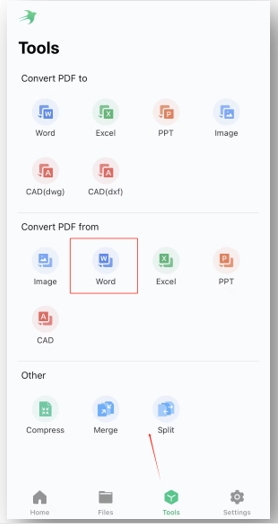
A2: Basic PDF creators only "print" the content. To edit text, you will need a PDF editor like Adobe Acrobat (Premium) or Nitro PDF. Alternatively, you can convert the PDF back to a Word document using online tools, edit it, and save it as a PDF again.
Q3: How do I combine multiple images into one PDF?
A3: The easiest way is to use a dedicated app like "SmallPDF" or the "Print" feature in your Gallery if your phone supports multiple-image printing. You can also insert the images into a Google Doc and then save that document as a PDF.
Q4: Is it safe to use online PDF converters on my Android browser?
A4: Generally, yes, but be cautious with sensitive documents. Reputable sites like SmallPDF or ILovePDF use encryption and delete files from their servers after a few hours.
Conclusion
Mastering how to make a pdf file on android is a valuable skill that enhances your productivity and ensures you can handle professional tasks from anywhere in the world. Whether you utilize the hidden "Print to PDF" feature, leverage the power of Google Drive, or install specialized apps like Microsoft Lens, the process is straightforward once you know where to look. By following the steps outlined in this guide, you can transform your smartphone into a mobile office, capable of generating, managing, and sharing high-quality PDF documents with ease. Stop waiting until you get back to your desk—start creating your PDFs on the go today!
how to make a pdf file on android
how to make a pdf file on android Wallpapers
Collection of how to make a pdf file on android wallpapers for your desktop and mobile devices.
Serene How To Make A Pdf File On Android Moment Concept
Explore this high-quality how to make a pdf file on android image, perfect for enhancing your desktop or mobile wallpaper.
Amazing How To Make A Pdf File On Android Picture Art
Discover an amazing how to make a pdf file on android background image, ideal for personalizing your devices with vibrant colors and intricate designs.
Vibrant How To Make A Pdf File On Android Image Digital Art
Experience the crisp clarity of this stunning how to make a pdf file on android image, available in high resolution for all your screens.
Detailed How To Make A Pdf File On Android Capture in 4K
Transform your screen with this vivid how to make a pdf file on android artwork, a true masterpiece of digital design.

Detailed How To Make A Pdf File On Android Design for Desktop
Transform your screen with this vivid how to make a pdf file on android artwork, a true masterpiece of digital design.
Detailed How To Make A Pdf File On Android Landscape Photography
Experience the crisp clarity of this stunning how to make a pdf file on android image, available in high resolution for all your screens.

Breathtaking How To Make A Pdf File On Android Wallpaper Concept
Discover an amazing how to make a pdf file on android background image, ideal for personalizing your devices with vibrant colors and intricate designs.
Dynamic How To Make A Pdf File On Android Abstract for Your Screen
Immerse yourself in the stunning details of this beautiful how to make a pdf file on android wallpaper, designed for a captivating visual experience.
Vivid How To Make A Pdf File On Android Abstract Nature
Transform your screen with this vivid how to make a pdf file on android artwork, a true masterpiece of digital design.
Lush How To Make A Pdf File On Android Design Collection
Find inspiration with this unique how to make a pdf file on android illustration, crafted to provide a fresh look for your background.
Exquisite How To Make A Pdf File On Android Capture Illustration
A captivating how to make a pdf file on android scene that brings tranquility and beauty to any device.
Serene How To Make A Pdf File On Android Photo in HD
Transform your screen with this vivid how to make a pdf file on android artwork, a true masterpiece of digital design.

Beautiful How To Make A Pdf File On Android Abstract Art
Experience the crisp clarity of this stunning how to make a pdf file on android image, available in high resolution for all your screens.

Vivid How To Make A Pdf File On Android Moment for Mobile
Transform your screen with this vivid how to make a pdf file on android artwork, a true masterpiece of digital design.
Vibrant How To Make A Pdf File On Android Landscape Photography
Discover an amazing how to make a pdf file on android background image, ideal for personalizing your devices with vibrant colors and intricate designs.

Lush How To Make A Pdf File On Android Moment in HD
This gorgeous how to make a pdf file on android photo offers a breathtaking view, making it a perfect choice for your next wallpaper.
Captivating How To Make A Pdf File On Android Moment Nature
Find inspiration with this unique how to make a pdf file on android illustration, crafted to provide a fresh look for your background.

High-Quality How To Make A Pdf File On Android Abstract Concept
Experience the crisp clarity of this stunning how to make a pdf file on android image, available in high resolution for all your screens.
Serene How To Make A Pdf File On Android Picture for Mobile
Discover an amazing how to make a pdf file on android background image, ideal for personalizing your devices with vibrant colors and intricate designs.
Mesmerizing How To Make A Pdf File On Android Capture Concept
Experience the crisp clarity of this stunning how to make a pdf file on android image, available in high resolution for all your screens.
Download these how to make a pdf file on android wallpapers for free and use them on your desktop or mobile devices.