How To Make A Pdf Non Editable On Mac
How to Make a PDF Non-Editable on Mac: The Ultimate Guide to Document Security
In today’s digital-first professional environment, the integrity of your documents is paramount. Whether you are sending a binding contract, a financial invoice, or an intellectual property-protected portfolio, you need to ensure that the recipient cannot alter the content. If you are a macOS user, you might be wondering how to lock your files effectively. Learning how to make a PDF non-editable on Mac is a fundamental skill that enhances your document security and ensures your professional communications remain professional.
Mac users are fortunate because macOS comes with powerful built-in tools like Preview, which can handle most PDF tasks without the need for expensive third-party software. However, depending on the level of security you require—ranging from simple "flattening" to advanced 128-bit encryption—different methods may be more appropriate. In this comprehensive guide, we will explore the various ways to protect your PDF files on a Mac, ensuring they are read-only and tamper-proof.
Why You Should Make Your PDF Files Read-Only
Before diving into the "how-to," it is important to understand the "why." A standard PDF (Portable Document Format) is designed to be platform-independent, but it isn't inherently unchangeable. With the right software, anyone can edit text, swap images, or delete pages. Making a PDF non-editable serves several purposes:
- Data Integrity: Ensures that figures, dates, and terms in legal or financial documents are not accidentally or maliciously altered.
- Intellectual Property Protection: Prevents others from copying your text or using your images without permission.
- Professionalism: Sending a locked document signals to the recipient that the file is a final version.
- Compliance: Many industries require documents to be archived in a non-modifiable format to meet regulatory standards.
Method 1: Using Apple Preview to Set Permissions
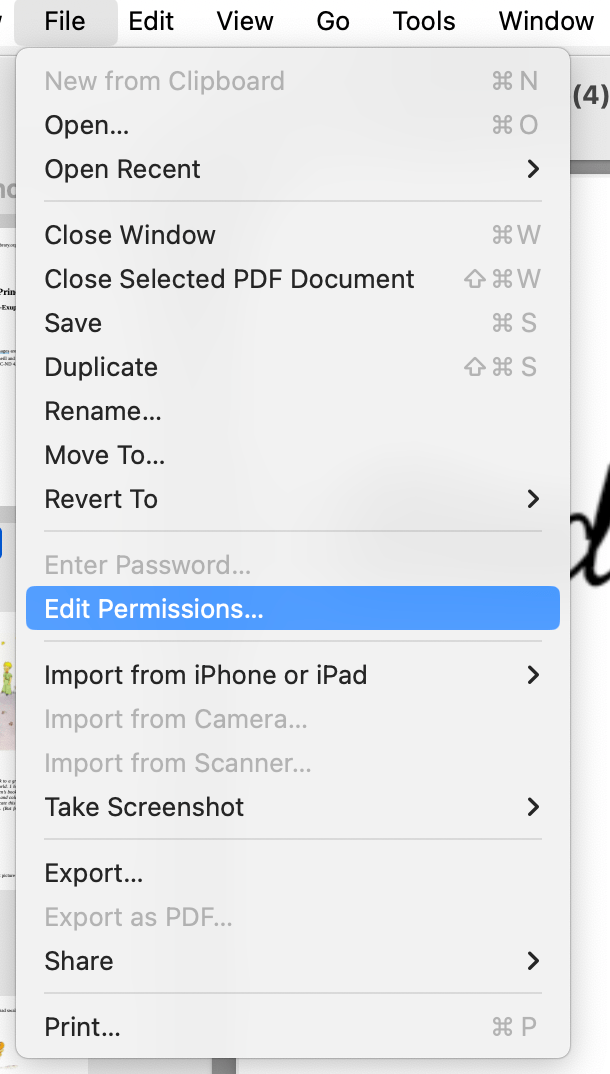
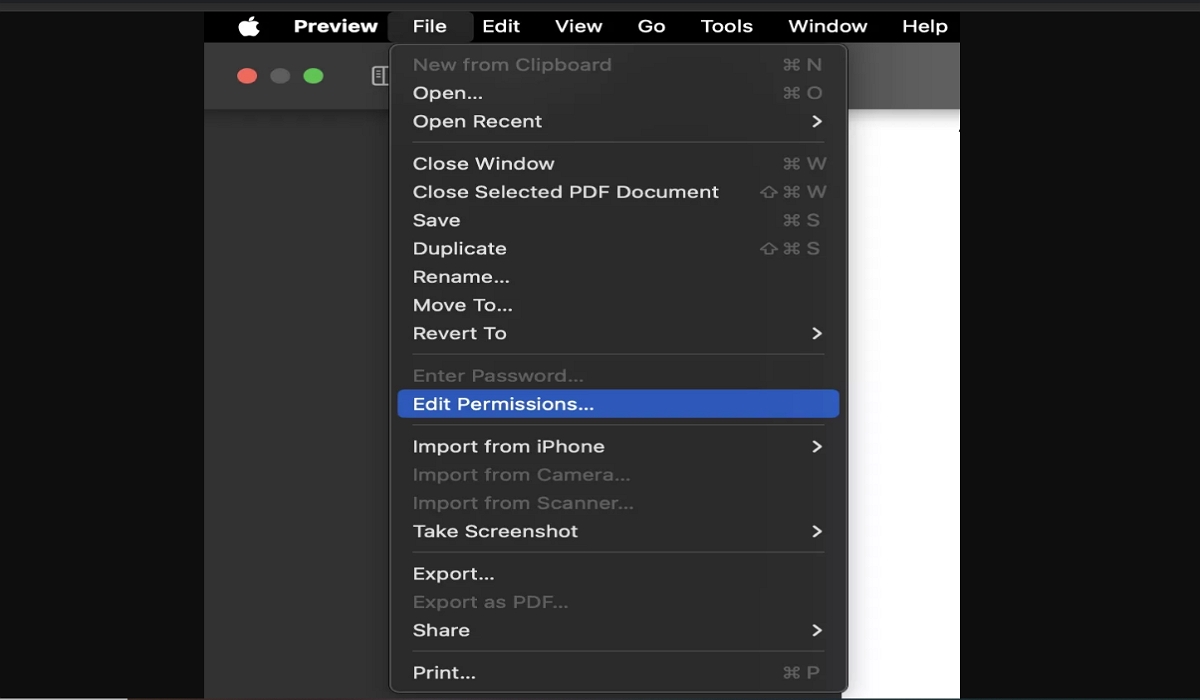
The most straightforward way to make a PDF non-editable on Mac is by using the built-in Preview application. Preview allows you to set "Owner Passwords" that specifically restrict editing and printing without locking the entire document from being viewed.
Step-by-Step Instructions:
- Open the PDF document you wish to protect using Preview.
- Go to the top menu and select File > Export... (Do not choose 'Export as PDF' initially).
- In the export dialog box, ensure the format is set to PDF.
- Click the Permissions... button.
- Here, you will see options for "Owner Password." Enter a strong password.
- Under the permissions section, uncheck the boxes for Changing the document, Copying text or graphics, and optionally, Printing.
- Click Apply and then Save.
By following these steps, the recipient can still open and read the file, but the tools required to modify the text or extract images will be grayed out unless they know the owner password.
Method 2: "Flattening" a PDF via the Print Menu
If you want a quick way to make a PDF non-editable without dealing with passwords, "flattening" is an excellent technique. Flattening a PDF merges all layers—such as form fields, annotations, and digital signatures—into a single image layer. This makes it significantly harder for someone to click into a text box and change the content.
How to Flatten Your PDF:
- Open your PDF in Preview or any web browser.
- Press Command + P to open the Print dialog.
- In the bottom left corner of the print window, click the dropdown menu that says PDF.
- Select Save as PDF.
- Choose your destination and save the file.
This process re-renders the document. While it doesn't provide "encryption," it removes the interactive elements of the PDF, making it a "flat" file that is much more difficult to edit with standard PDF editors.
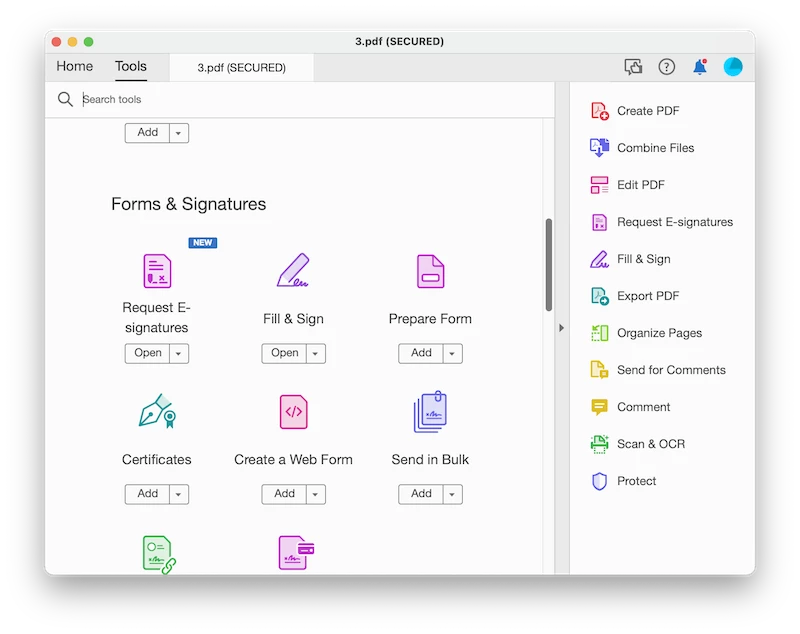
Method 3: Using Adobe Acrobat for Professional Encryption
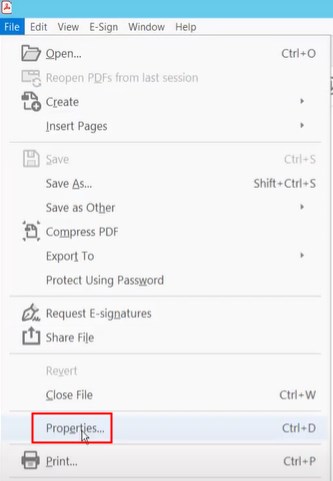
For those who require high-level security, Adobe Acrobat Pro is the industry standard. While it requires a subscription, it offers more granular control over what a user can and cannot do with your document on a Mac.
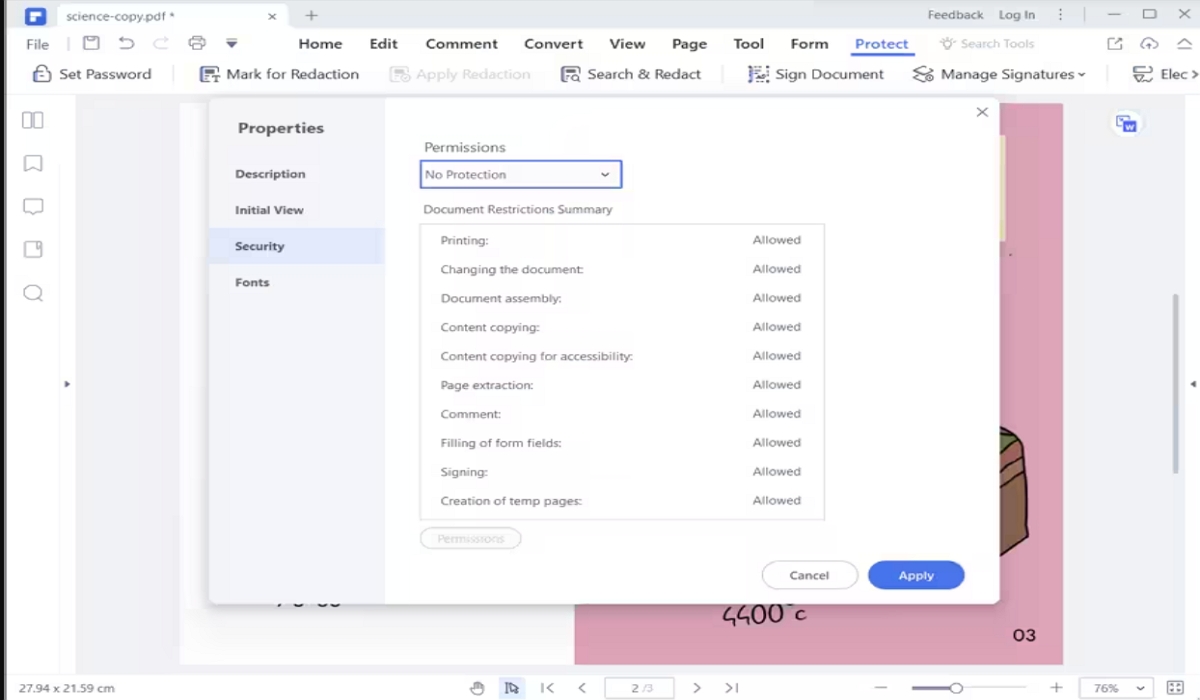
Adobe allows you to use AES (Advanced Encryption Standard). You can specifically prevent users from inserting, deleting, or rotating pages, which is a feature often missing from simpler tools. If your work involves highly sensitive corporate data, investing in Acrobat's "Protect" tool is the most secure route to making a PDF non-editable on Mac.
| Feature/Aspect | Description |
|---|---|
| Built-in Tool | Apple Preview provides free, native password protection and permission settings. |
| Flattening | The "Print to PDF" method removes interactive layers and form fields. |
| Encryption Level | Advanced tools like Adobe Acrobat offer 128-bit and 256-bit AES encryption. |
| Ease of Use | Preview is the easiest for casual users; Online tools are fastest for one-off tasks. |
| Security Note | Owner passwords prevent editing; User passwords prevent unauthorized viewing. |
Method 4: Using Online PDF Protectors
If you don't want to use Preview or pay for Adobe, several reputable online tools like Smallpdf, ILovePDF, or SodaPDF can make a PDF non-editable. These tools are useful if you are working on a Mac but prefer a browser-based workflow.
Simply upload your file, select the "Protect PDF" option, set your permissions or passwords, and download the secured version. Note: Always be cautious when uploading sensitive or confidential documents to third-party cloud servers. Check their privacy policy to ensure files are deleted after processing.
Best Practices for PDF Security on macOS
Knowing how to make a PDF non-editable on Mac is only half the battle. To ensure maximum security, follow these best practices:
- Use Strong Passwords: Avoid simple passwords like "1234" or "password." Use a combination of letters, numbers, and symbols for the Owner Password.
- Test the File: Before sending the document to a client, try opening it in a different PDF reader to confirm that the editing features are actually locked.
- Keep an Editable Original: Always keep a "master copy" that is not password-protected for your own future edits. If you lose the owner password, it can be very difficult to regain editing access.
- Combine Methods: For ultimate security, flatten the document first using the print method, then apply a password via Preview's export function.
Frequently Asked Questions (FAQ)
1. Can a non-editable PDF be converted back to an editable one?
Technically, someone with advanced OCR (Optical Character Recognition) software can scan the text and recreate an editable document. However, by making the PDF non-editable, you prevent 99% of users from making quick changes and ensure the original file remains intact.
2. Does making a PDF non-editable also hide the content?
No. Making a PDF "non-editable" usually refers to setting permissions against changes. If you want to prevent people from seeing the content entirely, you need to set a "Document Open Password" (User Password), which is also available in the Preview Export settings.
3. Is there a way to make a PDF non-editable for free on Mac?
Yes, using the Apple Preview app is completely free and built into macOS. You can either use the "Permissions" settings during export or the "Print to PDF" flattening method mentioned above.
4. Will my PDF security settings work on Windows and mobile devices?
Yes. PDF permission standards are universal. If you lock a PDF on a Mac using standard encryption or owner passwords, those restrictions will be honored by Adobe Reader and other major PDF viewers on Windows, iOS, and Android.
Conclusion
Securing your digital assets is a vital part of modern workflows. Whether you choose to use the native power of Apple Preview, the flattening technique via the print menu, or the advanced features of Adobe Acrobat, you now have the knowledge of how to make a PDF non-editable on Mac. By implementing these security measures, you protect your professional reputation, ensure the accuracy of your data, and maintain control over your creative and intellectual work. Start protecting your documents today—it only takes a few clicks to turn a vulnerable file into a secure, read-only document.
How To Make A Pdf Non Editable On Mac
How To Make A Pdf Non Editable On Mac Wallpapers
Collection of how to make a pdf non editable on mac wallpapers for your desktop and mobile devices.
High-Quality How To Make A Pdf Non Editable On Mac Photo in 4K
Experience the crisp clarity of this stunning how to make a pdf non editable on mac image, available in high resolution for all your screens.

Captivating How To Make A Pdf Non Editable On Mac Moment in 4K
A captivating how to make a pdf non editable on mac scene that brings tranquility and beauty to any device.
Crisp How To Make A Pdf Non Editable On Mac Image for Desktop
Find inspiration with this unique how to make a pdf non editable on mac illustration, crafted to provide a fresh look for your background.

Artistic How To Make A Pdf Non Editable On Mac Abstract Digital Art
Find inspiration with this unique how to make a pdf non editable on mac illustration, crafted to provide a fresh look for your background.
High-Quality How To Make A Pdf Non Editable On Mac View Art
Experience the crisp clarity of this stunning how to make a pdf non editable on mac image, available in high resolution for all your screens.
Dynamic How To Make A Pdf Non Editable On Mac Capture for Desktop
A captivating how to make a pdf non editable on mac scene that brings tranquility and beauty to any device.

Gorgeous How To Make A Pdf Non Editable On Mac Artwork in 4K
A captivating how to make a pdf non editable on mac scene that brings tranquility and beauty to any device.

Lush How To Make A Pdf Non Editable On Mac Wallpaper Collection
Find inspiration with this unique how to make a pdf non editable on mac illustration, crafted to provide a fresh look for your background.
Beautiful How To Make A Pdf Non Editable On Mac Landscape Digital Art
Discover an amazing how to make a pdf non editable on mac background image, ideal for personalizing your devices with vibrant colors and intricate designs.

Breathtaking How To Make A Pdf Non Editable On Mac Wallpaper for Your Screen
Experience the crisp clarity of this stunning how to make a pdf non editable on mac image, available in high resolution for all your screens.
Artistic How To Make A Pdf Non Editable On Mac View for Your Screen
Immerse yourself in the stunning details of this beautiful how to make a pdf non editable on mac wallpaper, designed for a captivating visual experience.

Detailed How To Make A Pdf Non Editable On Mac Photo Art
Transform your screen with this vivid how to make a pdf non editable on mac artwork, a true masterpiece of digital design.

Vivid How To Make A Pdf Non Editable On Mac Artwork in 4K
Transform your screen with this vivid how to make a pdf non editable on mac artwork, a true masterpiece of digital design.
Gorgeous How To Make A Pdf Non Editable On Mac Capture for Desktop
This gorgeous how to make a pdf non editable on mac photo offers a breathtaking view, making it a perfect choice for your next wallpaper.
Dynamic How To Make A Pdf Non Editable On Mac View Illustration
Immerse yourself in the stunning details of this beautiful how to make a pdf non editable on mac wallpaper, designed for a captivating visual experience.

Captivating How To Make A Pdf Non Editable On Mac Background for Desktop
This gorgeous how to make a pdf non editable on mac photo offers a breathtaking view, making it a perfect choice for your next wallpaper.

Stunning How To Make A Pdf Non Editable On Mac Picture for Mobile
Immerse yourself in the stunning details of this beautiful how to make a pdf non editable on mac wallpaper, designed for a captivating visual experience.

Vibrant How To Make A Pdf Non Editable On Mac Picture in HD
Transform your screen with this vivid how to make a pdf non editable on mac artwork, a true masterpiece of digital design.

Vivid How To Make A Pdf Non Editable On Mac Design for Your Screen
Transform your screen with this vivid how to make a pdf non editable on mac artwork, a true masterpiece of digital design.

Gorgeous How To Make A Pdf Non Editable On Mac Design Digital Art
Immerse yourself in the stunning details of this beautiful how to make a pdf non editable on mac wallpaper, designed for a captivating visual experience.
Download these how to make a pdf non editable on mac wallpapers for free and use them on your desktop or mobile devices.