How To Make Pdf Of Image In Mobile
How to Make PDF of Image in Mobile: A Comprehensive Step-by-Step Guide
In today’s fast-paced digital world, the ability to handle documents on the go is no longer just a luxury—it is a necessity. Whether you are a student submitting an assignment, a professional sending an invoice, or someone trying to organize personal receipts, knowing how to make a PDF of an image in mobile devices is a crucial skill. PDF (Portable Document Format) is the universal standard for document sharing because it preserves formatting across all devices and ensures high-quality printing.
While many people believe they need a desktop computer or a bulky scanner to create PDF documents, your smartphone is actually a powerful tool capable of converting photos to PDFs in seconds. In this guide, we will explore various methods for both Android and iOS users, utilizing built-in features and third-party applications to ensure you get the best results every time.
Why Convert Your Mobile Images to PDF?
Before we dive into the "how-to," it is important to understand the benefits of using the PDF format over standard image files like JPEG or PNG. When you learn how to make a PDF of an image in mobile, you unlock several advantages:
- Universal Compatibility: PDFs look the same on a Windows PC, a Mac, an iPhone, or an Android tablet.
- Document Security: PDFs can be password-protected, which is essential for sensitive documents.
- Multi-page Support: Unlike JPEGs, which are single images, a single PDF file can contain dozens of pages, making it ideal for multi-page contracts or essays.
- Reduced File Size: PDF conversion tools often compress images, making them easier to send via email or upload to portals without losing significant quality.
How to Make PDF of Image on Android Using Built-in Features
Android users have it quite easy when it comes to document conversion. You don't necessarily need to download new software because Google has integrated PDF printing into the operating system. Here is the most efficient way to do it:
Using the Google Photos App
- Open the Google Photos app on your Android device.
- Select the image you wish to convert to PDF.
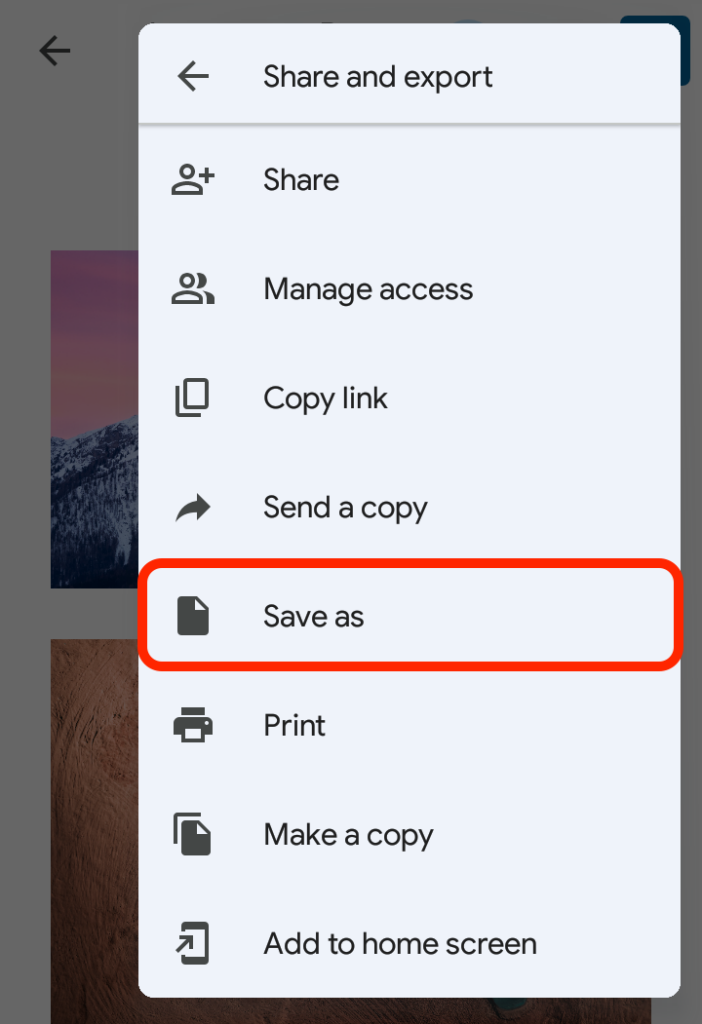
- Swipe up on the image or tap the three vertical dots (menu icon) in the top right corner.
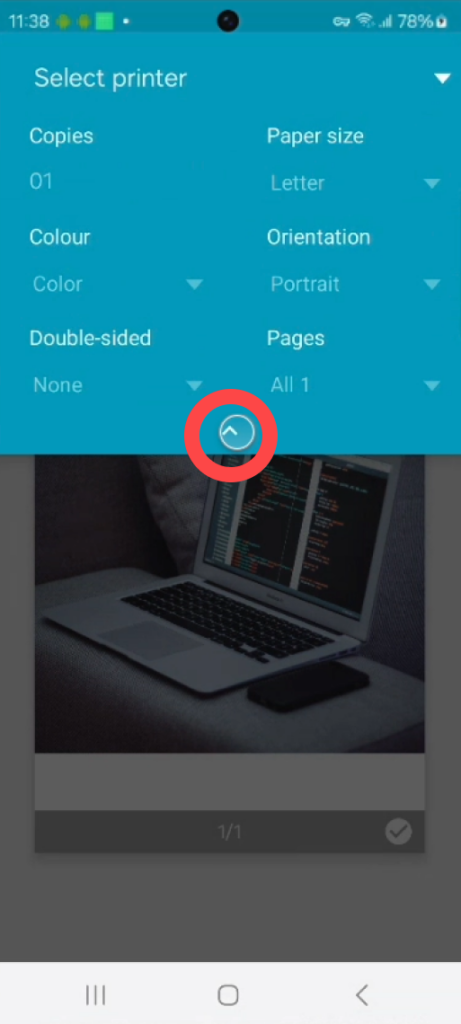
- Scroll through the options and select Print.
- Tap the drop-down menu at the top and choose Save as PDF.
- Tap the PDF download icon, choose your storage location, and hit Save.
Using the Gallery App
Most modern Android manufacturers (like Samsung, Xiaomi, or OnePlus) have a similar "Print" feature within their native Gallery apps. Simply open the photo, tap the share or menu button, find the print option, and select "Save as PDF."
How to Make PDF of Image on iPhone (iOS) Using the Files App
Apple has made the process of converting images to PDF incredibly streamlined within the iOS ecosystem. You can use the "Photos" app or the "Files" app to get the job done without any third-party software.
The Photos App Method
- Open the Photos app and select the image.
- Tap the Share button (the square with an upward arrow).
- Scroll down and select Print.
- On the Print Preview screen, use two fingers to "pinch-out" (zoom in) on the image preview. This action instantly converts the image into a PDF view.
- Tap the Share icon again in this new view and select Save to Files.
The Files App Method (Best for Multiple Images)
If you want to combine several images into one PDF, the Files app is the best tool:
- Move your images to the Files app.
- Tap the three dots in the top right and choose Select.
- Select all the images you want to include.
- Tap the three dots in the bottom right corner and select Create PDF.
Comparison of PDF Conversion Methods
To help you decide which method is best for your specific needs, we have compiled a comparison table below:
| Method/Feature | Description |
|---|---|
| Built-in Android (Print) | Fast, requires no internet, best for single images. |
| iOS Files App | Excellent for merging multiple images into one document quickly. |
| Adobe Scan / Microsoft Lens | Offers OCR (text recognition) and automatic edge cropping. |
| Online Converters | Good for bulk conversion but requires an active internet connection. |
Using Third-Party Apps for Advanced PDF Features
While built-in tools are great for basic tasks, sometimes you need more professional features like OCR (Optical Character Recognition), which allows you to search for text within your PDF. If you are looking for how to make a PDF of an image in mobile with professional-grade quality, consider these apps:
1. Adobe Scan
Adobe Scan is arguably the most powerful tool available. It uses AI to detect the borders of your document, removes shadows, and sharpens text. It automatically saves your scans as PDFs and can even recognize text so you can copy and paste it later.
2. Microsoft Lens
Microsoft Lens is perfect for those who use the Office 365 suite. It allows you to convert images to PDF, Word, or PowerPoint files. It has specialized modes for "Whiteboard," "Document," and "Business Card," ensuring the lighting and contrast are adjusted perfectly for each type.
3. CamScanner
CamScanner has been a long-time favorite for mobile users. It offers robust editing features, the ability to add watermarks for security, and cloud sync capabilities. However, be aware that the free version often includes a small watermark at the bottom of your documents.
Best Practices for High-Quality PDF Conversion
To ensure your converted PDF looks professional and is easy to read, follow these simple tips:
- Lighting: Always capture your image in a well-lit area. Natural sunlight is best. Avoid using the flash if the paper is glossy, as it may create glare.
- Stability: Hold your phone steady or use a tripod to avoid motion blur. Blurry text is difficult for OCR engines to read.
- Contrast: Place your document on a contrasting background. For example, place a white piece of paper on a dark wooden table. This helps the app's auto-crop feature find the edges of the page.
- Angle: Try to take the photo from directly above the document rather than at an angle to minimize perspective distortion.
Frequently Asked Questions (FAQ)
1. Can I convert multiple photos into a single PDF?
Yes. On an iPhone, you can do this through the "Files" app by selecting multiple images and choosing "Create PDF." On Android, you may need an app like "Combine PDF" or "Adobe Scan" to merge multiple photos into one document efficiently.
2. Does converting a photo to PDF reduce its quality?
Generally, the quality remains very high. However, some apps might compress the file to make it easier to share via email. If you need maximum quality, check the settings in your conversion app to ensure "High Resolution" is selected.
3. Is it safe to use online image-to-PDF converters?
While many online converters are safe, you should be cautious when uploading sensitive documents (like IDs or bank statements) to unknown websites. For sensitive data, it is always safer to use the built-in offline methods on your phone or trusted apps like Adobe Scan.
Conclusion
Knowing how to make a PDF of an image in mobile is an essential modern skill that saves time and improves productivity. Whether you use the built-in "Print to PDF" features on Android, the "Files" app on iOS, or specialized third-party applications like Adobe Scan, the process is quick and accessible to everyone.
By following the steps outlined in this guide, you can transform your smartphone into a portable office, allowing you to create, manage, and share professional documents from anywhere in the world. Remember to prioritize good lighting and steady hands to ensure your PDFs are of the highest quality. Now that you have mastered this process, you can say goodbye to the hassle of searching for a physical scanner!
How To Make Pdf Of Image In Mobile
How To Make Pdf Of Image In Mobile Wallpapers
Collection of how to make pdf of image in mobile wallpapers for your desktop and mobile devices.
Gorgeous How To Make Pdf Of Image In Mobile Artwork Nature
Immerse yourself in the stunning details of this beautiful how to make pdf of image in mobile wallpaper, designed for a captivating visual experience.

Mesmerizing How To Make Pdf Of Image In Mobile Photo Digital Art
Discover an amazing how to make pdf of image in mobile background image, ideal for personalizing your devices with vibrant colors and intricate designs.

Detailed How To Make Pdf Of Image In Mobile Capture for Desktop
Discover an amazing how to make pdf of image in mobile background image, ideal for personalizing your devices with vibrant colors and intricate designs.
Serene How To Make Pdf Of Image In Mobile Photo in HD
Transform your screen with this vivid how to make pdf of image in mobile artwork, a true masterpiece of digital design.

Detailed How To Make Pdf Of Image In Mobile Wallpaper for Desktop
Transform your screen with this vivid how to make pdf of image in mobile artwork, a true masterpiece of digital design.
Detailed How To Make Pdf Of Image In Mobile Photo Concept
Transform your screen with this vivid how to make pdf of image in mobile artwork, a true masterpiece of digital design.
Dynamic How To Make Pdf Of Image In Mobile Wallpaper Illustration
This gorgeous how to make pdf of image in mobile photo offers a breathtaking view, making it a perfect choice for your next wallpaper.

Vivid How To Make Pdf Of Image In Mobile Moment Digital Art
Discover an amazing how to make pdf of image in mobile background image, ideal for personalizing your devices with vibrant colors and intricate designs.

Beautiful How To Make Pdf Of Image In Mobile Landscape Concept
Experience the crisp clarity of this stunning how to make pdf of image in mobile image, available in high resolution for all your screens.
:max_bytes(150000):strip_icc()/001_save-pdf-to-iphone-or-ipad-4165490-a6d58f2ee9a949a487411d23d3e45c54.jpg "High-Quality How To Make Pdf Of Image In Mobile Photo for Your Screen")
High-Quality How To Make Pdf Of Image In Mobile Photo for Your Screen
Discover an amazing how to make pdf of image in mobile background image, ideal for personalizing your devices with vibrant colors and intricate designs.

Spectacular How To Make Pdf Of Image In Mobile Wallpaper in 4K
Find inspiration with this unique how to make pdf of image in mobile illustration, crafted to provide a fresh look for your background.

Detailed How To Make Pdf Of Image In Mobile Design for Desktop
Discover an amazing how to make pdf of image in mobile background image, ideal for personalizing your devices with vibrant colors and intricate designs.

High-Quality How To Make Pdf Of Image In Mobile Scene for Your Screen
Transform your screen with this vivid how to make pdf of image in mobile artwork, a true masterpiece of digital design.

Dynamic How To Make Pdf Of Image In Mobile Background Collection
A captivating how to make pdf of image in mobile scene that brings tranquility and beauty to any device.

Spectacular How To Make Pdf Of Image In Mobile Landscape Illustration
Find inspiration with this unique how to make pdf of image in mobile illustration, crafted to provide a fresh look for your background.

Amazing How To Make Pdf Of Image In Mobile Moment Concept
Transform your screen with this vivid how to make pdf of image in mobile artwork, a true masterpiece of digital design.

Beautiful How To Make Pdf Of Image In Mobile Picture for Your Screen
Discover an amazing how to make pdf of image in mobile background image, ideal for personalizing your devices with vibrant colors and intricate designs.

Breathtaking How To Make Pdf Of Image In Mobile Landscape in HD
Experience the crisp clarity of this stunning how to make pdf of image in mobile image, available in high resolution for all your screens.

Vibrant How To Make Pdf Of Image In Mobile Landscape Nature
Experience the crisp clarity of this stunning how to make pdf of image in mobile image, available in high resolution for all your screens.

Serene How To Make Pdf Of Image In Mobile Artwork Art
Explore this high-quality how to make pdf of image in mobile image, perfect for enhancing your desktop or mobile wallpaper.
Download these how to make pdf of image in mobile wallpapers for free and use them on your desktop or mobile devices.