How Do I Change The Size Of A Pdf In Acrobat
How Do I Change The Size Of A PDF In Acrobat: The Ultimate Professional Guide
Adobe Acrobat remains the industry gold standard for managing Portable Document Format (PDF) files. Whether you are a student trying to upload an assignment to a portal with a 5MB limit, or a professional preparing a high-resolution design for print, knowing how to manipulate document size is a critical skill. However, when people ask, "How do I change the size of a PDF in Acrobat?" they are often looking for one of two things: reducing the storage file size (compression) or altering the physical dimensions of the pages (scaling). In this comprehensive guide, we will explore every method available in Adobe Acrobat to help you achieve the perfect document size.
Understanding the Difference: File Size vs. Page Dimensions
Before diving into the "how-to," it is essential to distinguish between the two types of resizing. Many users get confused between these concepts, which leads to using the wrong tools.
- File Size (Digital Weight): This refers to how many Kilobytes (KB) or Megabytes (MB) the file occupies on your hard drive. Reducing this is often called "compressing" or "optimizing."
- Page Dimensions (Physical Size): This refers to the actual height and width of the document pages (e.g., A4, Letter, Legal, or custom inches/centimeters). Changing this involves "cropping" or "scaling."
Adobe Acrobat Pro provides specialized tools for both requirements. Below, we break down the step-by-step processes for each.
Method 1: Reducing File Size for Faster Sharing
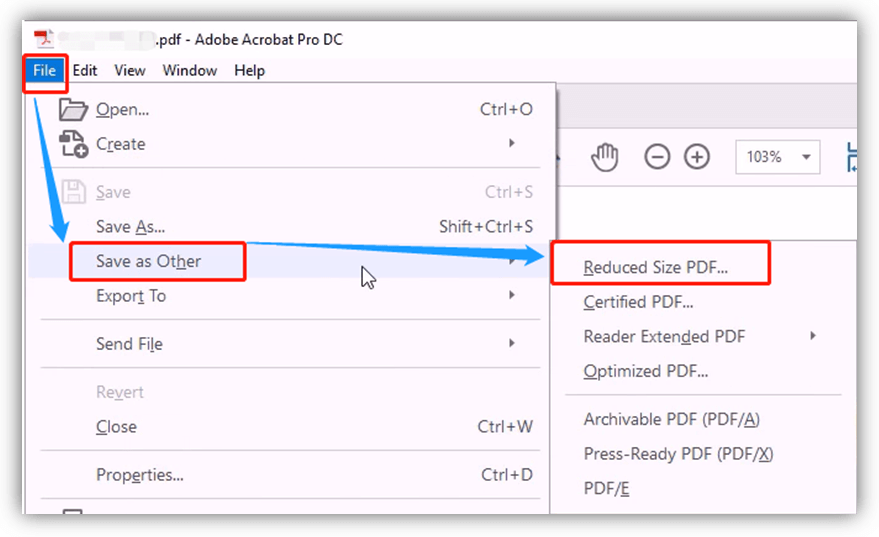
If your PDF is too large to send via email, Adobe Acrobat offers a "Reduce File Size" command that automates the compression process by downsampling images and removing embedded fonts that aren't necessary. Here is how to do it:
- Open your PDF document in Adobe Acrobat Pro.
- Navigate to the Menu (or File in older versions) and select Save as Other.
- Click on Reduced Size PDF.
- A dialog box will appear asking for version compatibility. Selecting "Acrobat 10.0 or later" usually yields the best compression results while maintaining modern standards.
- Click OK and save your new, smaller file.
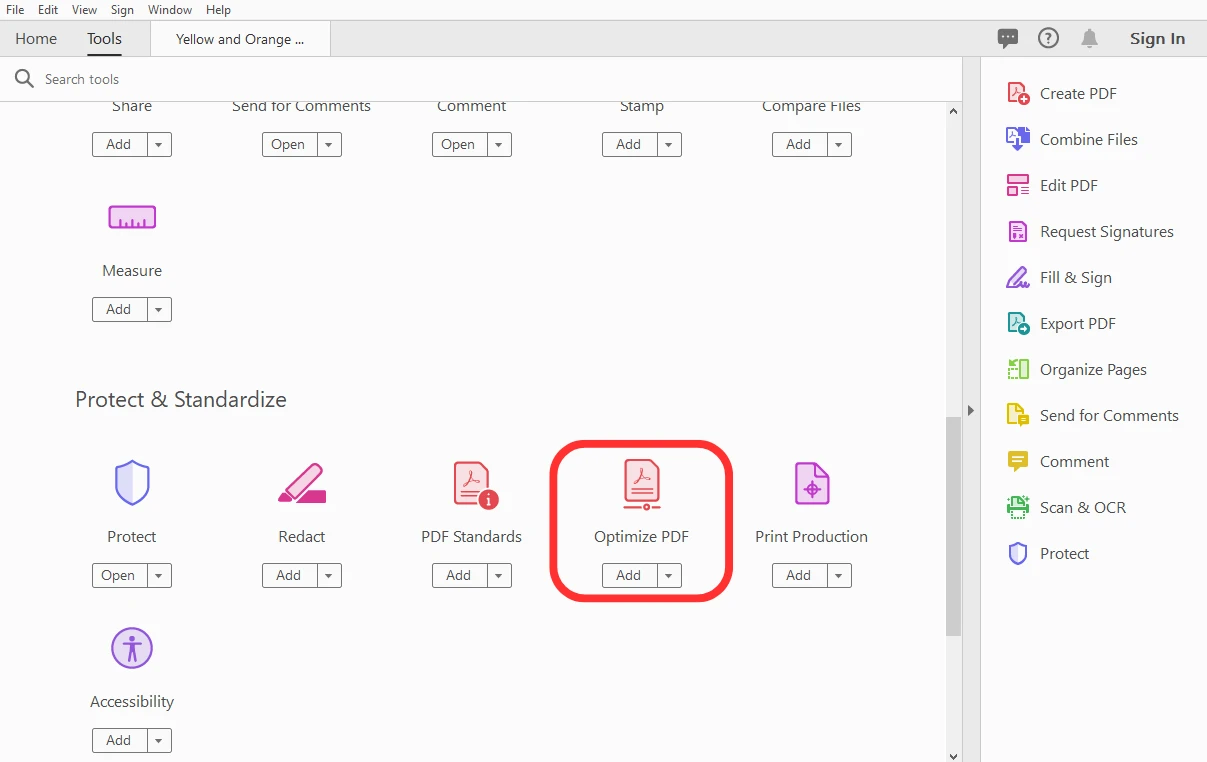
For more control, you can use the PDF Optimizer. This tool allows you to manually decide which elements to compress, such as images, transparency, and discarded objects. This is ideal for maintaining high quality in specific areas while cutting bulk elsewhere.
Method 2: Changing Physical Page Dimensions (Scaling)
If you need to change a PDF from "Letter" size to "A4" or create a custom dimension, the most effective way within Acrobat is using the Print to PDF scaling feature or the Preflight tool. While Acrobat doesn't have a simple "Resize Page" button like Word, these workarounds are professional-grade.
Using the Print Scaling Method
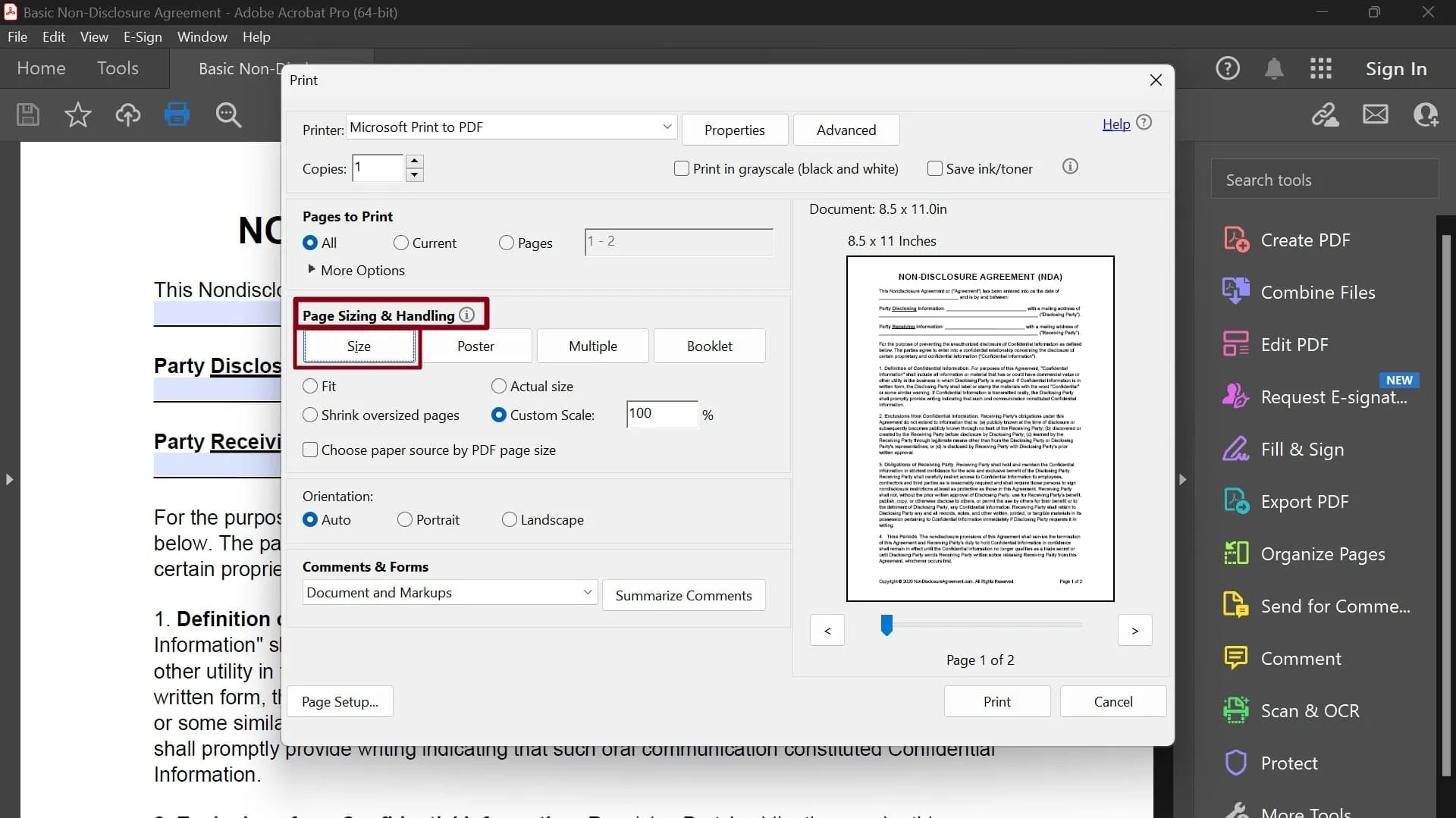
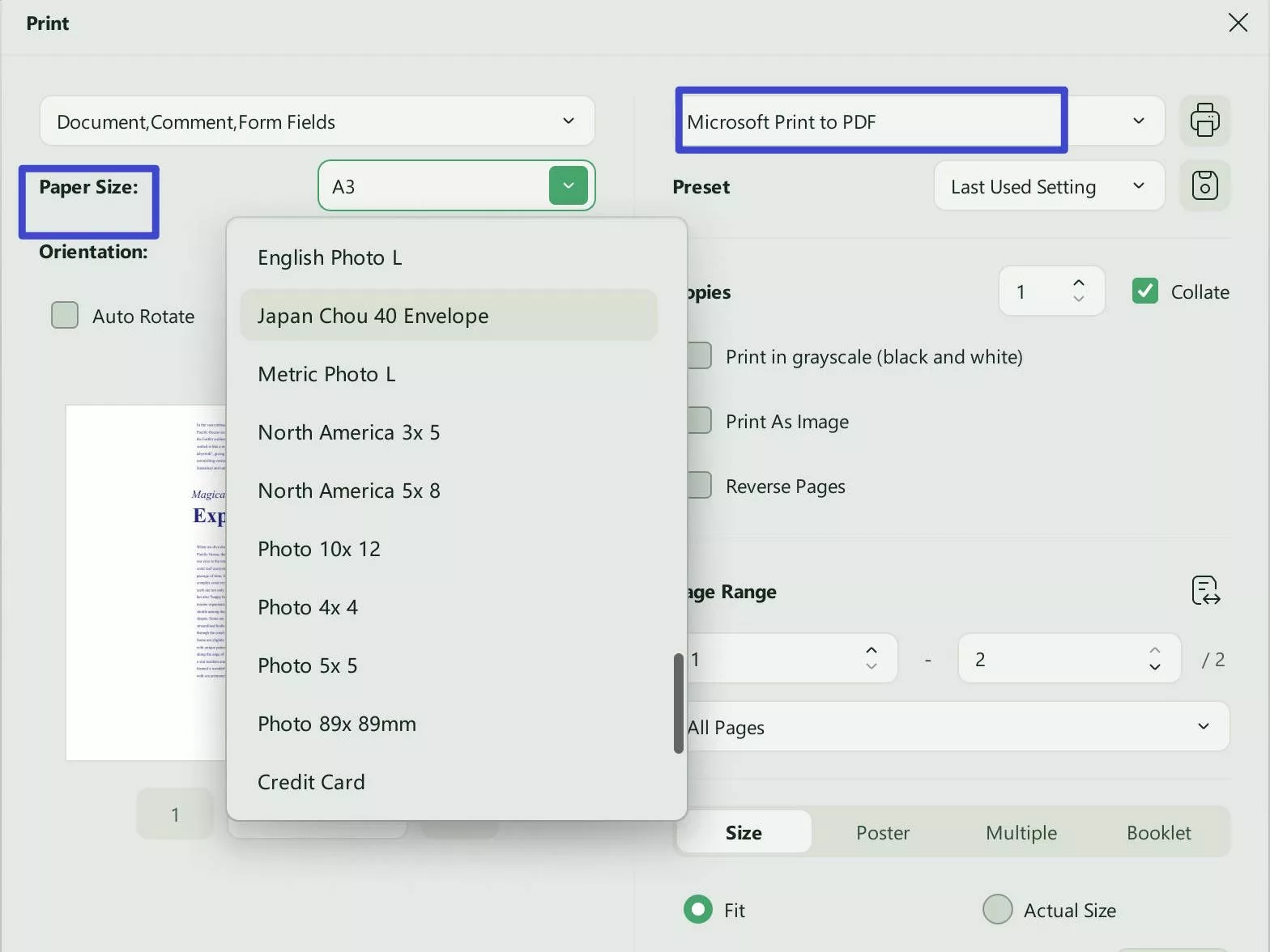
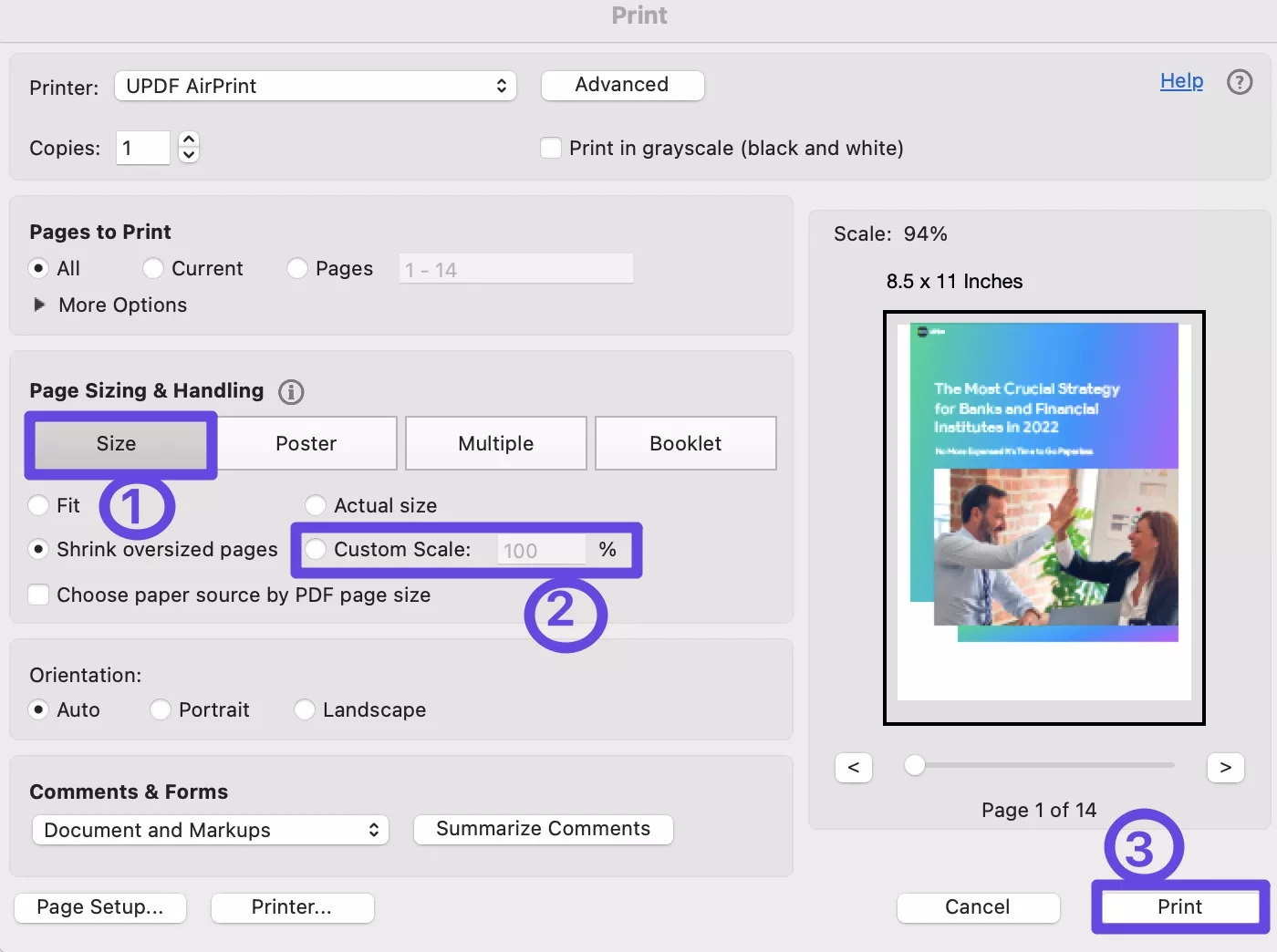
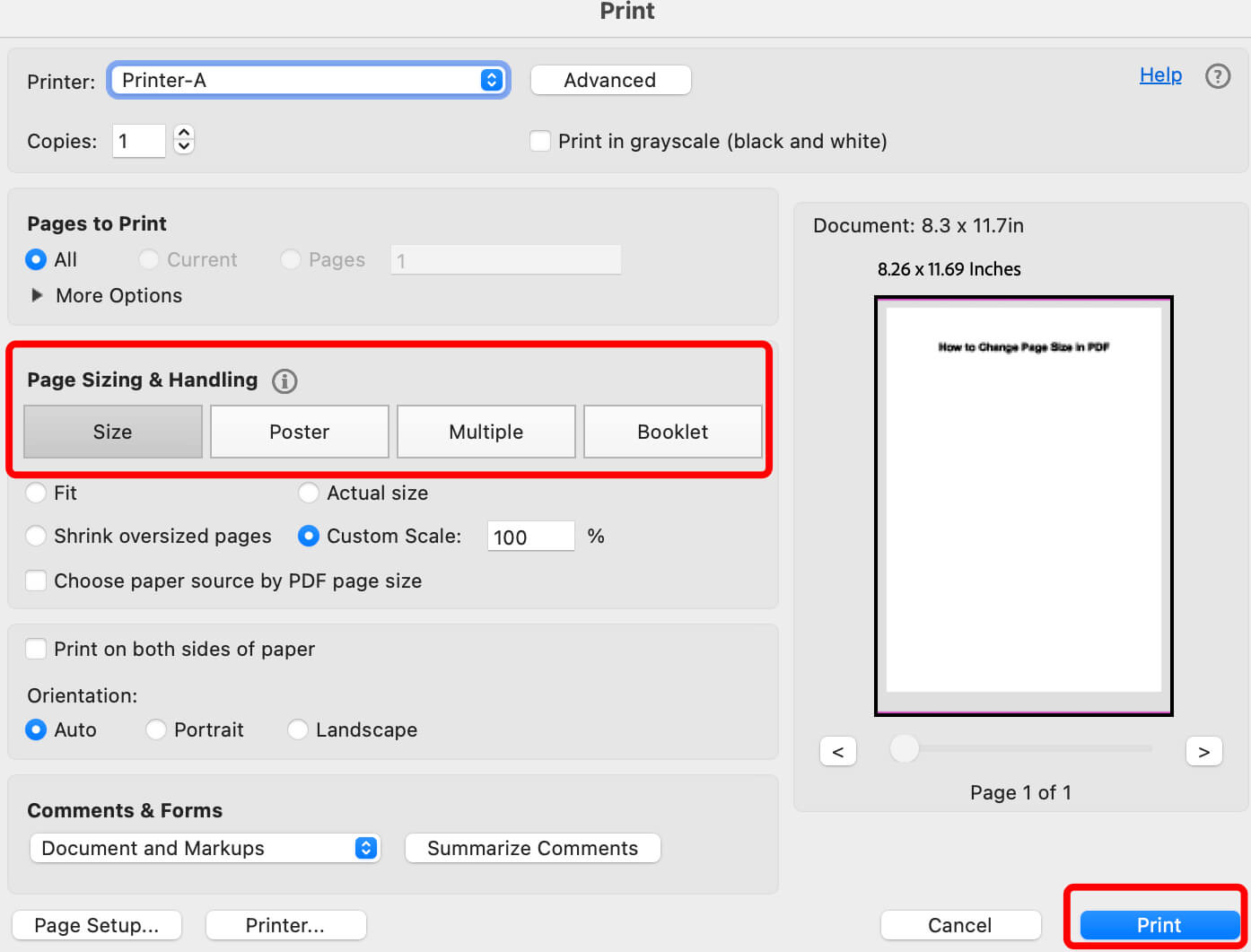
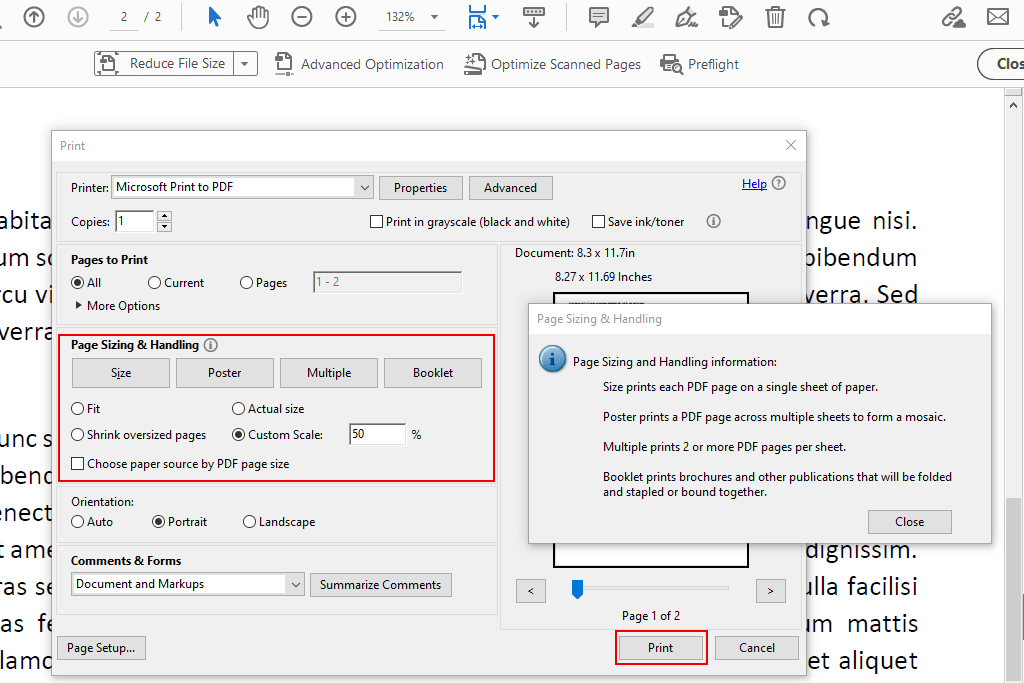
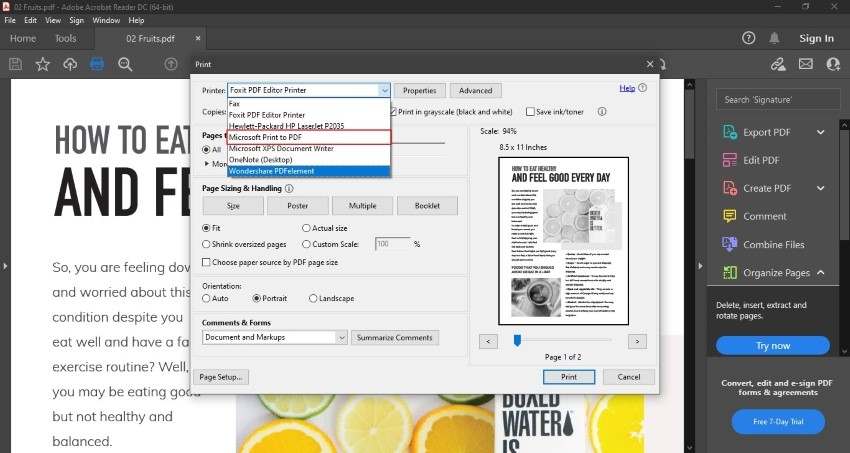
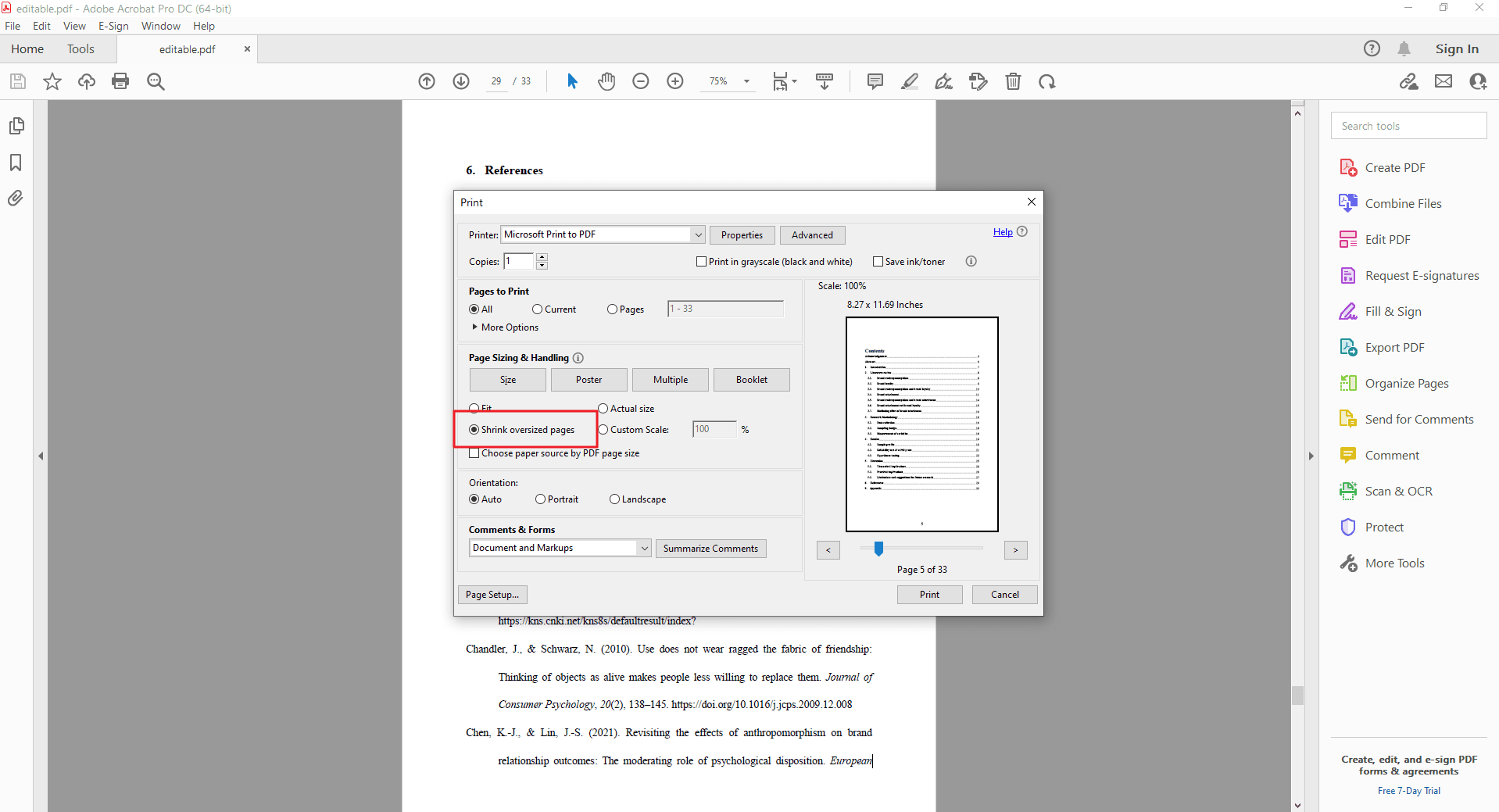
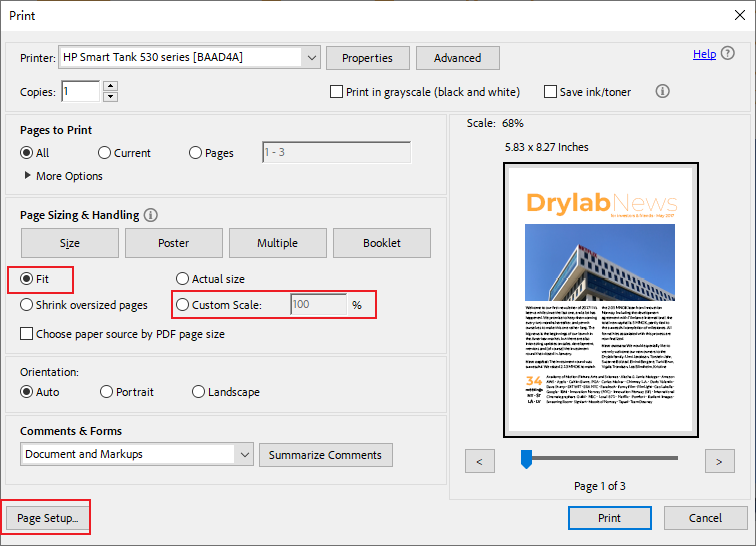
- Open the PDF and go to File > Print (or Ctrl+P).
- Select Adobe PDF as your printer.
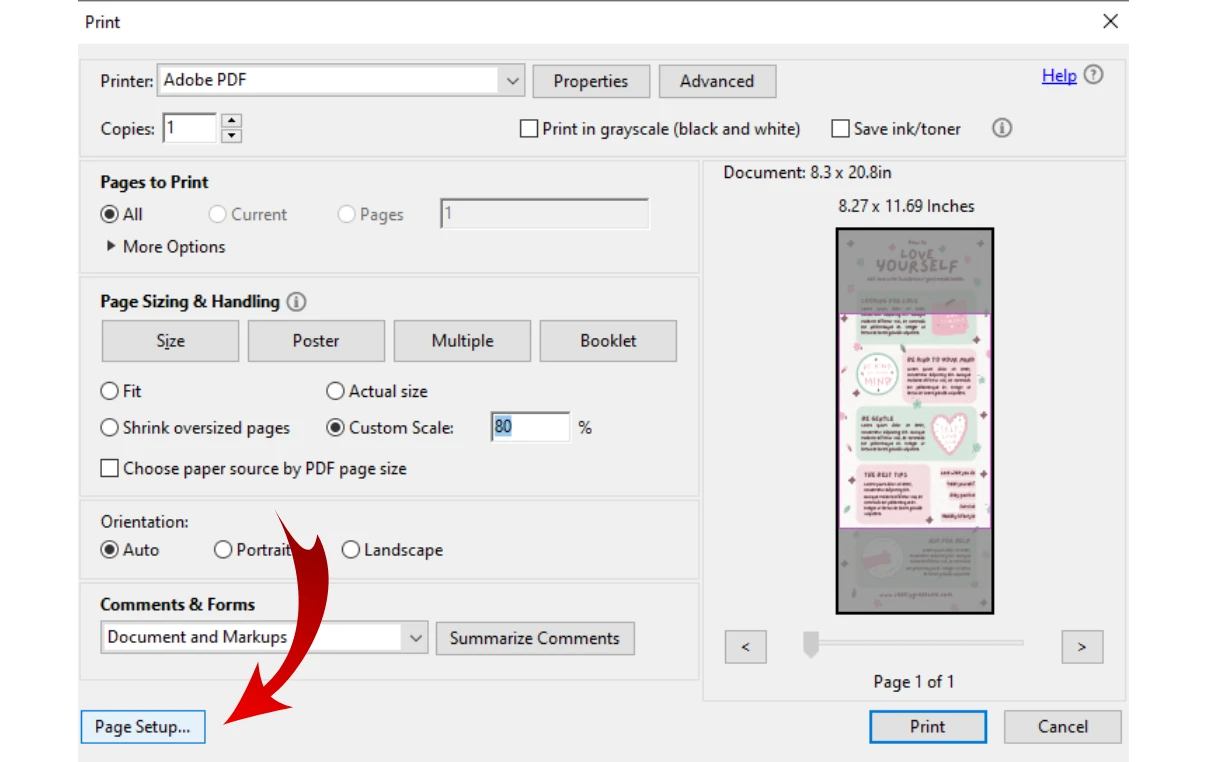
- Under Page Setup, choose the new paper size you desire.
- In the Page Sizing & Handling section, select Fit or Shrink oversized pages.
- Click Print. Acrobat will prompt you to save a new PDF which will now have the new physical dimensions.
| Feature/Aspect | Description |
|---|---|
| Reduce File Size | Quickly shrinks the MB/KB size of a PDF for email and web use. |
| PDF Optimizer | Advanced tool to control image DPI and metadata removal. |
| Page Cropping | Removes white margins or unwanted areas to change visual dimensions. |
| Print Scaling | Best for physically changing the document size (e.g., A4 to Legal). |
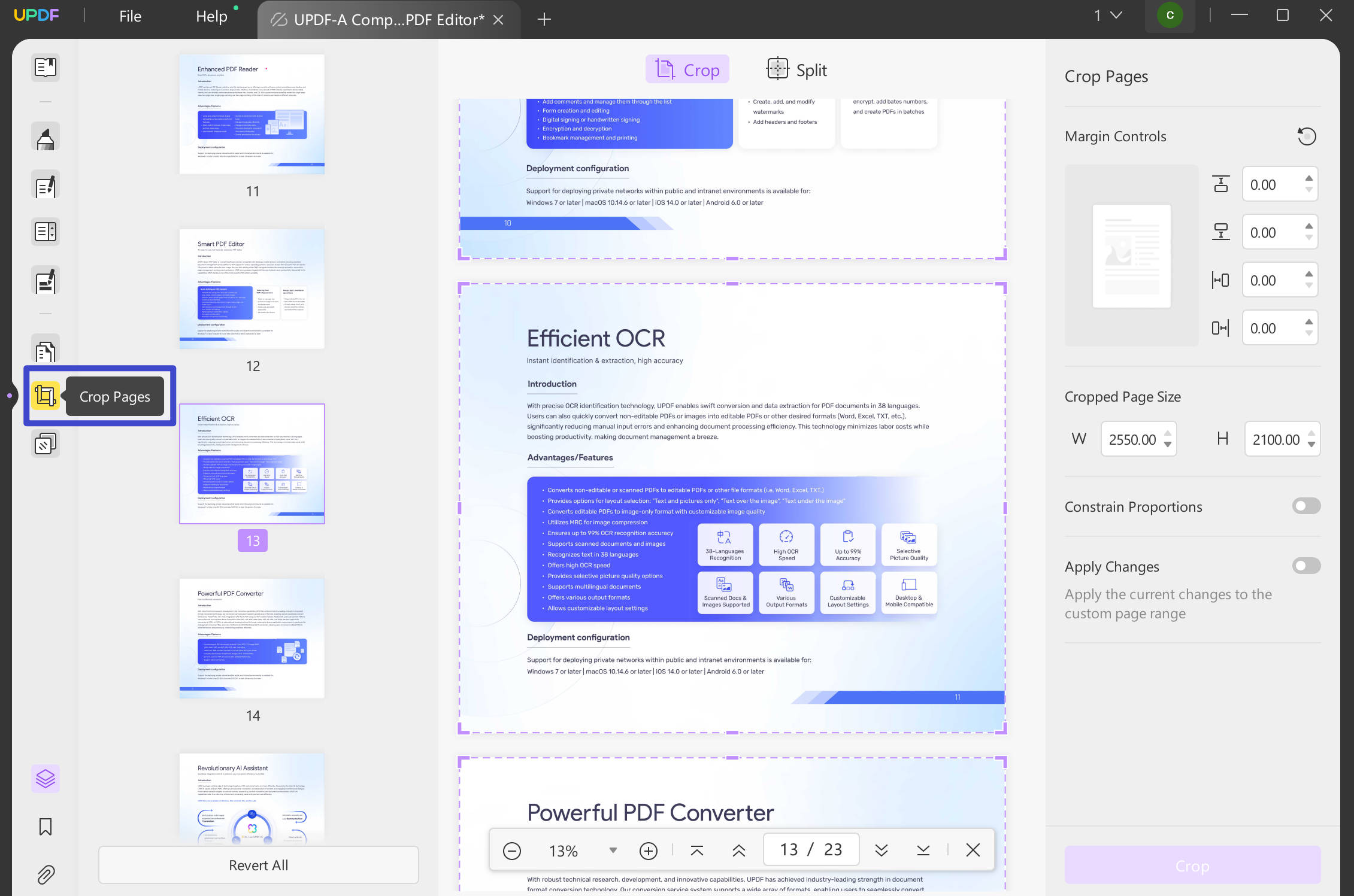
Method 3: Using the Crop Tool for Precision Sizing
Sometimes, changing the size simply means removing unnecessary white space around the text. The Crop Pages tool is perfect for this. It allows you to adjust the "Page Boxes" to define a new visible area.
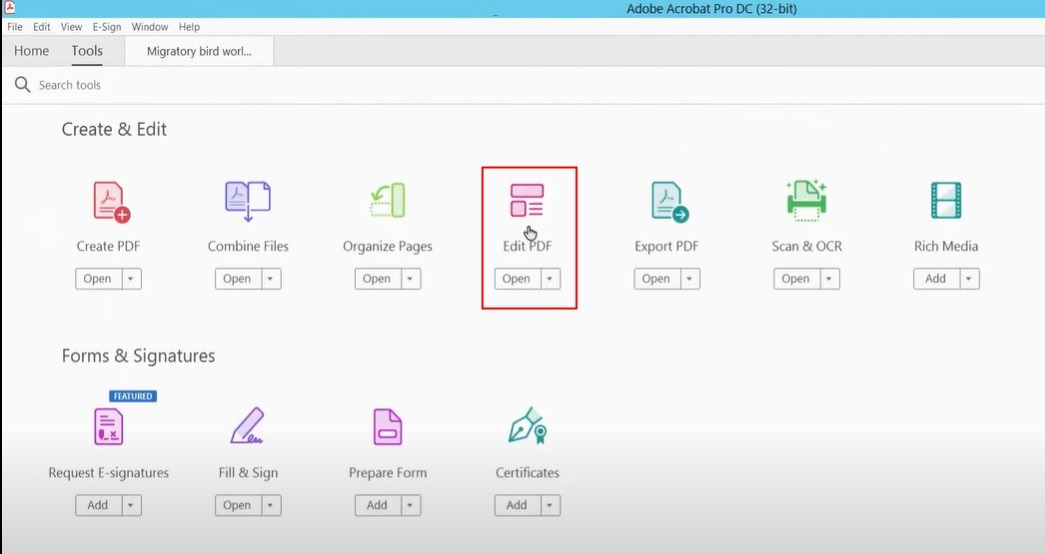
- Go to Tools > Edit PDF.
- In the secondary toolbar, click on Crop Pages.
- Drag a rectangle over the area you want to keep.
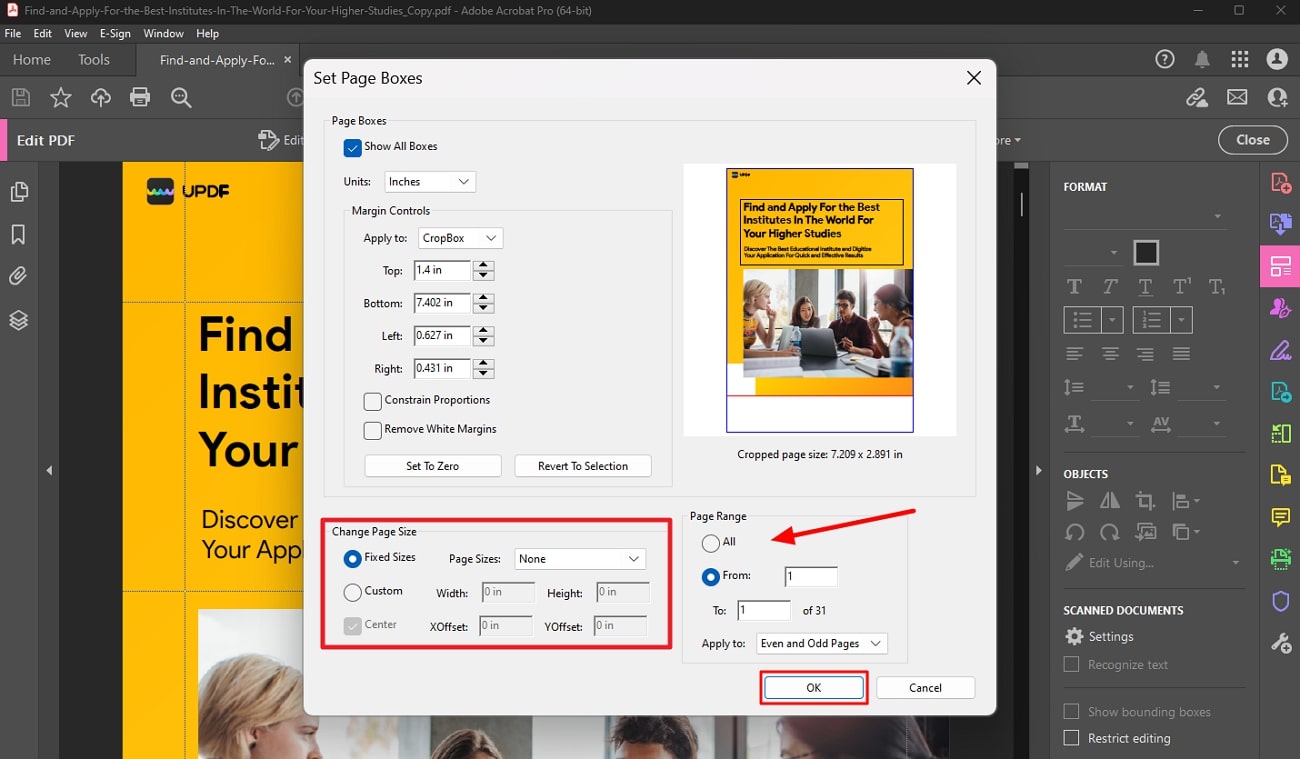
- Double-click inside the rectangle to open the Set Page Boxes dialog.
- Here, you can enter specific margins or dimensions. You can apply this change to a single page, a range, or the entire document.
- Click OK to apply the changes.
Method 4: Changing Size via Adobe Acrobat Online
If you don't have the desktop application installed, Adobe offers a powerful web-based alternative. This is often the fastest answer to "How do I change the size of a PDF in Acrobat" when you are on the go.
- Visit the Adobe Acrobat Online "Compress PDF" or "Resize PDF" page.
- Upload your file to the cloud.
- Choose your level of compression (High, Medium, or Low).
- Download the processed file.
While the online tool is convenient, it lacks the deep customization of the desktop Pro version, such as the ability to specifically target image resolution or remove hidden metadata.
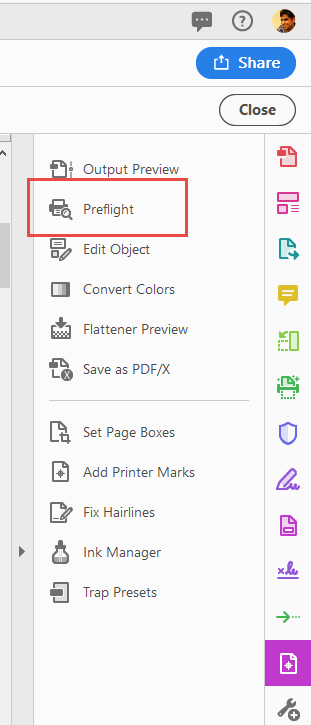
Advanced Tip: Using Preflight for Professional Resizing
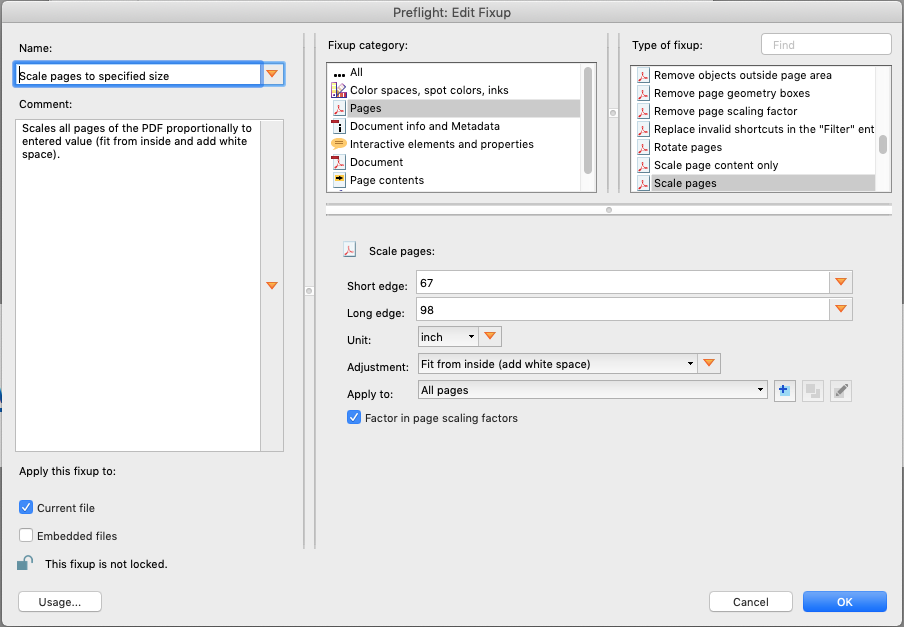
For power users, the Preflight tool (found under Print Production) contains a fixup called "Scale pages to specified size." This is the most accurate way to resize a PDF without losing quality or distorting the aspect ratio. It allows you to define exactly how the content should scale relative to the new page size, ensuring that your bleed and trim marks remain intact if you are working on a professional print project.
Frequently Asked Questions (FAQ)
1. Will resizing my PDF lower the quality of the images?
If you are reducing the file size (compression), yes, it usually involves "downsampling" images to a lower DPI. However, if you are only changing the page dimensions (physical size) through scaling or cropping without compression, the image quality remains the same.
2. Can I change the size of a PDF for free in Acrobat?
Adobe Acrobat Reader (the free version) allows for basic viewing and printing. To truly change the dimensions or use the Optimizer, you generally need an Acrobat Pro subscription. However, the Adobe Acrobat Online web tools offer limited free uses per day.
3. How do I resize multiple PDF files at once?
You can use the Action Wizard tool in Acrobat Pro. You can create a "New Action" that includes the "Optimize PDF" or "Save" command and apply it to an entire folder of documents simultaneously, saving hours of manual work.
Conclusion
Mastering the question "How do I change the size of a PDF in Acrobat" requires understanding whether you need to save disk space or change the physical layout. Adobe Acrobat Pro provides a robust suite of tools—from the simple Reduce File Size command to the high-precision Preflight and Crop tools—to ensure your documents meet any specification. By following the methods outlined above, you can ensure your PDFs are perfectly sized for both digital sharing and professional printing. Always remember to save a backup of your original file before performing heavy compression or scaling to ensure you never lose your source quality.
How Do I Change The Size Of A Pdf In Acrobat
How Do I Change The Size Of A Pdf In Acrobat Wallpapers
Collection of how do i change the size of a pdf in acrobat wallpapers for your desktop and mobile devices.
Detailed How Do I Change The Size Of A Pdf In Acrobat Image Concept
Explore this high-quality how do i change the size of a pdf in acrobat image, perfect for enhancing your desktop or mobile wallpaper.
Vivid How Do I Change The Size Of A Pdf In Acrobat Wallpaper Photography
Experience the crisp clarity of this stunning how do i change the size of a pdf in acrobat image, available in high resolution for all your screens.
Beautiful How Do I Change The Size Of A Pdf In Acrobat Artwork Collection
Discover an amazing how do i change the size of a pdf in acrobat background image, ideal for personalizing your devices with vibrant colors and intricate designs.
High-Quality How Do I Change The Size Of A Pdf In Acrobat Wallpaper Art
Explore this high-quality how do i change the size of a pdf in acrobat image, perfect for enhancing your desktop or mobile wallpaper.
Vivid How Do I Change The Size Of A Pdf In Acrobat Scene for Desktop
Experience the crisp clarity of this stunning how do i change the size of a pdf in acrobat image, available in high resolution for all your screens.
Beautiful How Do I Change The Size Of A Pdf In Acrobat Landscape for Desktop
Transform your screen with this vivid how do i change the size of a pdf in acrobat artwork, a true masterpiece of digital design.
Gorgeous How Do I Change The Size Of A Pdf In Acrobat Design for Desktop
Find inspiration with this unique how do i change the size of a pdf in acrobat illustration, crafted to provide a fresh look for your background.
Serene How Do I Change The Size Of A Pdf In Acrobat Abstract in 4K
Explore this high-quality how do i change the size of a pdf in acrobat image, perfect for enhancing your desktop or mobile wallpaper.
Serene How Do I Change The Size Of A Pdf In Acrobat Capture Illustration
Discover an amazing how do i change the size of a pdf in acrobat background image, ideal for personalizing your devices with vibrant colors and intricate designs.
Breathtaking How Do I Change The Size Of A Pdf In Acrobat Wallpaper Digital Art
Discover an amazing how do i change the size of a pdf in acrobat background image, ideal for personalizing your devices with vibrant colors and intricate designs.
Vivid How Do I Change The Size Of A Pdf In Acrobat View in 4K
Transform your screen with this vivid how do i change the size of a pdf in acrobat artwork, a true masterpiece of digital design.

Captivating How Do I Change The Size Of A Pdf In Acrobat Landscape Concept
This gorgeous how do i change the size of a pdf in acrobat photo offers a breathtaking view, making it a perfect choice for your next wallpaper.

Serene How Do I Change The Size Of A Pdf In Acrobat Wallpaper Concept
Discover an amazing how do i change the size of a pdf in acrobat background image, ideal for personalizing your devices with vibrant colors and intricate designs.
Detailed How Do I Change The Size Of A Pdf In Acrobat Picture Illustration
Discover an amazing how do i change the size of a pdf in acrobat background image, ideal for personalizing your devices with vibrant colors and intricate designs.
Serene How Do I Change The Size Of A Pdf In Acrobat Capture Digital Art
Transform your screen with this vivid how do i change the size of a pdf in acrobat artwork, a true masterpiece of digital design.
Detailed How Do I Change The Size Of A Pdf In Acrobat Background in 4K
Transform your screen with this vivid how do i change the size of a pdf in acrobat artwork, a true masterpiece of digital design.
Vivid How Do I Change The Size Of A Pdf In Acrobat Capture in HD
Discover an amazing how do i change the size of a pdf in acrobat background image, ideal for personalizing your devices with vibrant colors and intricate designs.
Lush How Do I Change The Size Of A Pdf In Acrobat Picture Nature
Find inspiration with this unique how do i change the size of a pdf in acrobat illustration, crafted to provide a fresh look for your background.
Vibrant How Do I Change The Size Of A Pdf In Acrobat Picture Nature
Experience the crisp clarity of this stunning how do i change the size of a pdf in acrobat image, available in high resolution for all your screens.
Exquisite How Do I Change The Size Of A Pdf In Acrobat Abstract Illustration
Find inspiration with this unique how do i change the size of a pdf in acrobat illustration, crafted to provide a fresh look for your background.
Download these how do i change the size of a pdf in acrobat wallpapers for free and use them on your desktop or mobile devices.