How To Make A Pdf File Smaller On Mac Free
How to Make a PDF File Smaller on Mac Free: The Ultimate Guide to PDF Compression
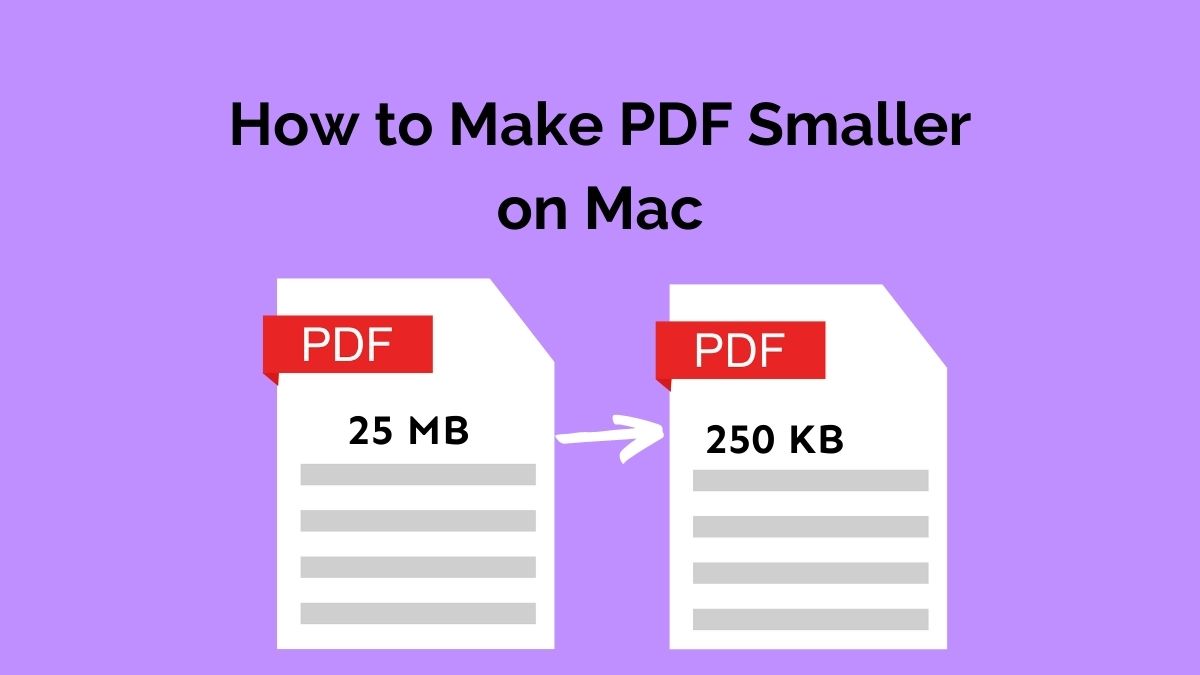
Managing digital documents is a daily necessity, but large PDF files can often become a significant hurdle. Whether you are trying to email a portfolio to a potential employer, upload a government form, or simply save space on your hard drive, knowing how to make a PDF file smaller on Mac free is an essential skill. Fortunately, macOS is equipped with several powerful, built-in tools that allow you to shrink file sizes without spending a penny on premium software.
In this comprehensive guide, we will explore the most effective methods to compress your PDF files using native macOS features like Preview and Quick Actions, as well as trusted online alternatives. We will also dive into advanced tips to ensure your documents remain legible while reducing their digital footprint.
Why Do PDF Files Get So Large?
Before we jump into the "how-to," it is helpful to understand why PDFs become bulky. Typically, the size of a PDF is dictated by three main factors: high-resolution images, embedded fonts, and metadata. When a document contains several high-quality photos or complex vector graphics, the file size can easily exceed 20MB or 50MB, making it nearly impossible to send via standard email services like Gmail or Outlook.
By learning how to compress these files, you are essentially instructing the software to downsample images and remove redundant data. On a Mac, this process is streamlined and user-friendly, provided you know where to look.
Method 1: Using the Preview App (The Most Popular Way)
The Preview app is the Swiss Army knife of macOS. It is the default viewer for images and PDFs, but it also contains a hidden "Quartz Filter" feature that can drastically reduce file sizes.
Step-by-Step Guide for Preview:
- Open your PDF: Double-click your PDF file to open it in Preview. If it opens in another app, right-click the file, select "Open With," and choose "Preview."
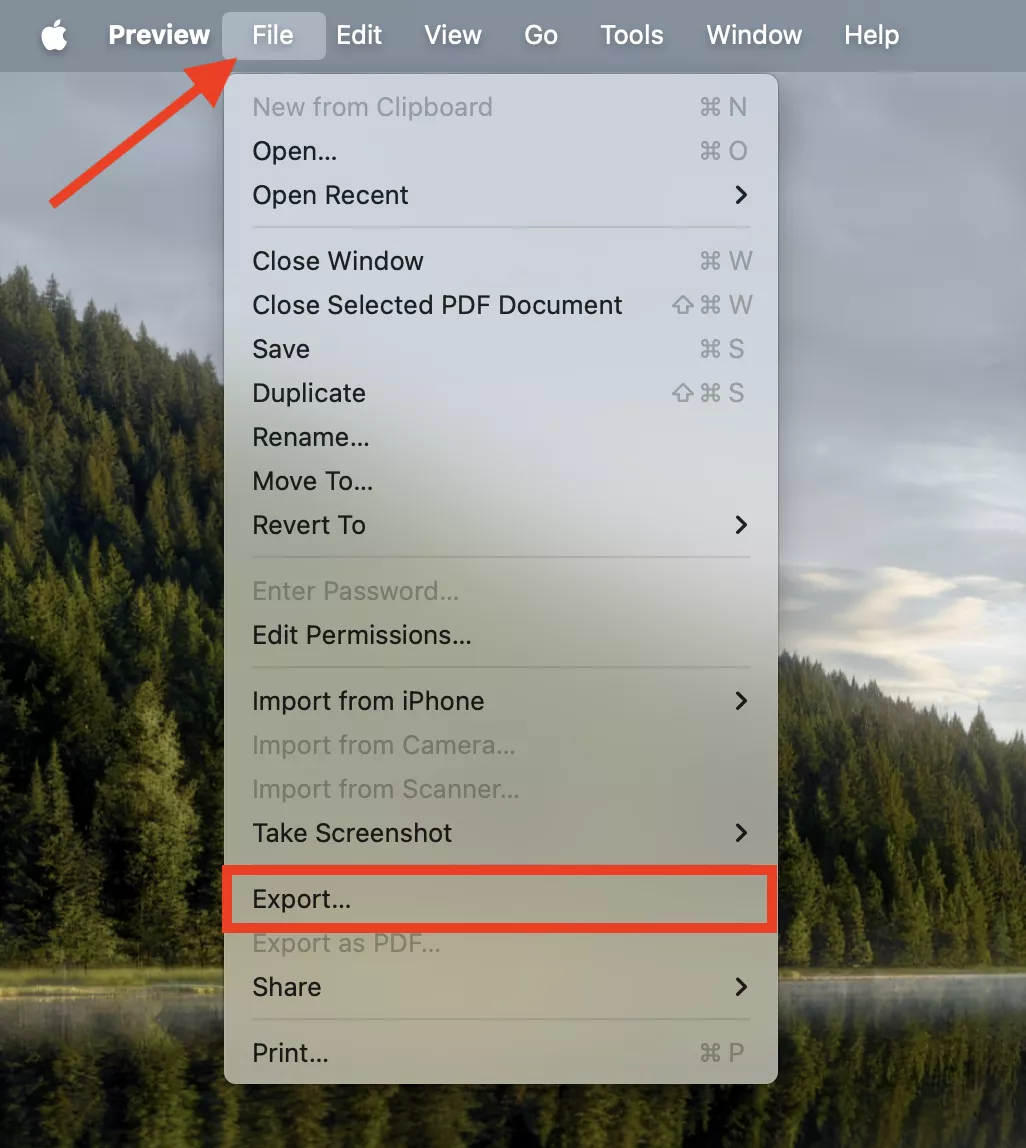
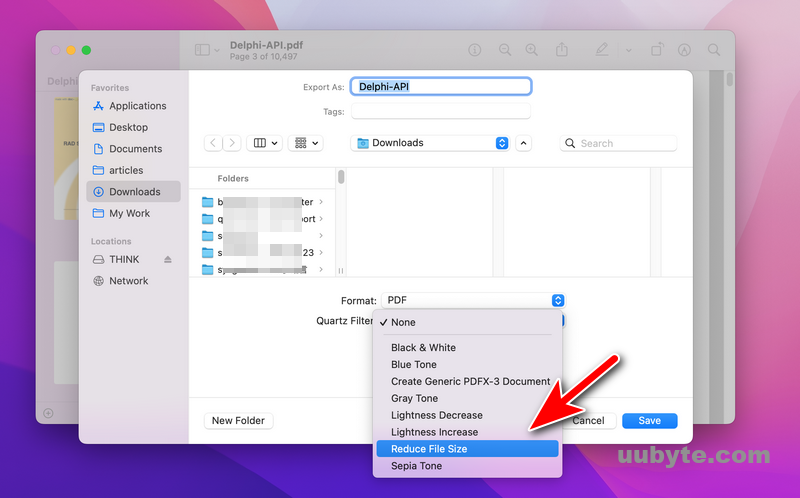
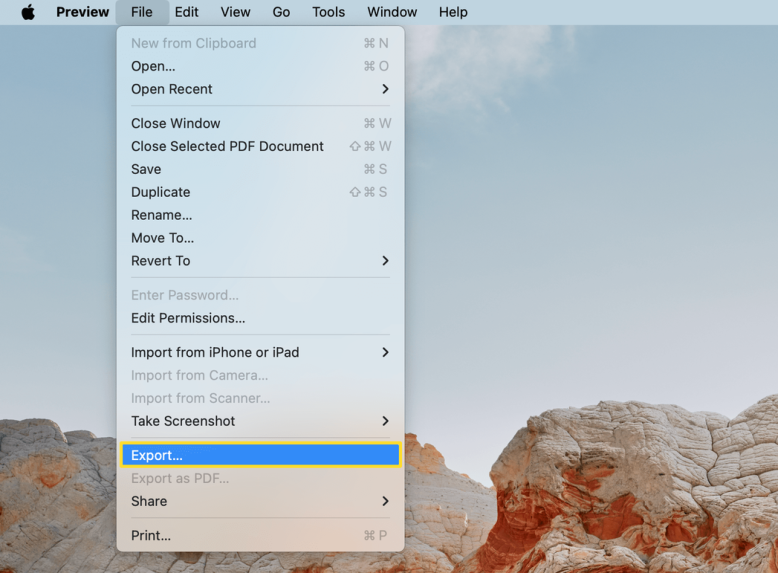
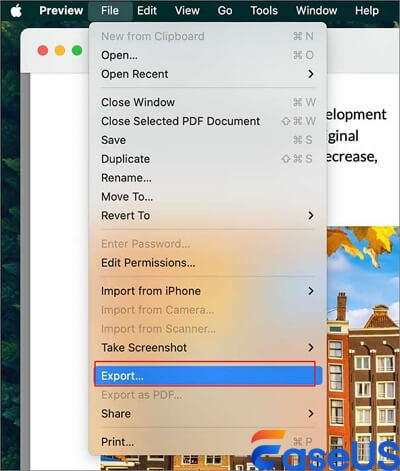
- Export the file: Go to the File menu in the top toolbar and select Export... (Note: Do not choose "Export as PDF").
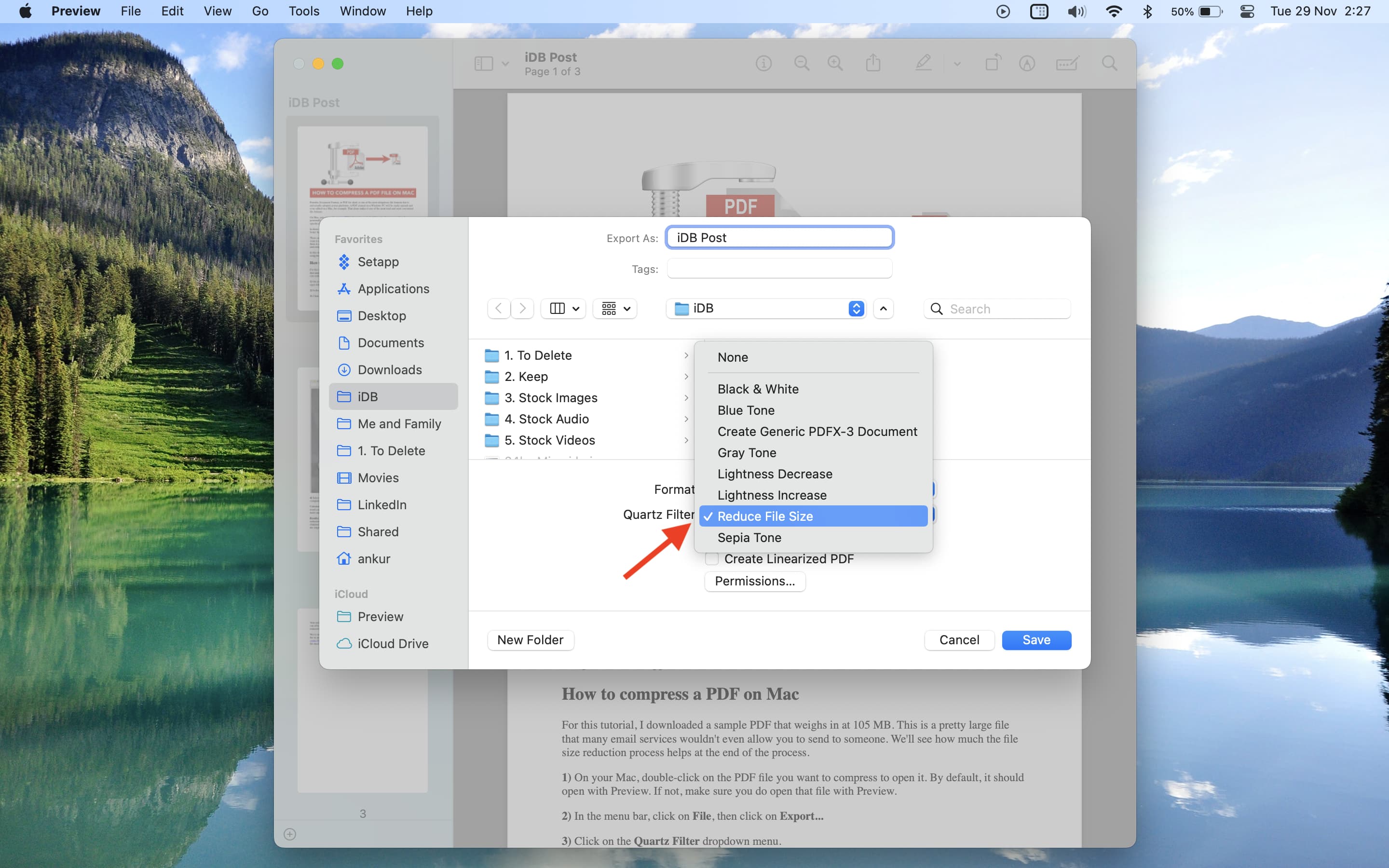
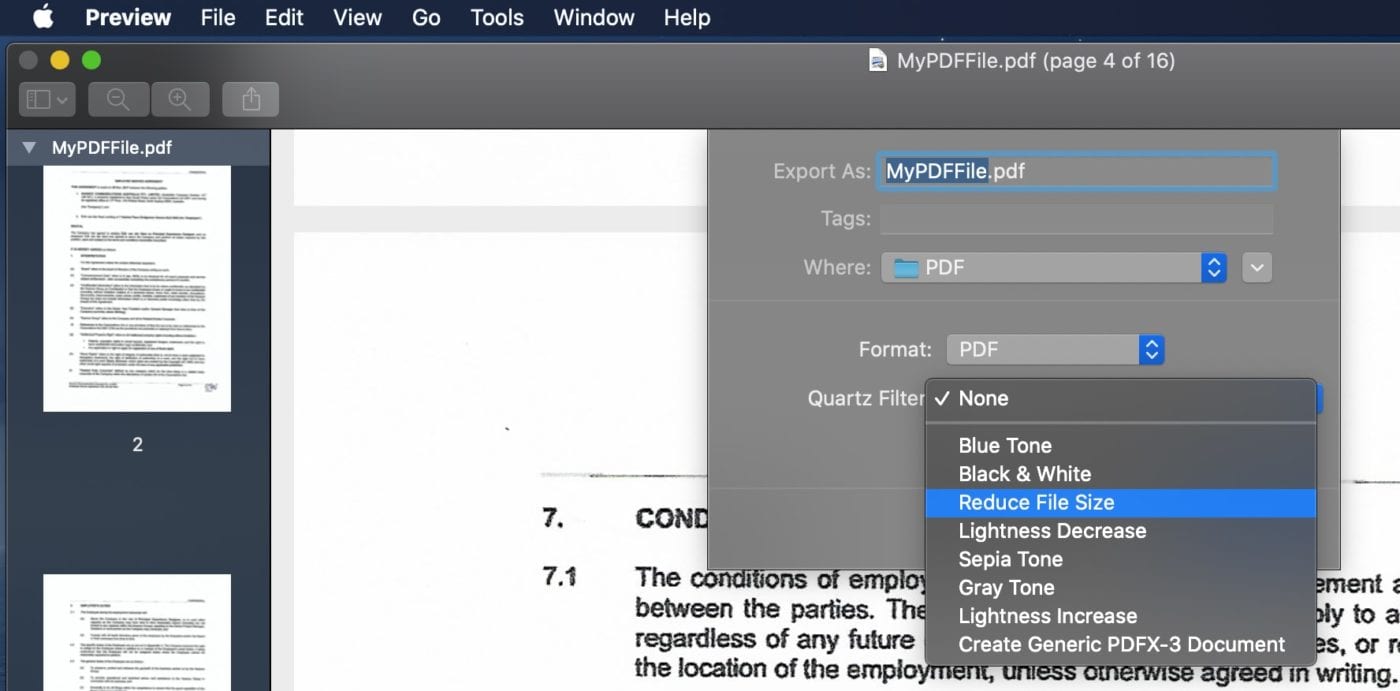
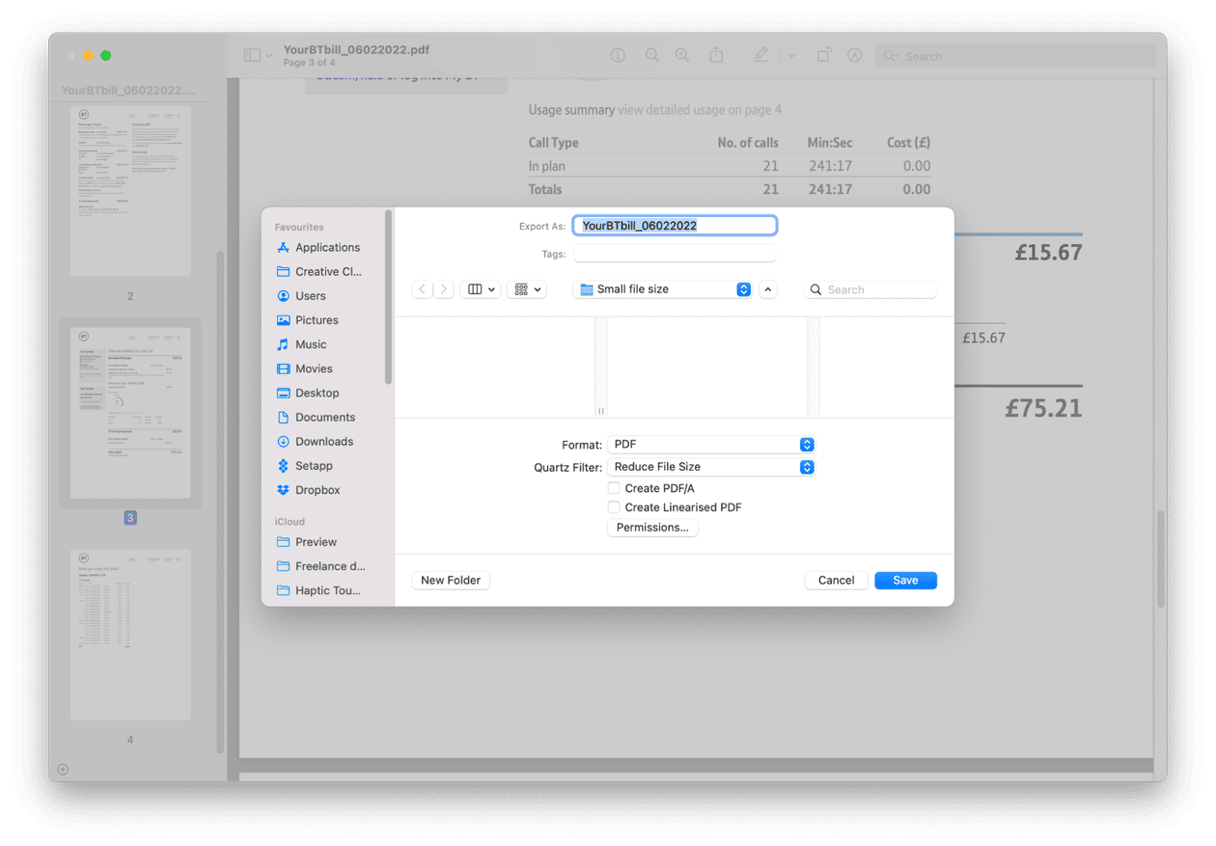
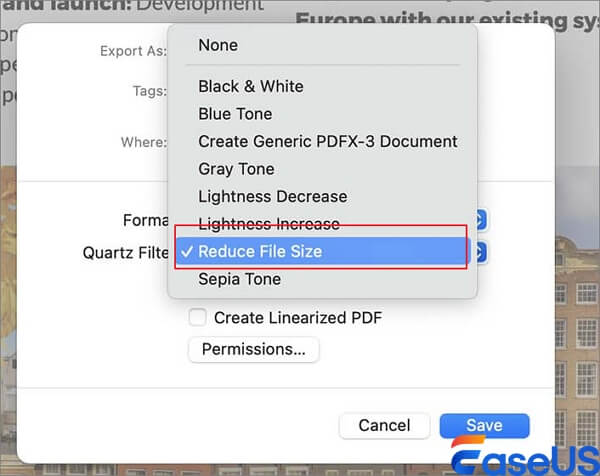
- Select the Quartz Filter: In the pop-up window, look for the dropdown menu labeled Quartz Filter.
- Choose Reduce File Size: Select the "Reduce File Size" option from the list.
- Save: Choose your destination folder and click Save.
Pro Tip: While this method is incredibly fast, it can sometimes make images look slightly blurry because it uses a standard compression algorithm. If quality is a priority, stay tuned for our advanced section on customizing Quartz Filters.
Method 2: Using Finder’s Quick Actions
If you are running a recent version of macOS (Mojave, Catalina, Big Sur, Monterey, Ventura, or Sonoma), you can compress PDFs directly from your desktop or folder without even opening an app. This is perhaps the fastest way to make a PDF file smaller on Mac free.
How to use Quick Actions:
- Locate the PDF file in your Finder.
- Right-click (or Control-click) on the file.
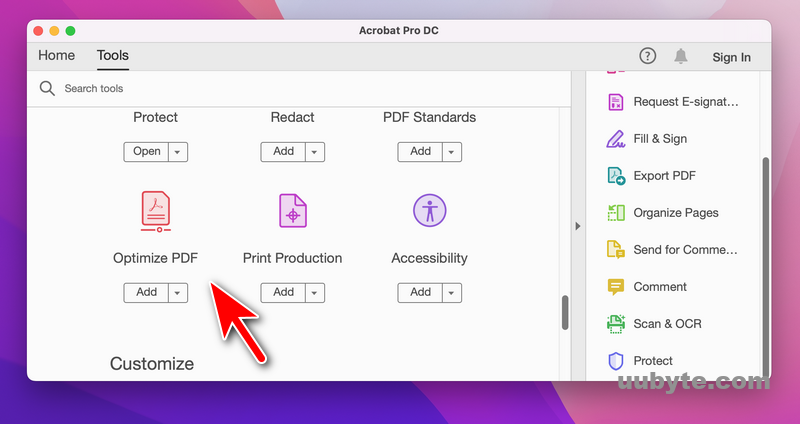
- Scroll down to Quick Actions.
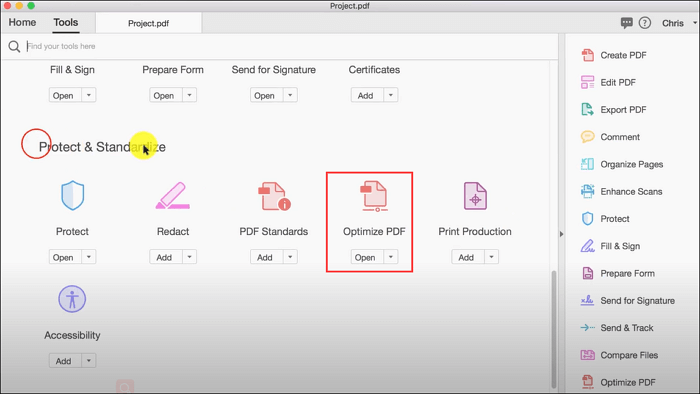
- Select Optimize PDF (Note: This option may appear as "Create PDF" or require custom configuration in some macOS versions, but "Optimize" is the standard for direct compression).
This method uses Apple’s internal optimization logic to balance file size and readability automatically. It is perfect for those who need a quick fix without diving into settings.
| Feature/Aspect | Description |
|---|---|
| Default Tool | macOS Preview (Built-in) |
| Compression Logic | Quartz Filters (Reduce File Size) |
| Speed | Instantaneous for most documents |
| Cost | 100% Free (No subscription required) |
| Privacy | Offline processing; data never leaves your Mac |
Method 3: Using Online PDF Compressors
Sometimes, the built-in Mac tools might compress a file *too much*, making the text hard to read, or they might not compress it *enough*. In these cases, free online tools can provide a better balance of quality and size. Websites like Smallpdf, iLovePDF, or Adobe Acrobat Online are excellent choices.
Steps for Online Compression:
- Navigate to a trusted site like ilovepdf.com.
- Upload your PDF file.
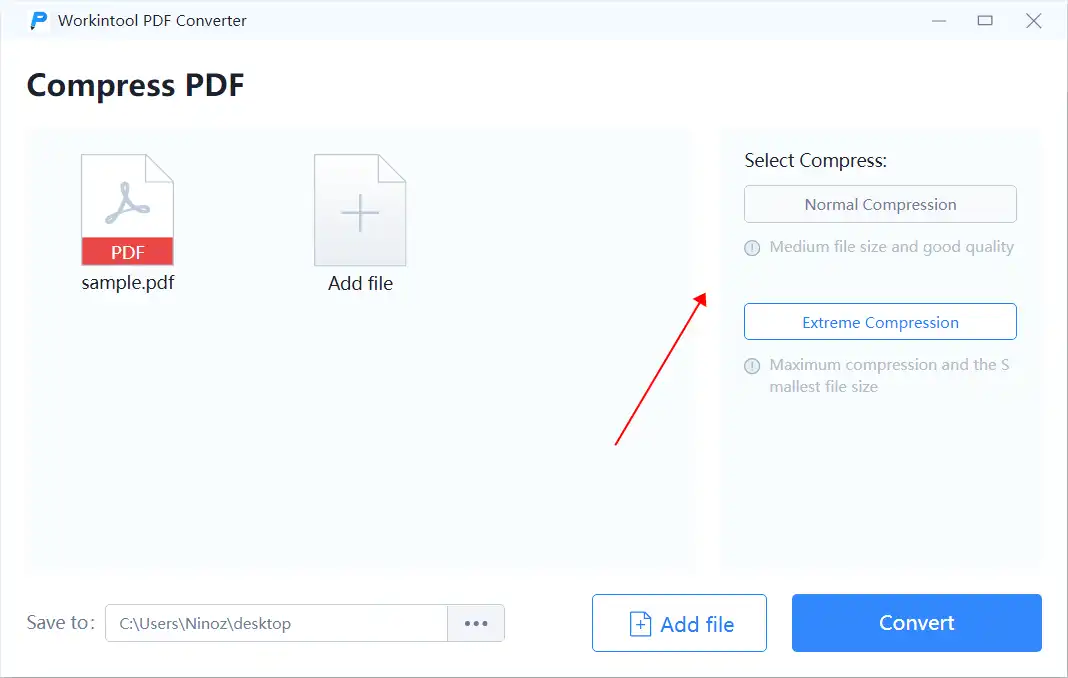
- Select the compression level (Extreme, Recommended, or Low Compression).
- Download the optimized file back to your Mac.
Caution: While these tools are convenient, avoid using them for documents containing sensitive or private information (like bank statements or legal contracts), as the files are processed on external servers.
Advanced Tip: Customizing Quartz Filters for Better Quality
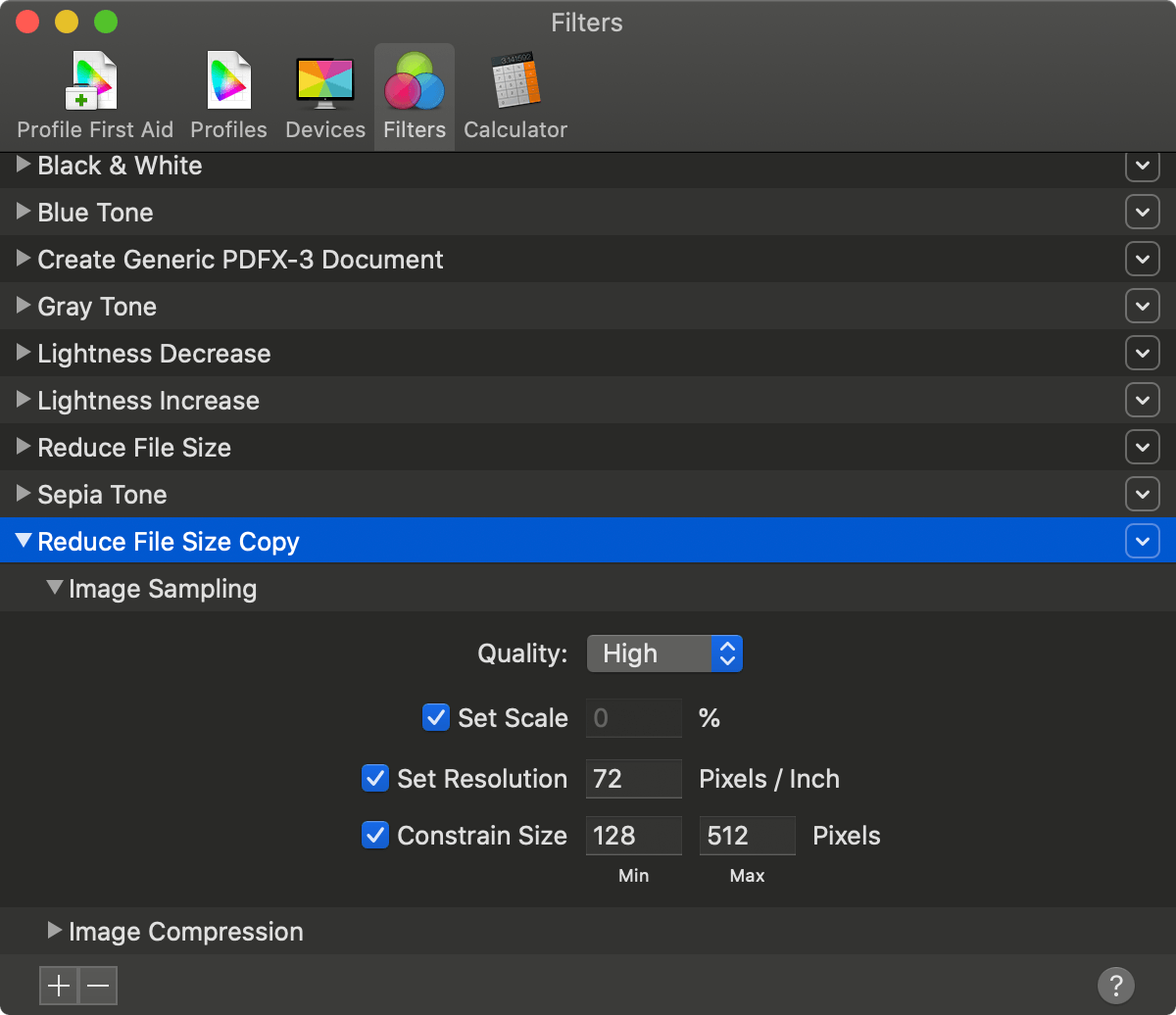
The biggest complaint about the "Reduce File Size" filter in Preview is that it can degrade image quality too aggressively. You can actually fix this by creating your own custom filter using the ColorSync Utility.
How to create a custom compression filter:
- Open ColorSync Utility (found in Applications > Utilities).
- Click on the Filters tab.
- Click the "+" icon to create a new filter and name it "Better Compression."
- Click the arrow next to your new filter and select Add Image Compression Component.
- Set the Quality to "Medium" or "High" and the Resolution to "150 DPI" (Dots Per Inch). This provides a much better balance than the default settings.
- The next time you use Preview to export, your "Better Compression" filter will appear in the Quartz Filter dropdown!
Frequently Asked Questions (FAQ)
1. Will compressing a PDF reduce its quality?
Yes, compression usually involves "downsampling" images, which reduces their resolution. However, for standard text-based documents or resumes, the reduction in quality is often imperceptible to the human eye.
2. Is it safe to use built-in Mac tools for sensitive documents?
Absolutely. Because Preview and Quick Actions process the file locally on your computer's hardware, your data remains private and is never uploaded to the internet.
3. Can I compress multiple PDF files at once on Mac?
Yes. You can select multiple PDF files in Finder, right-click, and use Quick Actions to optimize them all simultaneously. This is a huge time-saver for large projects.
Conclusion
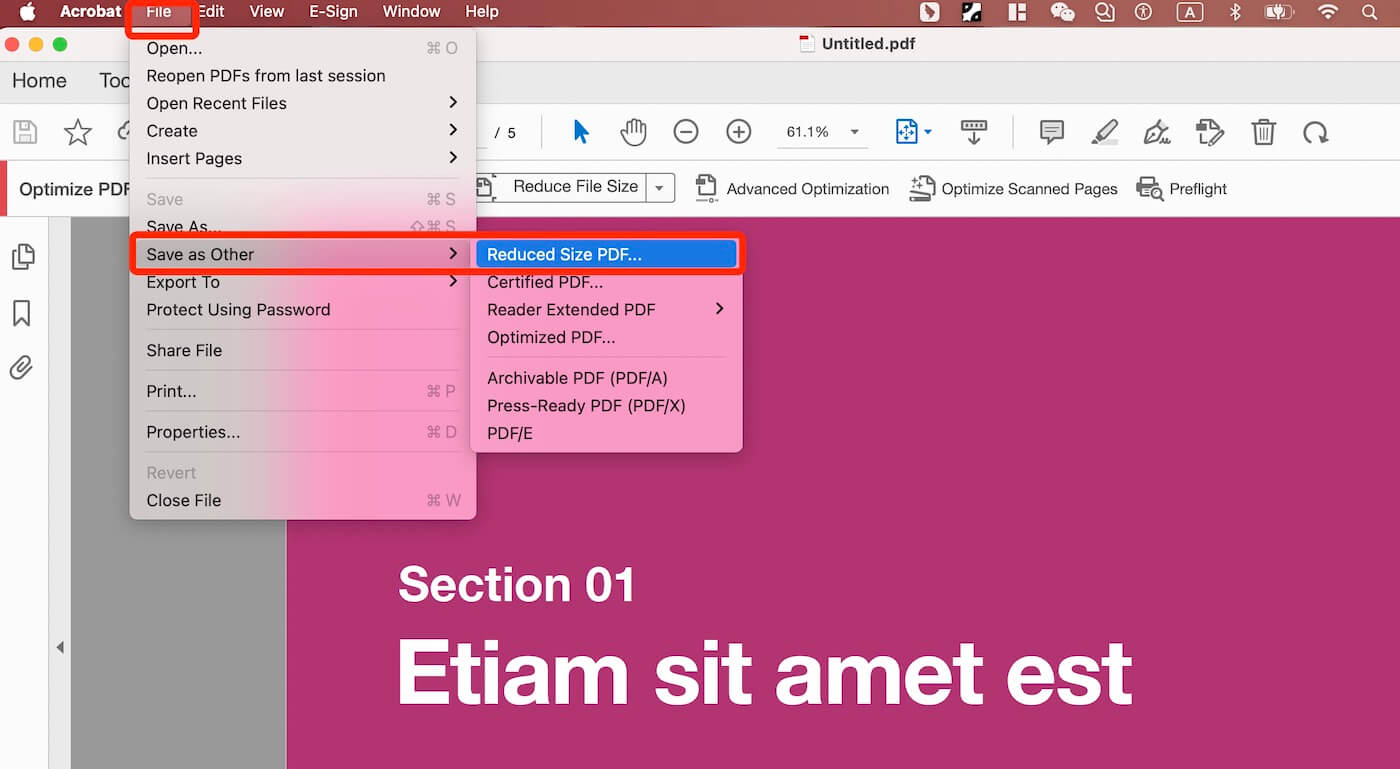
Learning how to make a PDF file smaller on Mac free is a straightforward process that doesn't require expensive third-party apps like Adobe Acrobat Pro. For most users, the Preview app and Quick Actions provide more than enough power to shrink files for everyday use. If you find that the default compression is too blurry, taking five minutes to set up a custom filter in ColorSync Utility is a "pro move" that will serve you for years to come.
By utilizing these native macOS features, you not only save money but also ensure your workflow remains efficient and your documents stay secure. Next time you encounter a "File too large" error, you’ll be ready to handle it in seconds!
How To Make A Pdf File Smaller On Mac Free
How To Make A Pdf File Smaller On Mac Free Wallpapers
Collection of how to make a pdf file smaller on mac free wallpapers for your desktop and mobile devices.
Dynamic How To Make A Pdf File Smaller On Mac Free Photo Art
Immerse yourself in the stunning details of this beautiful how to make a pdf file smaller on mac free wallpaper, designed for a captivating visual experience.
:max_bytes(150000):strip_icc()/how-to-make-a-file-smaller-on-mac-52109195-1220015ec8cf49b98b8ce692a7562a90.jpg "Exquisite How To Make A Pdf File Smaller On Mac Free Background in 4K")
Exquisite How To Make A Pdf File Smaller On Mac Free Background in 4K
Immerse yourself in the stunning details of this beautiful how to make a pdf file smaller on mac free wallpaper, designed for a captivating visual experience.
Lush How To Make A Pdf File Smaller On Mac Free Photo Art
Immerse yourself in the stunning details of this beautiful how to make a pdf file smaller on mac free wallpaper, designed for a captivating visual experience.
Exquisite How To Make A Pdf File Smaller On Mac Free Artwork Digital Art
Find inspiration with this unique how to make a pdf file smaller on mac free illustration, crafted to provide a fresh look for your background.
Mesmerizing How To Make A Pdf File Smaller On Mac Free Background Digital Art
Transform your screen with this vivid how to make a pdf file smaller on mac free artwork, a true masterpiece of digital design.
Gorgeous How To Make A Pdf File Smaller On Mac Free Landscape for Desktop
This gorgeous how to make a pdf file smaller on mac free photo offers a breathtaking view, making it a perfect choice for your next wallpaper.

Crisp How To Make A Pdf File Smaller On Mac Free Capture Digital Art
A captivating how to make a pdf file smaller on mac free scene that brings tranquility and beauty to any device.
Mesmerizing How To Make A Pdf File Smaller On Mac Free Landscape in HD
Experience the crisp clarity of this stunning how to make a pdf file smaller on mac free image, available in high resolution for all your screens.
Vivid How To Make A Pdf File Smaller On Mac Free Picture Collection
Transform your screen with this vivid how to make a pdf file smaller on mac free artwork, a true masterpiece of digital design.
Lush How To Make A Pdf File Smaller On Mac Free View Digital Art
Find inspiration with this unique how to make a pdf file smaller on mac free illustration, crafted to provide a fresh look for your background.

Vivid How To Make A Pdf File Smaller On Mac Free Image Illustration
Explore this high-quality how to make a pdf file smaller on mac free image, perfect for enhancing your desktop or mobile wallpaper.
High-Quality How To Make A Pdf File Smaller On Mac Free Capture Art
Experience the crisp clarity of this stunning how to make a pdf file smaller on mac free image, available in high resolution for all your screens.
Vivid How To Make A Pdf File Smaller On Mac Free Scene Collection
Explore this high-quality how to make a pdf file smaller on mac free image, perfect for enhancing your desktop or mobile wallpaper.
Vibrant How To Make A Pdf File Smaller On Mac Free Capture Illustration
Discover an amazing how to make a pdf file smaller on mac free background image, ideal for personalizing your devices with vibrant colors and intricate designs.
Artistic How To Make A Pdf File Smaller On Mac Free Photo Photography
Find inspiration with this unique how to make a pdf file smaller on mac free illustration, crafted to provide a fresh look for your background.
Detailed How To Make A Pdf File Smaller On Mac Free Wallpaper for Desktop
Transform your screen with this vivid how to make a pdf file smaller on mac free artwork, a true masterpiece of digital design.
Exquisite How To Make A Pdf File Smaller On Mac Free Abstract in 4K
Find inspiration with this unique how to make a pdf file smaller on mac free illustration, crafted to provide a fresh look for your background.
Dynamic How To Make A Pdf File Smaller On Mac Free Abstract for Desktop
Immerse yourself in the stunning details of this beautiful how to make a pdf file smaller on mac free wallpaper, designed for a captivating visual experience.
Lush How To Make A Pdf File Smaller On Mac Free Artwork for Desktop
Immerse yourself in the stunning details of this beautiful how to make a pdf file smaller on mac free wallpaper, designed for a captivating visual experience.
:max_bytes(150000):strip_icc()/how-to-make-a-file-smaller-on-mac-52109194-81912d239fd94378ba71eed307ad0234.jpg "Amazing How To Make A Pdf File Smaller On Mac Free Abstract Concept")
Amazing How To Make A Pdf File Smaller On Mac Free Abstract Concept
Discover an amazing how to make a pdf file smaller on mac free background image, ideal for personalizing your devices with vibrant colors and intricate designs.
Download these how to make a pdf file smaller on mac free wallpapers for free and use them on your desktop or mobile devices.