How To Reduce The Size Of A Pdf In Bluebeam
How to Reduce the Size of a PDF in Bluebeam: The Ultimate Guide for Professionals
In the fast-paced world of architecture, engineering, and construction (AEC), sharing large document sets is a daily necessity. However, high-resolution blueprints and complex markups can lead to bloated PDF files that are difficult to email, slow to upload to project management software, and frustrating to open on mobile devices. Learning how to reduce the size of a PDF in Bluebeam Revu is a critical skill that ensures your collaboration remains seamless without sacrificing the professional quality of your work.
Bluebeam Revu offers a variety of powerful tools designed specifically to optimize documents. Whether you need a quick "one-click" fix or a granular approach to stripping out unnecessary metadata and compressing images, Bluebeam provides the flexibility to get your file size down to a manageable level. In this guide, we will explore the most effective methods to compress your PDFs while maintaining the clarity required for technical drawings.
Why File Size Optimization Matters in AEC Workflows
Before diving into the "how," it is important to understand the "why." Large PDF files are not just a storage nuisance; they impact project timelines. Many email servers have a 20MB to 25MB limit, and many document management systems (like Procore or BIM 360) perform better with optimized files. Furthermore, field technicians using tablets often struggle with "laggy" documents if the file size is too large. By optimizing your PDFs, you improve the end-user experience, ensure faster synchronization with the cloud, and reduce the risk of document corruption during transfer.
Method 1: Using the Built-in "Reduce File Size" Tool
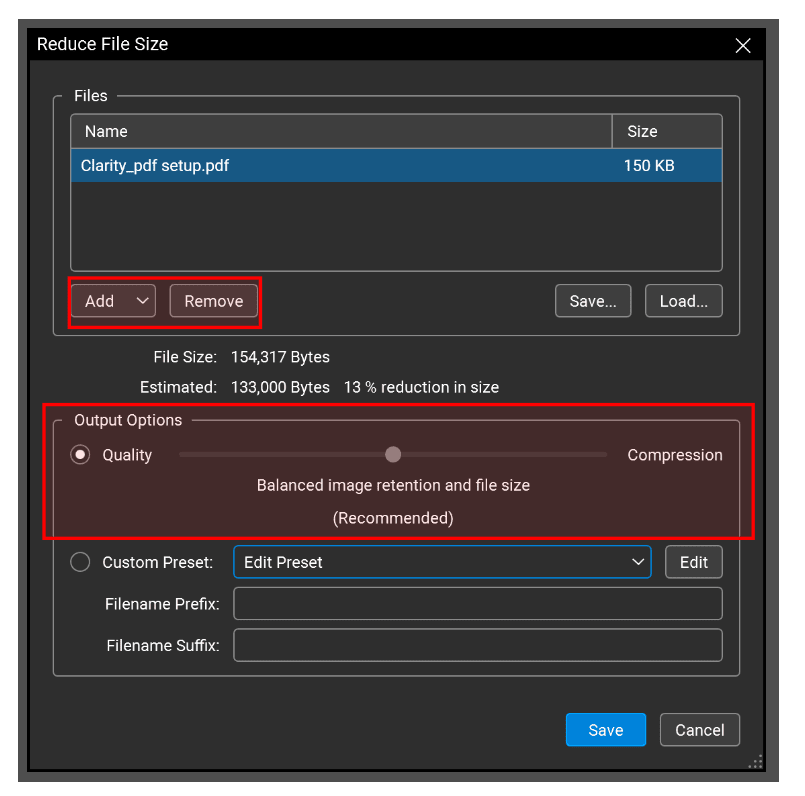
The most straightforward way to compress a document is via the dedicated Reduce File Size feature. This tool is designed for users who want a quick result without getting bogged down in technical settings. Bluebeam uses an intuitive slider that balances "Quality" versus "Compression."
Step-by-Step Process:
- Open the PDF you wish to compress in Bluebeam Revu.
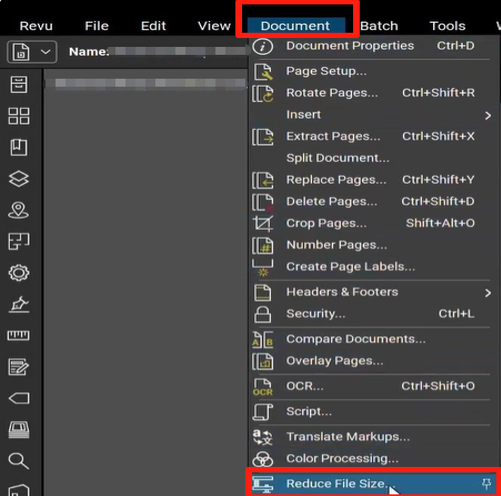
- Go to the Document menu in the top toolbar.
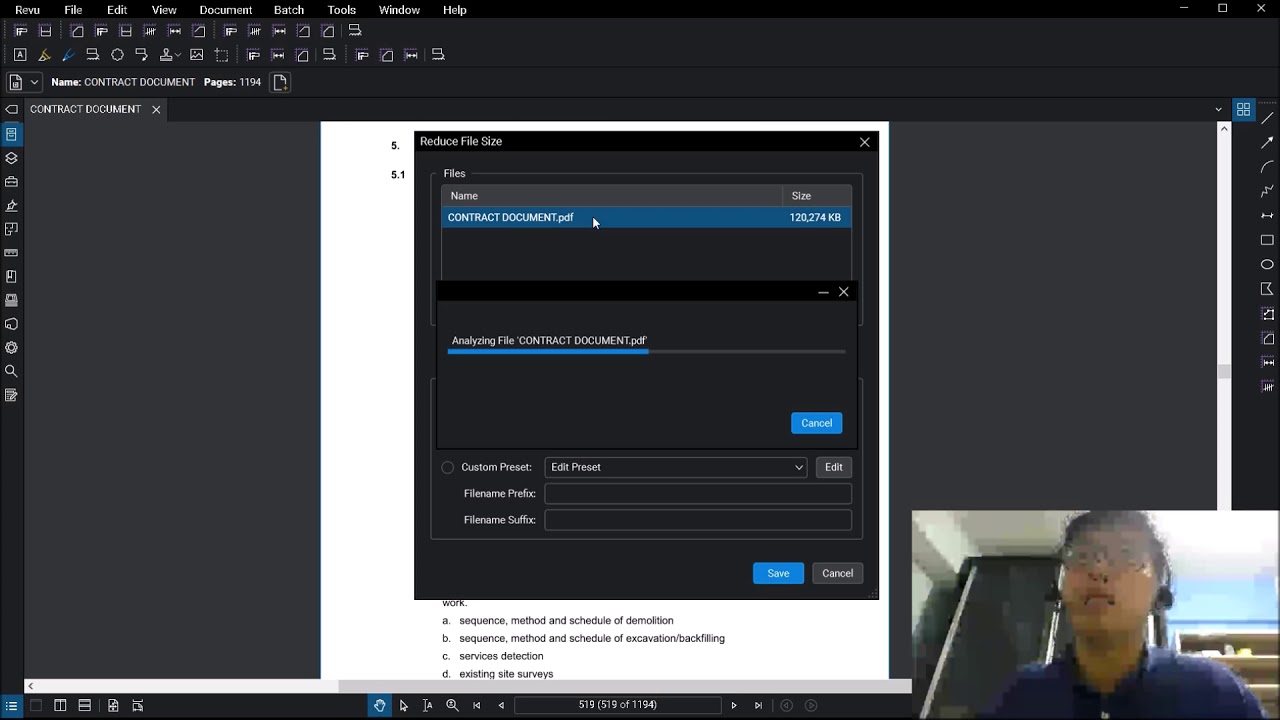
- Select Reduce File Size from the dropdown list.
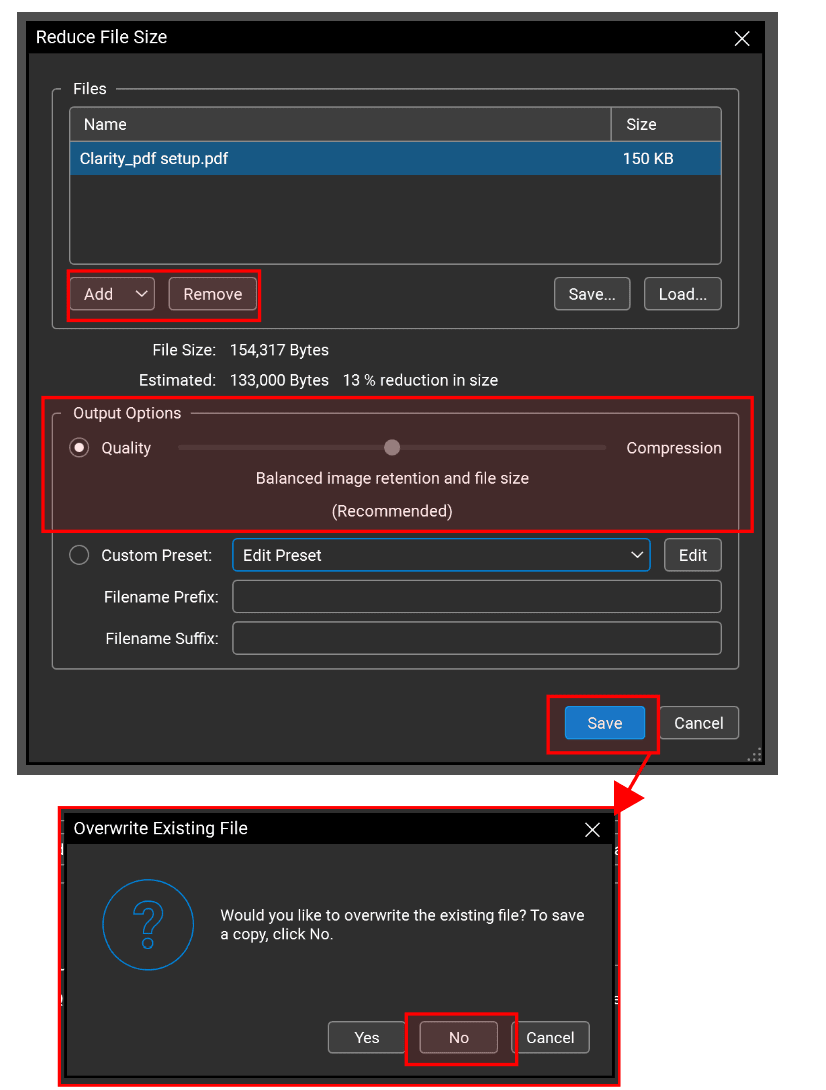
- A dialog box will appear with a simple slider. Moving the slider to the left increases compression (smaller file, lower quality), while moving it to the right preserves more detail (larger file, higher quality).
- For most construction documents, keeping the slider in the middle provides an excellent balance.
- Click OK. Bluebeam will prompt you to save the file. It is recommended to save it as a new version (e.g., "Drawing_v2_Optimized") so you retain your original high-resolution master file.
Method 2: Customizing Compression Settings for Precise Results
If the standard slider doesn't give you the results you need, Bluebeam allows for custom presets. This is particularly useful when your PDF contains many high-resolution photos or complex vector patterns that don't need to be hyper-detailed.
Advanced Customization:
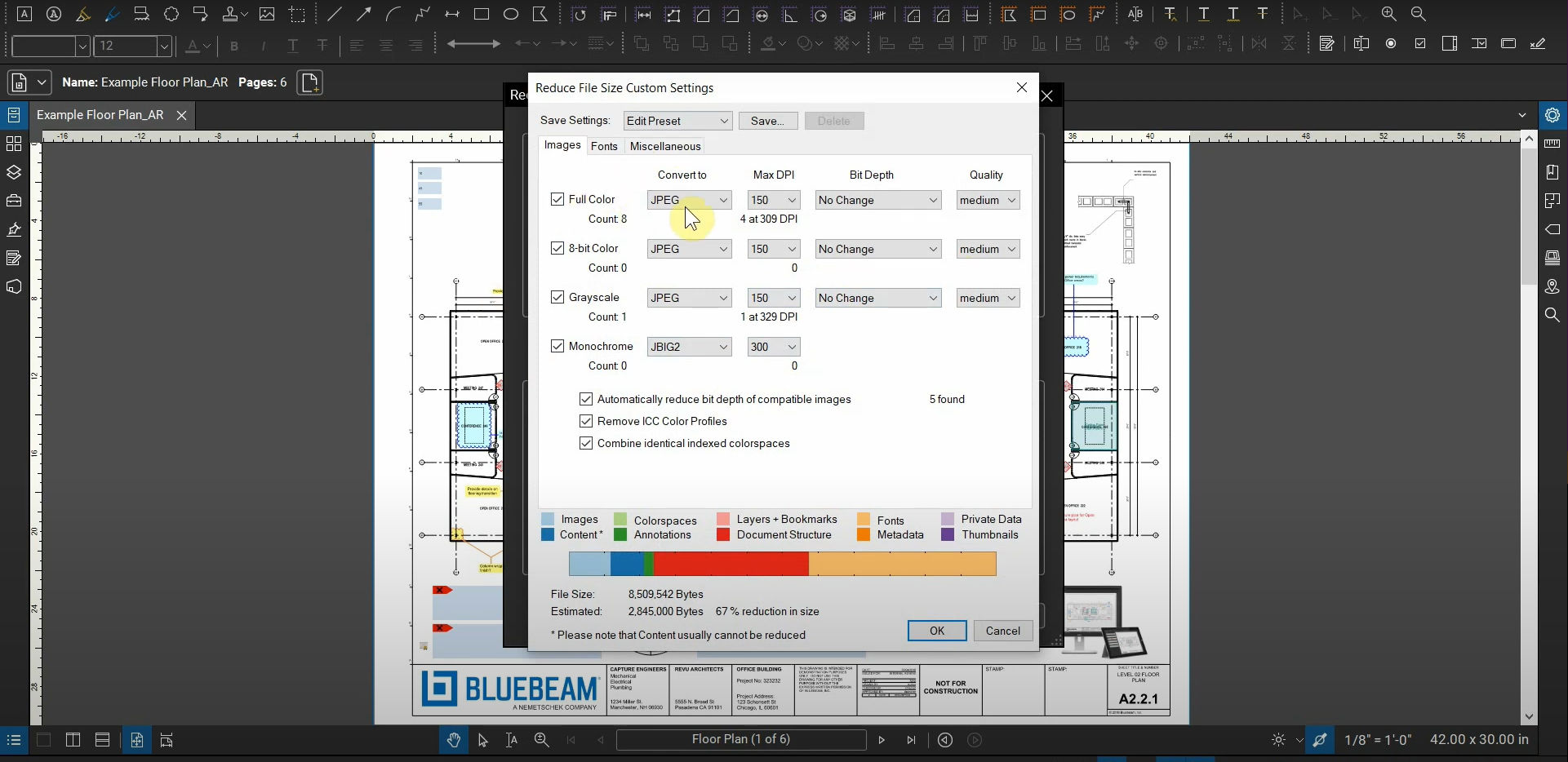
Within the Reduce File Size dialog, you can click on the "Edit" or "Manual" settings to control exactly what is being compressed. Here, you can adjust the following:
- Image Compression: You can choose between JPEG, JPEG2000, or Flate. Lowering the DPI (dots per inch) of color and grayscale images from 300 to 150 can significantly reduce size without losing noticeable quality on a standard monitor.
- Bitmaps: Converting heavy vector patterns into bitmaps can sometimes save space, though this should be used cautiously as it can affect the crispness of line work.
- Font Embedding: Bluebeam can strip out embedded fonts that aren't necessary for the document's readability, further shaving off kilobytes.
| Feature/Aspect | Description |
|---|---|
| Reduce File Size Slider | A simple UI tool to quickly balance quality vs. file size reduction. |
| DPI Reduction | Lowers the resolution of images within the PDF to save space. |
| Repair PDF | Advanced feature to remove unused data and metadata from the file structure. |
| Batch Process | Allows the user to apply compression settings to multiple files at once. |
| Metadata Stripping | Removes invisible document history and properties that add weight. |
Method 3: Using the "Repair PDF" Feature to Clean Up Files
Sometimes, a file is large not because of images, but because of "junk" data—residual information from previous versions, redundant metadata, or complex layers. In these cases, the Repair PDF function is your best friend. This process "re-distills" the PDF, cleaning the internal structure.
How to Repair and Compress:
- Go to Document > Process > Repair PDF.
- Select the options to "Remove Unused Objects" and "Remove Unused Resources."
- This method is particularly effective for files that have gone through many rounds of markups and revisions, as it clears out the "ghost" data that Bluebeam might be holding onto.
Method 4: Batch Reducing File Size for Large Projects
If you are a Project Manager or BIM Coordinator, you likely have dozens or even hundreds of drawings to compress. Doing this one by one is inefficient. Bluebeam Revu eXtreme users have access to Batch Processing tools that can handle this workload in minutes.
How to Batch Compress:
- Go to the File menu and select Batch.
- Select Reduce File Size.
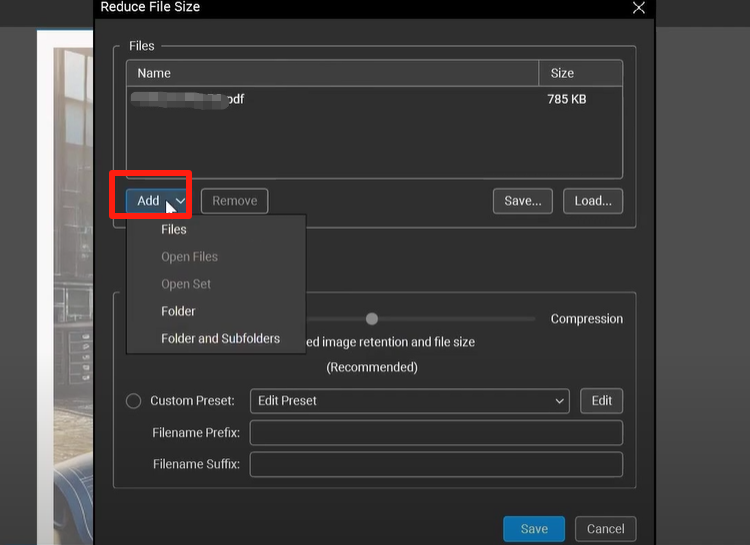
- Add all the files or folders you need to optimize.
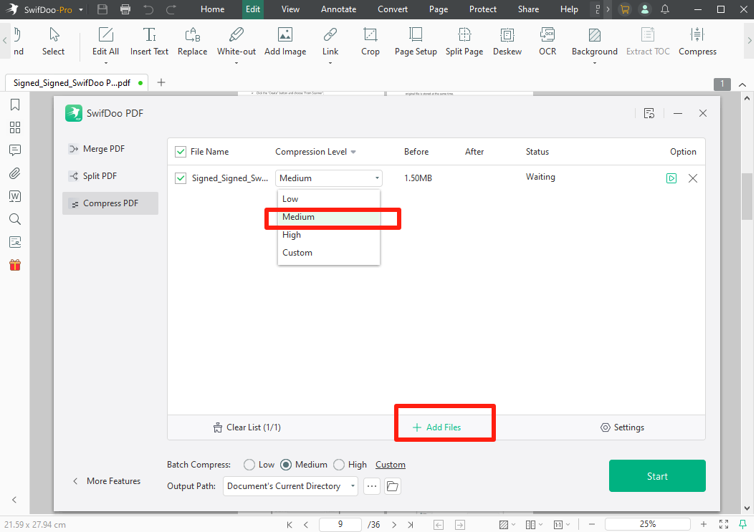
- Choose your desired quality level (slider or custom profile).
- Select an output folder to ensure your originals remain untouched.
- Run the process and watch Bluebeam automatically shrink your entire project directory.
Tips for Maintaining PDF Quality While Reducing Size
The goal is to reduce size, not usability. Here are a few expert tips to keep in mind:
- Check Text Searchability: Excessive compression can sometimes turn text into images (OCR issues). Always check that your document remains searchable after reduction.
- Don't Over-Compress Graphics: If the PDF contains intricate details like electrical schematics, avoid dropping the DPI below 150, as lines may become blurry.
- Flatten Markups: Before reducing file size, consider flattening your markups (Document > Flatten). This turns annotations into part of the PDF content, which can help in reducing the complexity of the file.
Frequently Asked Questions (FAQ)
1. Will reducing the file size in Bluebeam affect my scale or measurements?
No, reducing the file size primarily affects the resolution of images and the removal of metadata. As long as you do not "rescale" the document, your calibration and measurements will remain accurate. However, it is always a best practice to verify a known measurement after compression.
2. Can I undo the file size reduction?
Once you save the file after reducing its size, the data that was stripped away cannot be recovered in that specific file. This is why we recommend using "Save As" to create a compressed copy while keeping your original high-resolution PDF intact.
3. Why is my PDF still large after using the Reduce File Size tool?
If your file size doesn't change much, it likely contains many vector-based elements (like lines and hatches) rather than images. The "Reduce File Size" tool is most effective on raster images. For vector-heavy files, try the "Repair PDF" method or flattening all layers and markups first.
Conclusion
Mastering how to reduce the size of a PDF in Bluebeam is a vital part of professional document management. By using the "Reduce File Size" tool for quick fixes, customizing DPI for detailed control, or utilizing "Repair PDF" to clean up internal data, you can ensure your documents are lean, fast, and accessible to all project stakeholders. Optimized files lead to faster communication, fewer technical errors in the field, and a more streamlined digital workflow. Start implementing these techniques today to take full control of your AEC documentation.
How To Reduce The Size Of A Pdf In Bluebeam
How To Reduce The Size Of A Pdf In Bluebeam Wallpapers
Collection of how to reduce the size of a pdf in bluebeam wallpapers for your desktop and mobile devices.
Crisp How To Reduce The Size Of A Pdf In Bluebeam Design Art
Find inspiration with this unique how to reduce the size of a pdf in bluebeam illustration, crafted to provide a fresh look for your background.
Beautiful How To Reduce The Size Of A Pdf In Bluebeam Image Art
Transform your screen with this vivid how to reduce the size of a pdf in bluebeam artwork, a true masterpiece of digital design.
Crisp How To Reduce The Size Of A Pdf In Bluebeam Design Art
A captivating how to reduce the size of a pdf in bluebeam scene that brings tranquility and beauty to any device.
Captivating How To Reduce The Size Of A Pdf In Bluebeam Background Illustration
A captivating how to reduce the size of a pdf in bluebeam scene that brings tranquility and beauty to any device.

Dynamic How To Reduce The Size Of A Pdf In Bluebeam Landscape for Desktop
Immerse yourself in the stunning details of this beautiful how to reduce the size of a pdf in bluebeam wallpaper, designed for a captivating visual experience.
Breathtaking How To Reduce The Size Of A Pdf In Bluebeam Photo for Your Screen
Explore this high-quality how to reduce the size of a pdf in bluebeam image, perfect for enhancing your desktop or mobile wallpaper.
Spectacular How To Reduce The Size Of A Pdf In Bluebeam Scene Illustration
Find inspiration with this unique how to reduce the size of a pdf in bluebeam illustration, crafted to provide a fresh look for your background.

Breathtaking How To Reduce The Size Of A Pdf In Bluebeam Capture for Desktop
Experience the crisp clarity of this stunning how to reduce the size of a pdf in bluebeam image, available in high resolution for all your screens.

Beautiful How To Reduce The Size Of A Pdf In Bluebeam Wallpaper Illustration
Transform your screen with this vivid how to reduce the size of a pdf in bluebeam artwork, a true masterpiece of digital design.
Amazing How To Reduce The Size Of A Pdf In Bluebeam Abstract in 4K
Explore this high-quality how to reduce the size of a pdf in bluebeam image, perfect for enhancing your desktop or mobile wallpaper.

Spectacular How To Reduce The Size Of A Pdf In Bluebeam Design Photography
Immerse yourself in the stunning details of this beautiful how to reduce the size of a pdf in bluebeam wallpaper, designed for a captivating visual experience.
Breathtaking How To Reduce The Size Of A Pdf In Bluebeam Moment Collection
Explore this high-quality how to reduce the size of a pdf in bluebeam image, perfect for enhancing your desktop or mobile wallpaper.

Mesmerizing How To Reduce The Size Of A Pdf In Bluebeam Moment Nature
Explore this high-quality how to reduce the size of a pdf in bluebeam image, perfect for enhancing your desktop or mobile wallpaper.
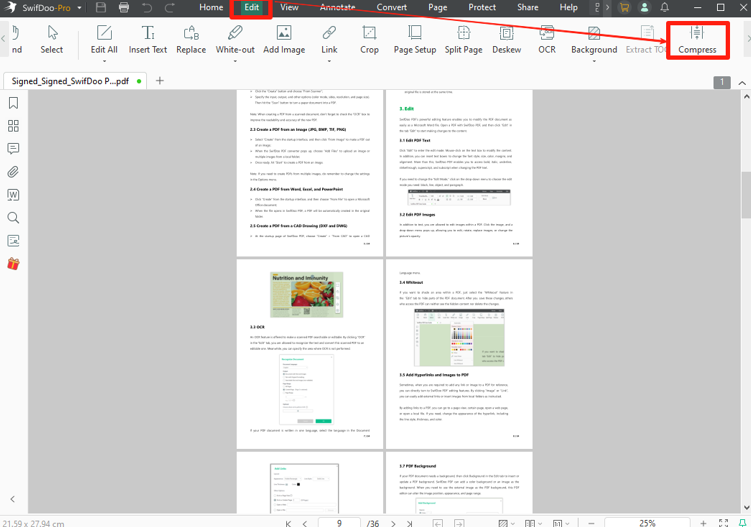
Beautiful How To Reduce The Size Of A Pdf In Bluebeam View Illustration
Explore this high-quality how to reduce the size of a pdf in bluebeam image, perfect for enhancing your desktop or mobile wallpaper.

Artistic How To Reduce The Size Of A Pdf In Bluebeam Artwork Photography
A captivating how to reduce the size of a pdf in bluebeam scene that brings tranquility and beauty to any device.
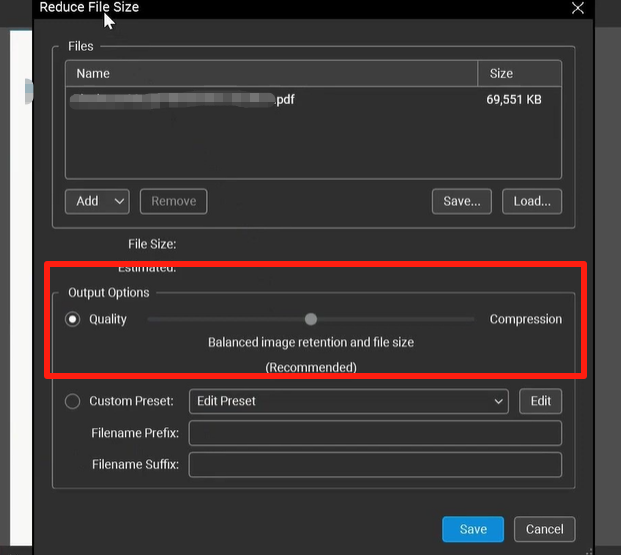
Lush How To Reduce The Size Of A Pdf In Bluebeam Abstract in 4K
Immerse yourself in the stunning details of this beautiful how to reduce the size of a pdf in bluebeam wallpaper, designed for a captivating visual experience.

Captivating How To Reduce The Size Of A Pdf In Bluebeam Landscape in 4K
Find inspiration with this unique how to reduce the size of a pdf in bluebeam illustration, crafted to provide a fresh look for your background.

Amazing How To Reduce The Size Of A Pdf In Bluebeam Image Digital Art
Experience the crisp clarity of this stunning how to reduce the size of a pdf in bluebeam image, available in high resolution for all your screens.
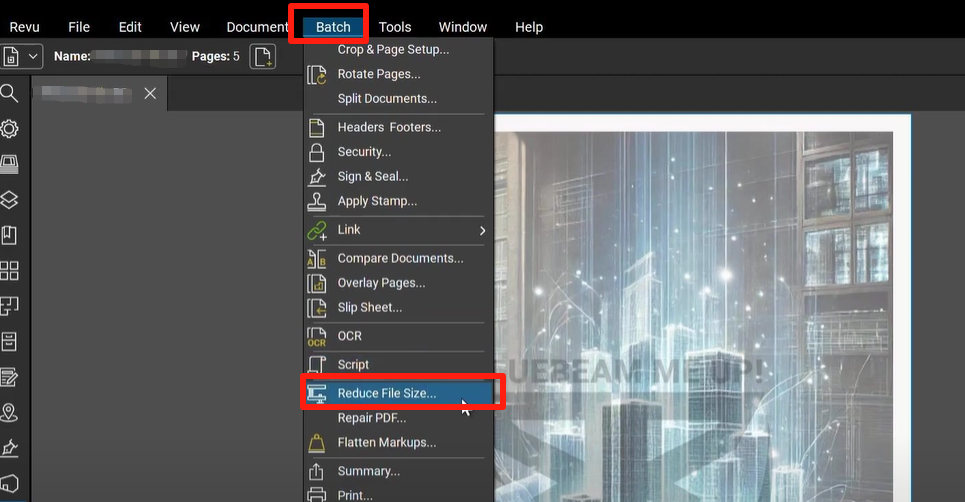
Serene How To Reduce The Size Of A Pdf In Bluebeam Design Art
Transform your screen with this vivid how to reduce the size of a pdf in bluebeam artwork, a true masterpiece of digital design.

Captivating How To Reduce The Size Of A Pdf In Bluebeam Design for Desktop
This gorgeous how to reduce the size of a pdf in bluebeam photo offers a breathtaking view, making it a perfect choice for your next wallpaper.
Download these how to reduce the size of a pdf in bluebeam wallpapers for free and use them on your desktop or mobile devices.