Amazon Tracking Code Not Working
Amazon Tracking Code Not Working? 7 Ways to Fix and Save Your Commissions
For Amazon Associates, there is nothing more frustrating than putting in hours of work to drive traffic, only to realize your Amazon tracking code is not working. Whether you are a seasoned affiliate marketer or just starting, tracking issues can lead to lost revenue and inaccurate data. If your clicks are not showing up in the Associates Central dashboard or your sales seem suspiciously low, it is time to troubleshoot your affiliate links.
In this comprehensive guide, we will explore the common reasons why Amazon tracking codes fail, how to verify your links, and the best practices to ensure every referral is counted toward your commissions. Understanding the mechanics of Amazon's cookie system and link structure is essential for long-term success in the affiliate world.
1. Common Reasons for Amazon Tracking Code Failure
The first step in fixing a broken Amazon tracking code is identifying the root cause. Tracking failures usually fall into three categories: human error, technical interference, or policy violations. Here are the most frequent culprits:
- Incorrect Tracking ID: If you have multiple tracking IDs for different websites, you might have accidentally used the wrong one or misspelled it during manual link creation.
- Ad-Blockers and Privacy Extensions: Many modern browsers and browser extensions (like uBlock Origin or Brave) block tracking scripts and affiliate cookies by default. If your visitors are tech-savvy, a portion of your clicks might never be recorded.
- Copy-Paste Errors: Sometimes, when copying a link from the Amazon SiteStrip, a character is missed at the beginning or end, rendering the link broken or stripping away the affiliate parameters.
- Plugin Conflicts: If you use WordPress plugins to manage affiliate links, a recent update or a conflict between two plugins can stop the tracking code from firing correctly.
- Javascript Issues: If you are using Amazon’s "Native Shopping Ads" or "OneLink" script, any Javascript error on your website can prevent these features from loading.
2. How to Verify Your Amazon Affiliate Link Structure
Amazon affiliate links must follow a specific structure to ensure the "cookie" is dropped into the user's browser. If the structure is altered, the tracking fails. A standard Amazon link looks like this: https://www.amazon.com/dp/ASIN/?tag=yourtrackingid-20.
To verify if your tracking code is active, you should use the Link Checker tool located inside the Amazon Associates Central dashboard. Go to Tools > Link Checker and paste your link. Amazon will immediately tell you if the link is "Success" (tracking correctly) or "Failure" (missing parameters).
Additionally, check your "SiteStrip" settings. The SiteStrip is the gray bar at the top of the Amazon store page when you are logged in. Ensure that you are generating "Text" links properly and that the tracking ID selected in the dropdown menu is the one you intended to use.
| Feature/Aspect | Description |
|---|---|
| Amazon SiteStrip | The primary tool for generating tagged links directly from the Amazon storefront. |
| Link Checker Tool | An official tool in Associates Central to validate if a link is correctly tagged. |
| Amazon OneLink | A script that allows you to monetize international traffic by redirecting users to their local Amazon store. |
| Tracking ID (-20) | The unique identifier appended to URLs to attribute sales to your account. |
| 24-Hour Cookie | The duration Amazon tracks a user after they click your affiliate link. |
3. Troubleshooting Amazon OneLink and Global Tracking
If your tracking code is working for US customers but not for those in the UK, Canada, or other regions, the issue likely lies with Amazon OneLink. OneLink is designed to bridge the gap between different Amazon storefronts. However, it requires a specific Javascript snippet to be placed in the <head> of your website.
If OneLink is not working:
- Check if the Javascript code is present on all pages.
- Ensure your international accounts (UK, CA, etc.) are properly "linked" in the Associates Central OneLink settings.
- Verify that you aren't using a "Redirect" plugin that strips the Javascript before it has a chance to execute.
Remember that OneLink only works for "Text" links. If you are using image links or custom banners, the global redirection might not function as expected, leading to zero commissions from international buyers.
4. The Impact of Cookies and Cache on Tracking
Often, an Amazon tracking code not working is actually a misunderstanding of how cookies work. Amazon uses a 24-hour cookie. If a user clicks your link, adds an item to their cart, but doesn't check out for 48 hours, you won't get the commission (unless they added it to the cart within that first 24 hours, which extends the window for that specific item to 90 days).
If you are testing your own links and don't see clicks in your dashboard, keep in mind that Amazon's reporting is not "Real-Time." There is typically a 12 to 24-hour delay before click data appears in your reports. Furthermore, Amazon's system is sophisticated enough to filter out "invalid clicks," including your own clicks if you are logged into your Associate account on the same browser.
Solving Caching Problems
If you use WordPress caching plugins like WP Rocket or W3 Total Cache, your site might be serving an "old" version of a page where the tracking ID was missing or incorrect. Whenever you update your affiliate links, always clear your server-side and CDN (like Cloudflare) cache to ensure the live version of the site contains the updated code.
5. Best Practices for Reliable Affiliate Tracking
To minimize the risk of tracking failures, follow these industry best practices:
- Use the Amazon API: For high-traffic sites, using the Amazon Product Advertising API is more reliable than manual links. Plugins like AAWP or Lasso use the API to pull data and ensure links are always formatted correctly.
- Avoid Link Shorteners: Avoid using external shorteners like Bitly or Rebrandly. Amazon prefers its own `amzn.to` shortener (generated via SiteStrip). External shorteners can sometimes strip the referral parameters or trigger spam filters.
- Don't Put Links in PDFs or Emails: Amazon’s Operating Agreement generally prohibits putting affiliate links in "offline" content, including eBooks, PDFs, and direct emails. Tracking often fails in these environments anyway because cookies cannot be set properly.
- Regularly Audit Your Top Pages: Use a link crawler or manually check your top 10 highest-earning pages once a month to ensure all links are active and redirecting to the correct products.
Frequently Asked Questions (FAQ)
Q1: Why do my clicks show up but I have zero sales?
This is usually not a tracking code error. It means your links are working (since clicks are being recorded), but the traffic is not converting. This could be due to "window shopping," high product prices, or users finding the same product cheaper elsewhere. Also, remember the 24-hour cookie limit.
Q2: Can I use an Amazon tracking code on social media?
Yes, you can use Amazon links on social media platforms like Facebook, Instagram, and YouTube, provided you disclose the affiliate relationship. Use the SiteStrip "Text" link for the best tracking results on these platforms.
Q3: Does an ad blocker stop me from earning commissions?
Unfortunately, yes. Some aggressive ad blockers prevent the affiliate cookie from being placed in the user's browser. While you cannot control what users install, providing high-quality content encourages users to whitelist your site or use browsers that don't interfere with your links.
Q4: How do I know if my Tracking ID is active?
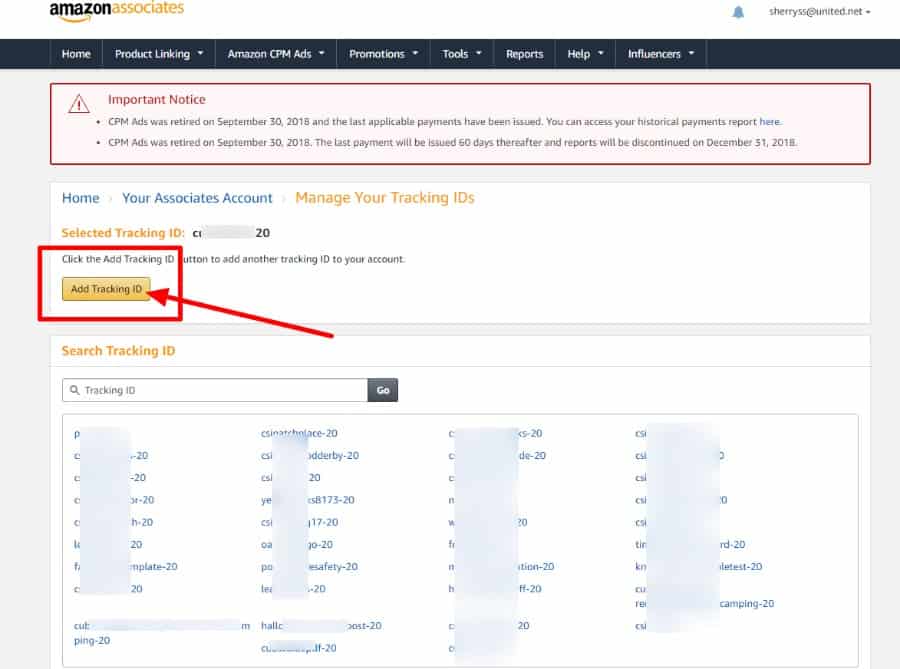
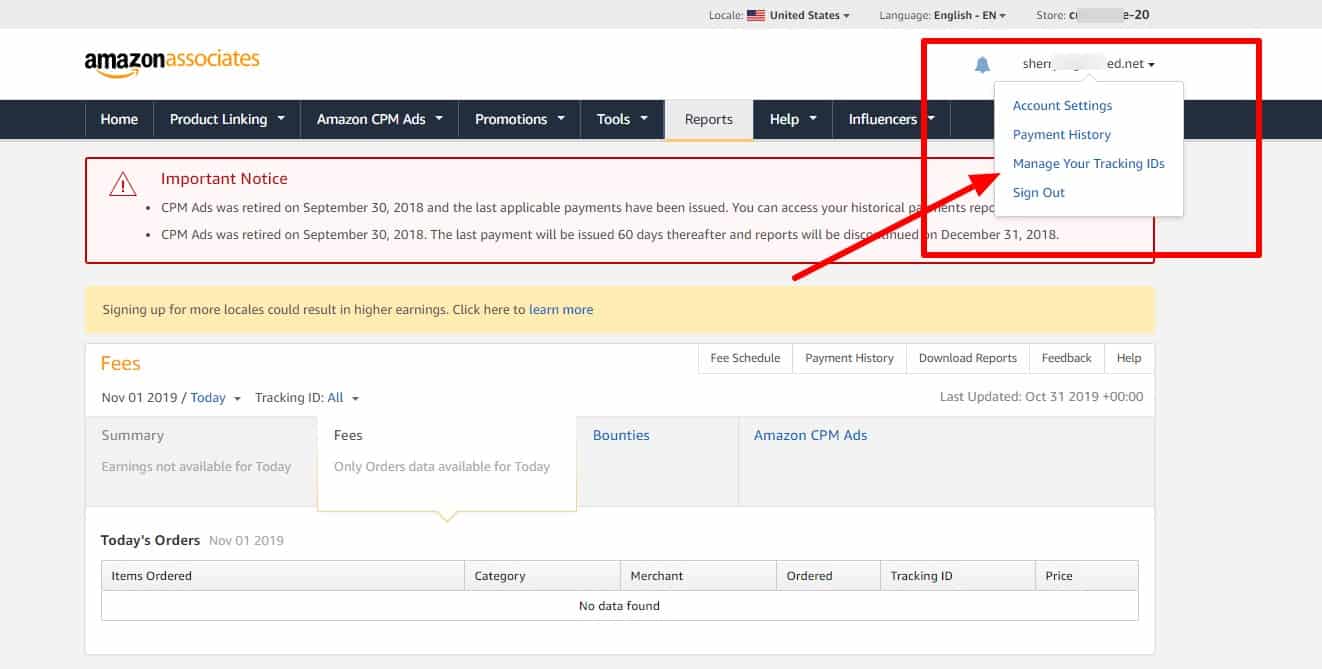
Log into Amazon Associates Central, go to the "Account Settings" section, and click on "Manage Your Tracking IDs." If the ID is listed there, it is active and ready for use.
Conclusion
Having an Amazon tracking code not working is a hurdle that every affiliate marketer faces at some point. By systematically checking your link structure, utilizing the official Link Checker tool, and ensuring your international tracking (OneLink) is correctly configured, you can protect your earnings. Most issues are simple fixes—like clearing a cache or correcting a typo—but they require a proactive approach.
Always stay updated with Amazon’s Operating Agreement and use reliable tools like the Amazon SiteStrip or API-based plugins to generate your links. Consistency and technical accuracy are the foundations of a profitable Amazon affiliate business. Start auditing your links today to ensure no commission goes uncollected!
Amazon Tracking Code Not Working
Amazon Tracking Code Not Working Wallpapers
Collection of amazon tracking code not working wallpapers for your desktop and mobile devices.

Captivating Amazon Tracking Code Not Working Scene Nature
Immerse yourself in the stunning details of this beautiful amazon tracking code not working wallpaper, designed for a captivating visual experience.

Dynamic Amazon Tracking Code Not Working Background Illustration
This gorgeous amazon tracking code not working photo offers a breathtaking view, making it a perfect choice for your next wallpaper.
Lush Amazon Tracking Code Not Working Background Digital Art
A captivating amazon tracking code not working scene that brings tranquility and beauty to any device.

Vibrant Amazon Tracking Code Not Working Background Photography
Explore this high-quality amazon tracking code not working image, perfect for enhancing your desktop or mobile wallpaper.

Crisp Amazon Tracking Code Not Working View Concept
Find inspiration with this unique amazon tracking code not working illustration, crafted to provide a fresh look for your background.

High-Quality Amazon Tracking Code Not Working Photo Nature
Experience the crisp clarity of this stunning amazon tracking code not working image, available in high resolution for all your screens.

Amazing Amazon Tracking Code Not Working Artwork Nature
Experience the crisp clarity of this stunning amazon tracking code not working image, available in high resolution for all your screens.
Vivid Amazon Tracking Code Not Working Capture Illustration
Explore this high-quality amazon tracking code not working image, perfect for enhancing your desktop or mobile wallpaper.
Vibrant Amazon Tracking Code Not Working Capture Nature
Discover an amazing amazon tracking code not working background image, ideal for personalizing your devices with vibrant colors and intricate designs.

Gorgeous Amazon Tracking Code Not Working Landscape Concept
Immerse yourself in the stunning details of this beautiful amazon tracking code not working wallpaper, designed for a captivating visual experience.

Mesmerizing Amazon Tracking Code Not Working Artwork Illustration
Transform your screen with this vivid amazon tracking code not working artwork, a true masterpiece of digital design.
Serene Amazon Tracking Code Not Working Background Art
Discover an amazing amazon tracking code not working background image, ideal for personalizing your devices with vibrant colors and intricate designs.
High-Quality Amazon Tracking Code Not Working Picture in 4K
Experience the crisp clarity of this stunning amazon tracking code not working image, available in high resolution for all your screens.

Mesmerizing Amazon Tracking Code Not Working Scene Digital Art
Transform your screen with this vivid amazon tracking code not working artwork, a true masterpiece of digital design.

Breathtaking Amazon Tracking Code Not Working Photo Collection
Discover an amazing amazon tracking code not working background image, ideal for personalizing your devices with vibrant colors and intricate designs.

Crisp Amazon Tracking Code Not Working Photo Nature
This gorgeous amazon tracking code not working photo offers a breathtaking view, making it a perfect choice for your next wallpaper.

Stunning Amazon Tracking Code Not Working View in HD
A captivating amazon tracking code not working scene that brings tranquility and beauty to any device.
Breathtaking Amazon Tracking Code Not Working Scene Illustration
Explore this high-quality amazon tracking code not working image, perfect for enhancing your desktop or mobile wallpaper.
Serene Amazon Tracking Code Not Working Abstract in 4K
Explore this high-quality amazon tracking code not working image, perfect for enhancing your desktop or mobile wallpaper.

Gorgeous Amazon Tracking Code Not Working Scene in 4K
Find inspiration with this unique amazon tracking code not working illustration, crafted to provide a fresh look for your background.
Download these amazon tracking code not working wallpapers for free and use them on your desktop or mobile devices.