How To Make A Pdf File Smaller In Bluebeam
Mastering Your Workflow: How To Make A Pdf File Smaller In Bluebeam Revu
In the world of architecture, engineering, and construction (AEC), Bluebeam Revu stands as the gold standard for PDF markup and management. However, with high-resolution drawings, multiple layers, and extensive metadata, these files can quickly grow to unwieldy sizes. Learning how to make a PDF file smaller in Bluebeam is not just a convenience—it is a necessity for efficient communication. Large files clog up email inboxes, slow down document management systems like Procore or BIM 360, and cause lag during mobile viewing on tablets in the field.
Optimizing your PDFs ensures that your project partners can open files quickly without sacrificing the essential clarity needed for technical reviews. This guide will walk you through the various methods available in Bluebeam Revu—from the quick "Reduce File Size" slider to advanced manual optimization techniques.
Why Bluebeam PDF Files Become Excessively Large
Before diving into the "how-to," it is important to understand why your files are bloated. A standard PDF might be a few hundred kilobytes, but a Revu-processed document can easily hit 50MB or 100MB. The primary culprits include:
- High-Resolution Raster Images: Photos taken on-site or high-res scans embedded in the document.
- Complex Vector Data: Thousands of tiny lines and hatches from CAD exports.
- Unnecessary Metadata: Information about the software, layers, and document history that isn't needed for the final viewer.
- Embedded Fonts: Full font sets included in the file rather than just the characters used.
- Hidden Markups: Deleted markups that still reside in the file’s background data.
Method 1: Using the "Reduce File Size" Tool
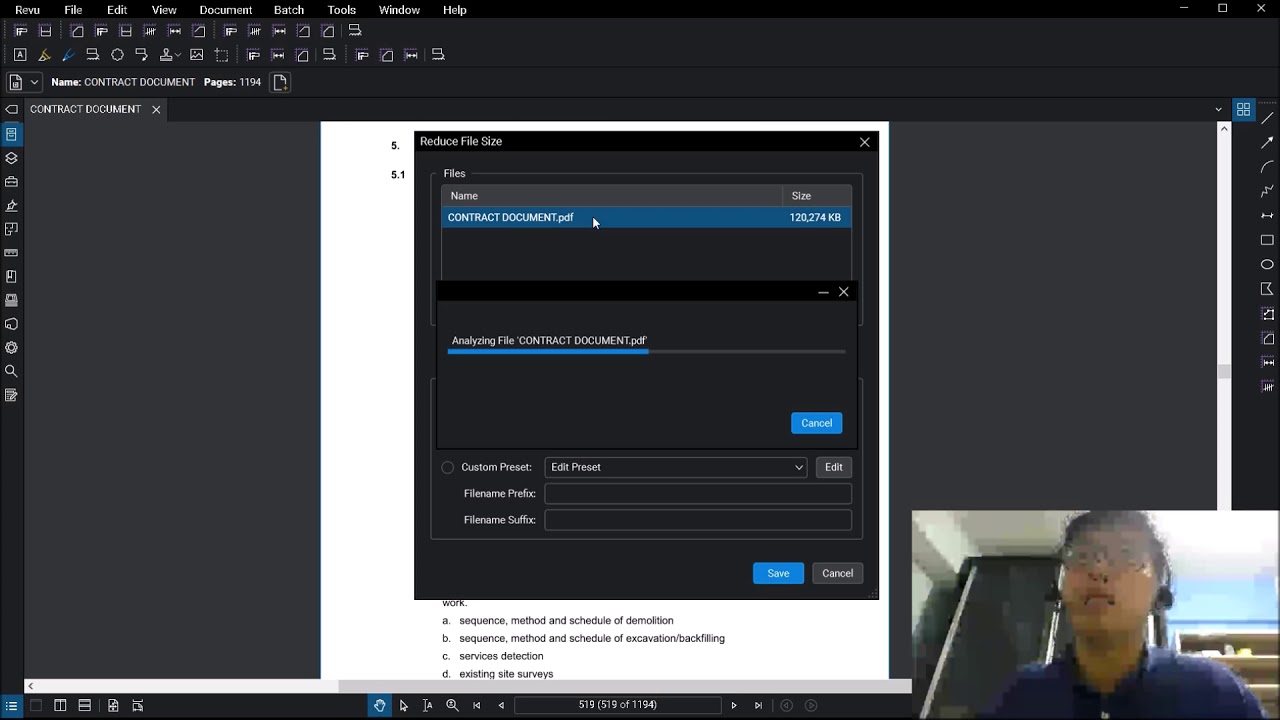
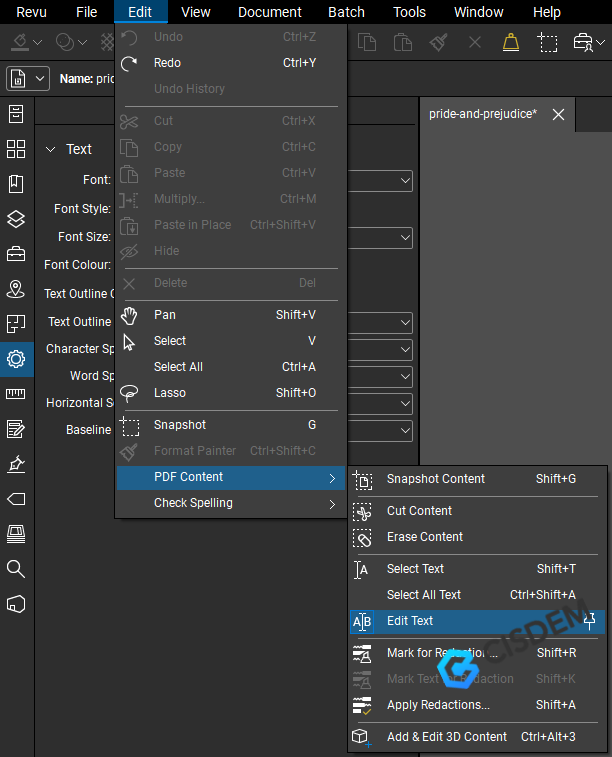
The most straightforward way to tackle file size is the built-in Reduce File Size tool. This feature is designed to automate the compression process by adjusting image quality and removing redundant data with a simple slider.
Steps to Use the Reduce File Size Tool:
- Open your document in Bluebeam Revu.
- Go to the Document menu in the top toolbar.
- Select Reduce File Size. A pop-up window will appear.
- You will see a slider ranging from "Quality" to "Compression." For most construction documents, the middle setting provides an excellent balance.
- If you want more control, click Edit to manually adjust DPI (Dots Per Inch) settings and color depth.
- Click Save. Bluebeam will prompt you to overwrite the current file or save a new version (it is recommended to save as a new version to ensure you don't lose too much detail accidentally).
| Feature/Aspect | Description of Optimization |
|---|---|
| Image Compression | Reduces the resolution (DPI) of raster images and converts them to more efficient formats like JPEG. |
| Font Subsetting | Embeds only the characters used in the document rather than the entire font library, saving space. |
| Unused Data Removal | Deletes hidden metadata, old undo history, and thumbnails that are not essential for viewing. |
| Vector Consolidation | Simplifies complex line-work without significantly altering the visual appearance of drawings. |
Method 2: Advanced Manual Optimization
Sometimes the automated slider isn't enough, or it degrades the quality of your site photos too much. In these cases, you should use the PDF Optimizer. This gives you granular control over what gets compressed and what stays high-resolution.
Fine-Tuning Your Settings
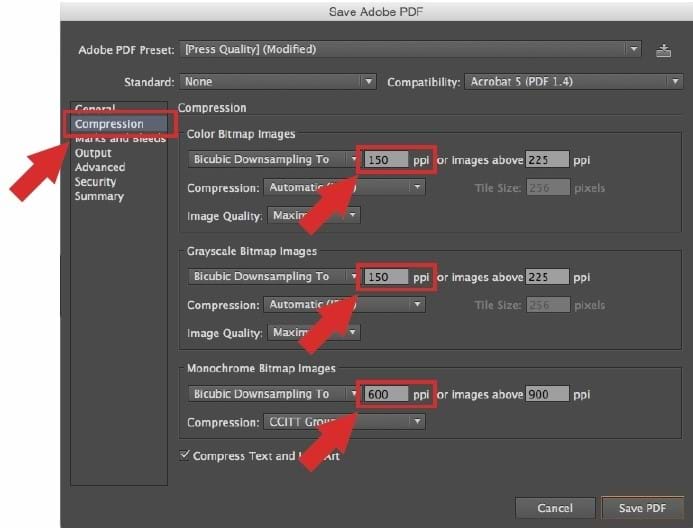
Within the Advanced settings, focus on Color Images and Grayscale Images. For standard architectural plans, 150 DPI is usually sufficient for printing and viewing. If you have extremely detailed maps, you might stick to 300 DPI. Reducing images from 600 DPI to 150 DPI can often reduce a file size by 70% or more.
Furthermore, look at the "Discard" tab in the Optimizer. Here you can check boxes to discard User Data, JavaScript, and Embedded Thumbnails. These are small items, but in a 500-page set of drawings, they add up significantly.
Method 3: Repairing the PDF Structure
If your file is still large despite compression, it might have a corrupted internal structure or unnecessary "bloat" from being saved multiple times across different software. Bluebeam offers a "Repair PDF" function that can often fix these issues.
- Navigate to Document > Process > Repair PDF.
- Check the options for Remove Unused Objects and Consolidate Duplicate Fonts.
- Run the process. This essentially "re-builds" the PDF from the ground up, often resulting in a much leaner file.
Batch Processing: Making Multiple Files Smaller
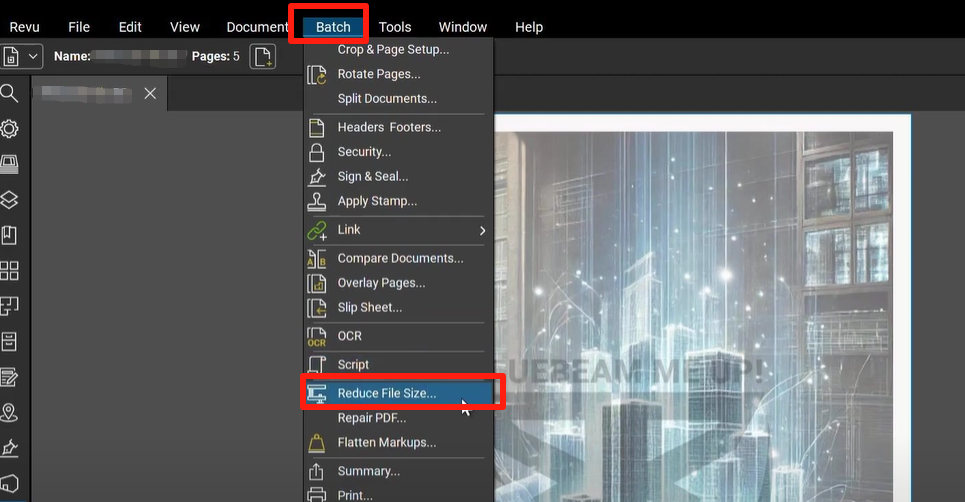
If you are working on a massive project with hundreds of individual sheets, you don’t have time to compress them one by one. Bluebeam Revu eXtreme users have access to Batch Tools.
By selecting Batch > Reduce File Size, you can add an entire folder of documents. Bluebeam will apply your chosen compression profile to every file in that folder simultaneously. This is a game-changer during the closeout phase of a project when you need to hand over thousands of documents to an owner.
Best Practices for Maintaining Quality
While the goal is to make the PDF smaller, you must ensure the document remains "legal" and "readable." Here are some tips:
- Always test hyperlinks: High compression can sometimes break internal links or bookmarks.
- Check OCR Text: If you have run Optical Character Recognition (OCR), heavy compression can make the text unsearchable.
- Flatten Markups: If you no longer need to edit markups, use the Flatten tool (Ctrl+Shift+M). This merges the markups into the content layer, which often reduces the file size and makes the PDF render faster on mobile devices.
Frequently Asked Questions (FAQ)
1. Will reducing the file size in Bluebeam affect the scale of my drawings?
No, reducing the file size primarily affects image resolution and metadata. It does not change the physical dimensions or the scale of the vector lines in your drawings. Your measurements and calibrations will remain accurate.
2. Why is my PDF larger after I tried to compress it?
This rare occurrence usually happens if the PDF was already highly compressed by another software, and Bluebeam's settings are actually higher than the existing ones. Ensure your DPI settings in the "Reduce File Size" menu are set lower than the current document's specs.
3. Can I undo a file size reduction?
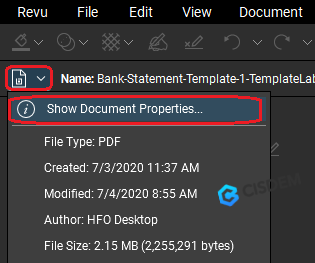
Once you save and close the document, you cannot "un-compress" it to regain the lost detail. This is why it is vital to use the "Save As" option to create a smaller version while keeping your original high-resolution master file safe.
4. Does flattening markups always make the file smaller?
Usually, yes. Flattening turns dozens or hundreds of individual "objects" into a single layer. However, if you choose the option to "Allow Markup Recovery" during flattening, the file size will not decrease because the original data is still hidden within the file.
Conclusion
Understanding how to make a PDF file smaller in Bluebeam is an essential skill for any modern professional. By utilizing the Reduce File Size tool for quick fixes, the PDF Optimizer for precision, and Batch Processing for large sets, you can ensure your documents are both high-quality and easily shareable. Remember to always keep a backup of your original files and test your compressed versions to ensure that text remains legible and links remain functional. With these techniques, you will streamline your project communication and save valuable storage space.
How To Make A Pdf File Smaller In Bluebeam
How To Make A Pdf File Smaller In Bluebeam Wallpapers
Collection of how to make a pdf file smaller in bluebeam wallpapers for your desktop and mobile devices.

Artistic How To Make A Pdf File Smaller In Bluebeam Artwork Photography
A captivating how to make a pdf file smaller in bluebeam scene that brings tranquility and beauty to any device.
Captivating How To Make A Pdf File Smaller In Bluebeam Background Illustration
A captivating how to make a pdf file smaller in bluebeam scene that brings tranquility and beauty to any device.

Vibrant How To Make A Pdf File Smaller In Bluebeam Scene in 4K
Discover an amazing how to make a pdf file smaller in bluebeam background image, ideal for personalizing your devices with vibrant colors and intricate designs.

Gorgeous How To Make A Pdf File Smaller In Bluebeam Capture Collection
A captivating how to make a pdf file smaller in bluebeam scene that brings tranquility and beauty to any device.

Captivating How To Make A Pdf File Smaller In Bluebeam Design for Desktop
This gorgeous how to make a pdf file smaller in bluebeam photo offers a breathtaking view, making it a perfect choice for your next wallpaper.

Breathtaking How To Make A Pdf File Smaller In Bluebeam Capture for Desktop
Experience the crisp clarity of this stunning how to make a pdf file smaller in bluebeam image, available in high resolution for all your screens.
Serene How To Make A Pdf File Smaller In Bluebeam Design Art
Transform your screen with this vivid how to make a pdf file smaller in bluebeam artwork, a true masterpiece of digital design.
High-Quality How To Make A Pdf File Smaller In Bluebeam Design for Your Screen
Transform your screen with this vivid how to make a pdf file smaller in bluebeam artwork, a true masterpiece of digital design.

Crisp How To Make A Pdf File Smaller In Bluebeam Capture Digital Art
A captivating how to make a pdf file smaller in bluebeam scene that brings tranquility and beauty to any device.

Lush How To Make A Pdf File Smaller In Bluebeam View in 4K
A captivating how to make a pdf file smaller in bluebeam scene that brings tranquility and beauty to any device.

Dynamic How To Make A Pdf File Smaller In Bluebeam Capture Photography
This gorgeous how to make a pdf file smaller in bluebeam photo offers a breathtaking view, making it a perfect choice for your next wallpaper.

Beautiful How To Make A Pdf File Smaller In Bluebeam Wallpaper Illustration
Transform your screen with this vivid how to make a pdf file smaller in bluebeam artwork, a true masterpiece of digital design.

Beautiful How To Make A Pdf File Smaller In Bluebeam View Art
Explore this high-quality how to make a pdf file smaller in bluebeam image, perfect for enhancing your desktop or mobile wallpaper.
:max_bytes(150000):strip_icc()/how-to-make-a-file-smaller-on-mac-52109195-1220015ec8cf49b98b8ce692a7562a90.jpg "Exquisite How To Make A Pdf File Smaller In Bluebeam Wallpaper for Desktop")
Exquisite How To Make A Pdf File Smaller In Bluebeam Wallpaper for Desktop
This gorgeous how to make a pdf file smaller in bluebeam photo offers a breathtaking view, making it a perfect choice for your next wallpaper.
Detailed How To Make A Pdf File Smaller In Bluebeam Scene Concept
Explore this high-quality how to make a pdf file smaller in bluebeam image, perfect for enhancing your desktop or mobile wallpaper.
Exquisite How To Make A Pdf File Smaller In Bluebeam Scene for Mobile
Find inspiration with this unique how to make a pdf file smaller in bluebeam illustration, crafted to provide a fresh look for your background.
Breathtaking How To Make A Pdf File Smaller In Bluebeam Moment Collection
Explore this high-quality how to make a pdf file smaller in bluebeam image, perfect for enhancing your desktop or mobile wallpaper.
Serene How To Make A Pdf File Smaller In Bluebeam Image Collection
Transform your screen with this vivid how to make a pdf file smaller in bluebeam artwork, a true masterpiece of digital design.

Amazing How To Make A Pdf File Smaller In Bluebeam Background Art
Explore this high-quality how to make a pdf file smaller in bluebeam image, perfect for enhancing your desktop or mobile wallpaper.
Spectacular How To Make A Pdf File Smaller In Bluebeam Picture for Mobile
Immerse yourself in the stunning details of this beautiful how to make a pdf file smaller in bluebeam wallpaper, designed for a captivating visual experience.
Download these how to make a pdf file smaller in bluebeam wallpapers for free and use them on your desktop or mobile devices.