Disable Google Play Protect Scan
How to Disable Google Play Protect Scan: A Comprehensive Guide for Android Users
Android devices are renowned for their flexibility, allowing users to customize their experience and install applications from a wide variety of sources. At the heart of Android's security architecture lies Google Play Protect. This built-in security feature constantly scans your device for potentially harmful applications (PHAs) and ensures that the apps you download from the Google Play Store are safe. However, there are specific scenarios—such as app development, testing specialized tools, or installing trusted third-party applications that are not hosted on the Play Store—where you may need to disable Google Play Protect scan.
While Google Play Protect is a vital layer of defense against malware and ransomware, it can sometimes be overly aggressive, flagging "modded" apps or niche utilities as threats. In this article, we will provide a detailed, professional walkthrough on how to navigate your settings to turn off this feature, the risks involved, and how to maintain your device's security during the process.
What is Google Play Protect and How Does It Work?
Before proceeding to disable the service, it is essential to understand what you are turning off. Google Play Protect is a multi-faceted security system that uses machine learning to adapt and improve its detection capabilities. It performs several key functions:
- App Scanning: It checks apps before you download them from the Google Play Store.
- Device Scanning: It periodically scans your device for apps installed from other sources (sideloaded APKs) that might exhibit malicious behavior.
- Safe Browsing: It works with Google Chrome to alert you if you visit a website that may contain malware.
- Privacy Protection: It alerts you if an app is detected that can get your personal information and sends you notifications to remove such apps.
By disabling the scan, you are essentially removing the "sentry" that monitors these activities. This is why Google makes the option somewhat hidden within the settings menu to prevent accidental deactivation by average users.
Step-by-Step Instructions to Disable Google Play Protect Scan
If you have decided that you need to bypass these security checks, follow these steps. Note that the interface might vary slightly depending on your Android version or manufacturer skin (like Samsung’s One UI or Xiaomi’s MIUI), but the general path remains the same.
Method 1: Through the Google Play Store App
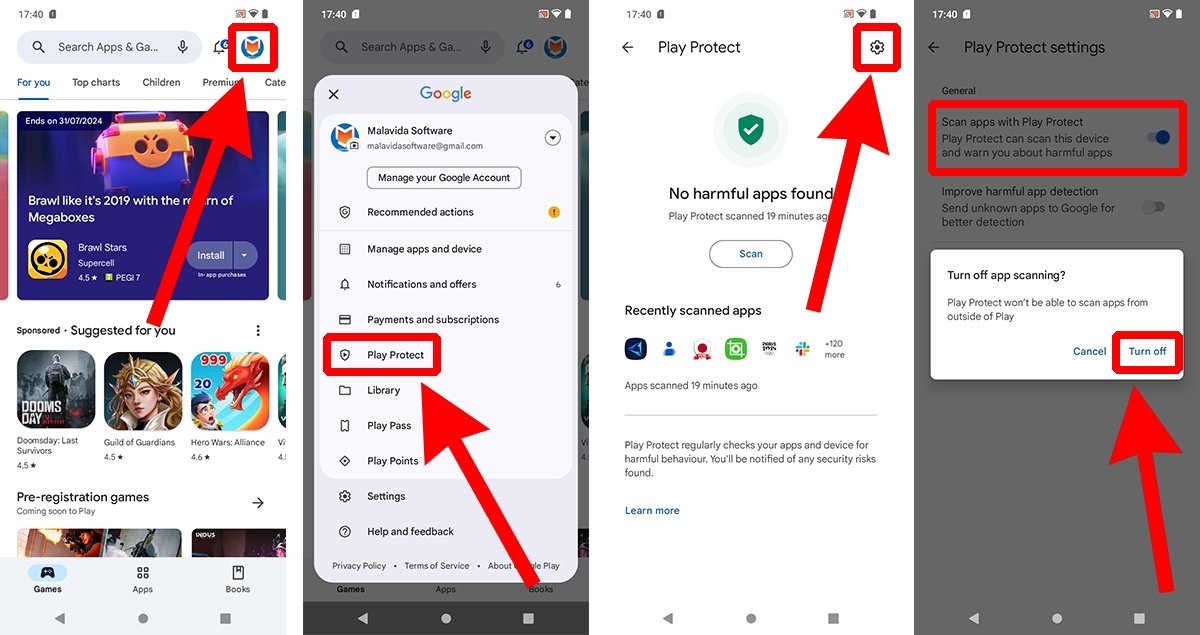
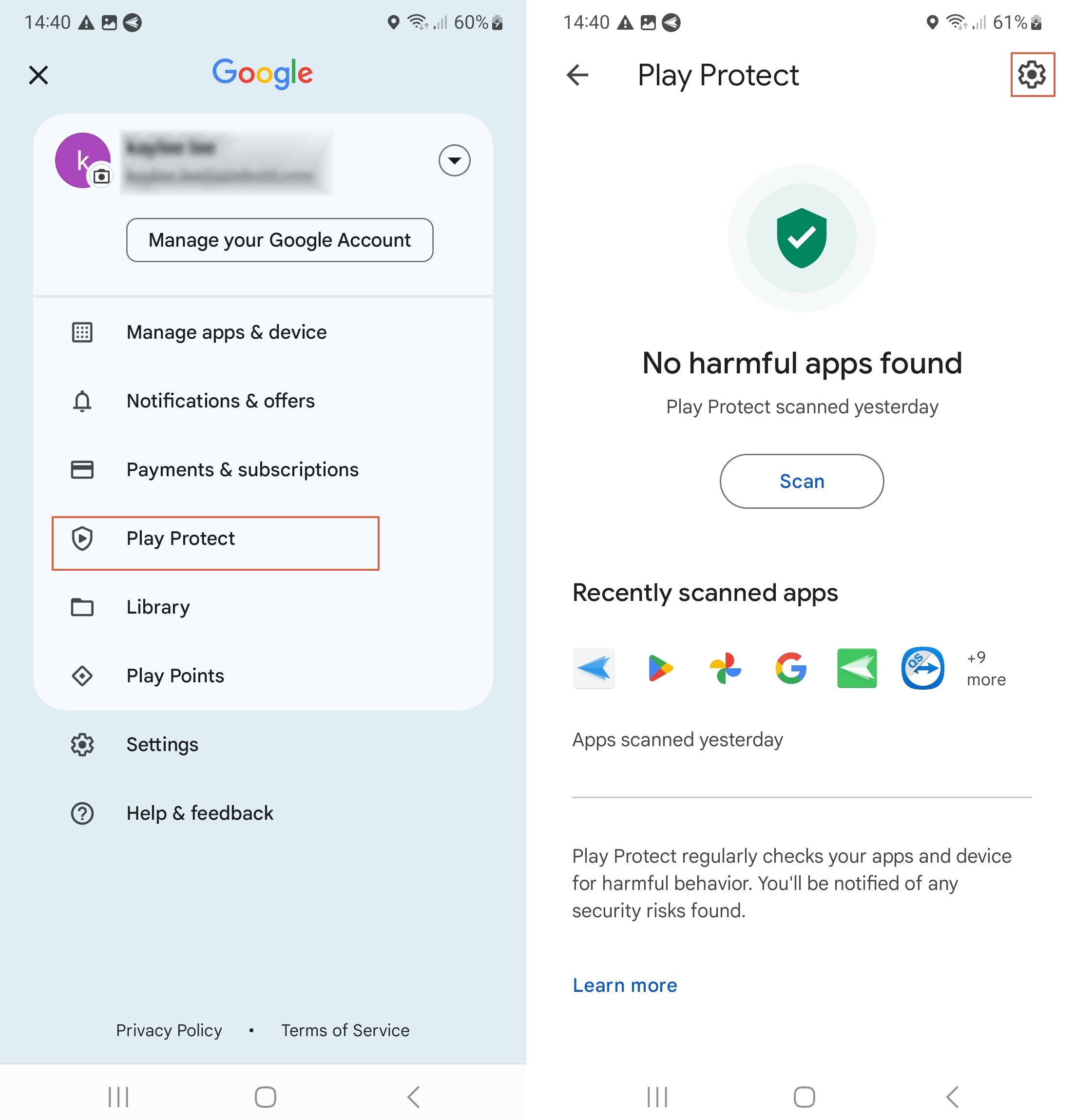
- Open the Google Play Store: Locate the Play Store icon on your home screen or app drawer.
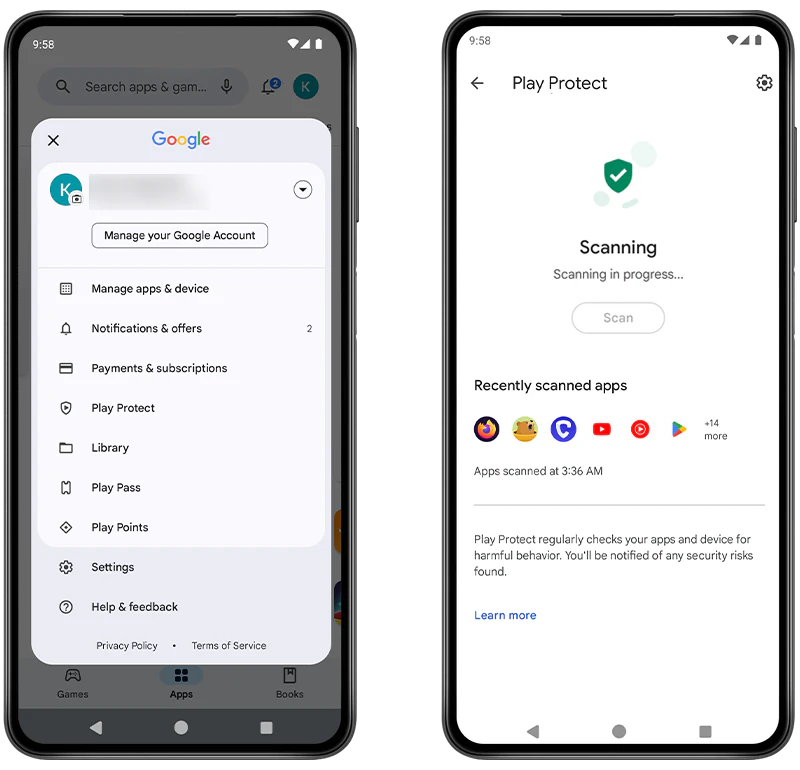
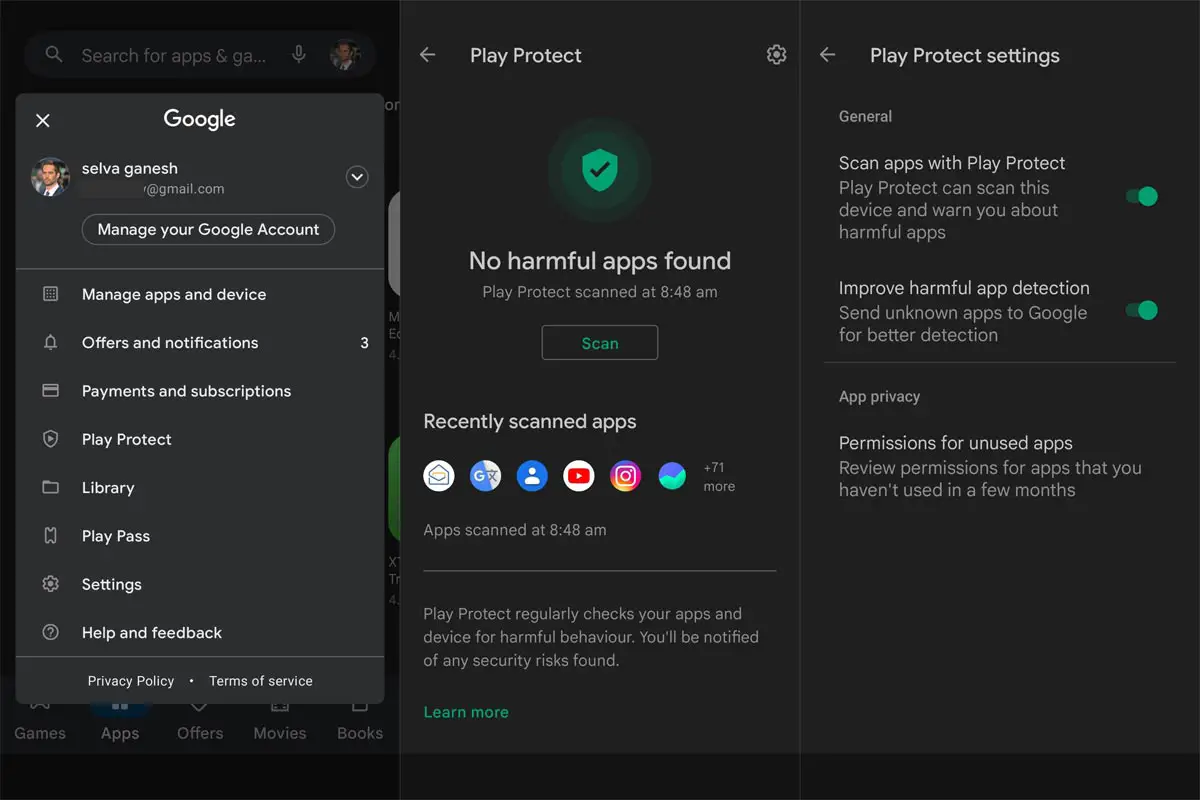
- Access the Profile Menu: Tap on your profile icon located in the top-right corner of the screen.
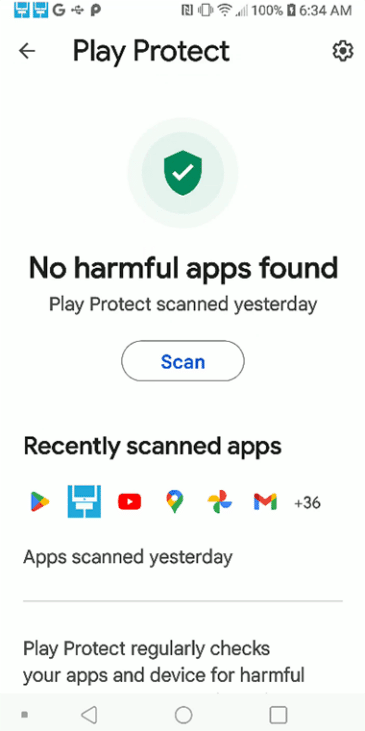
- Select Play Protect: In the menu that appears, tap on the "Play Protect" option.
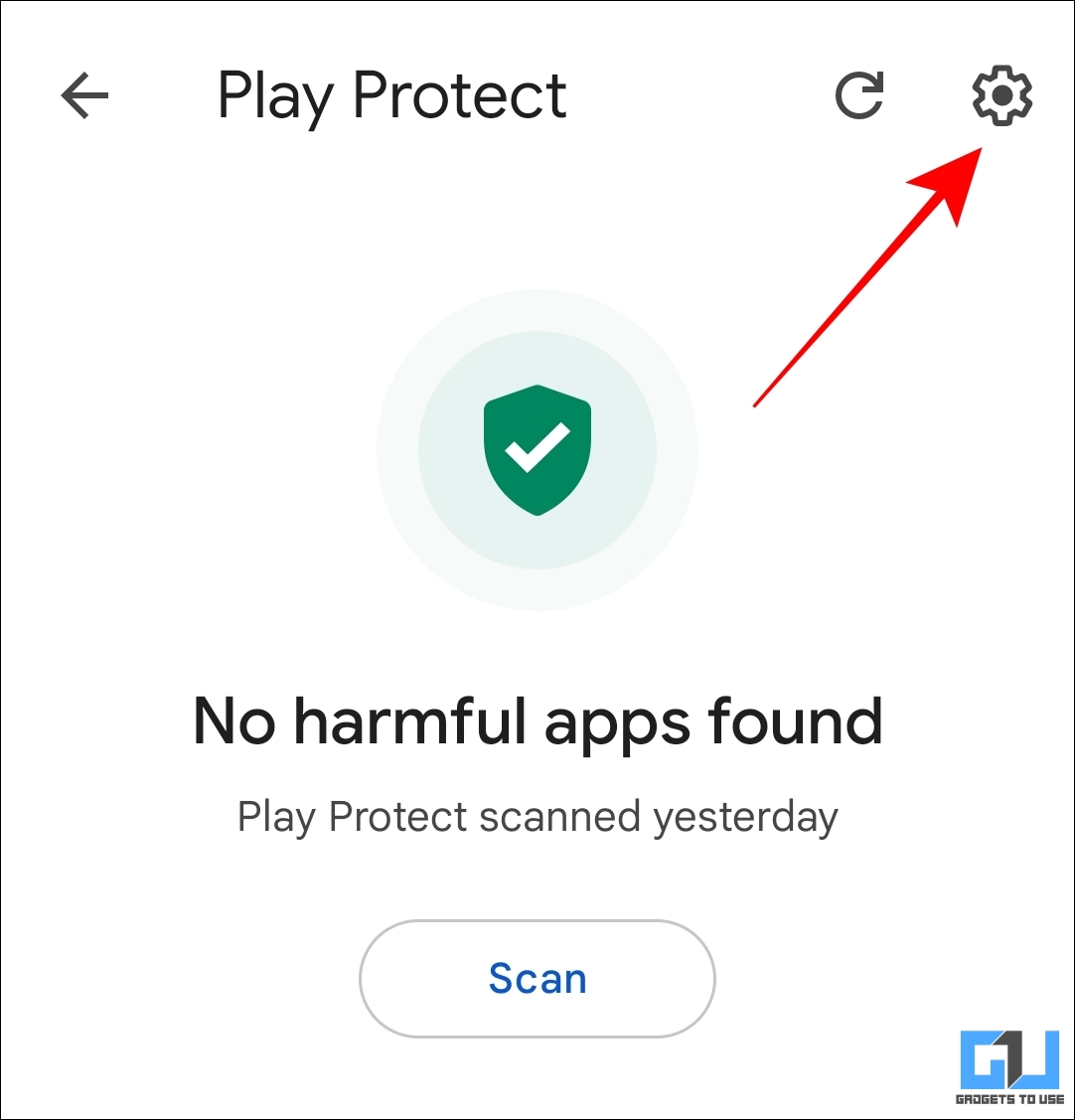
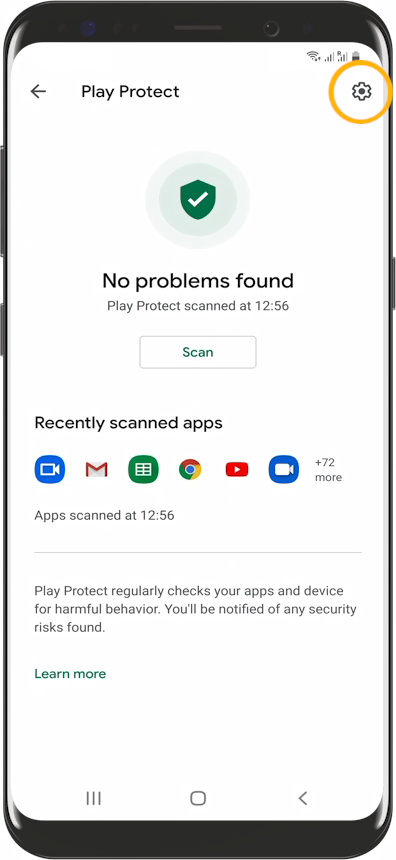
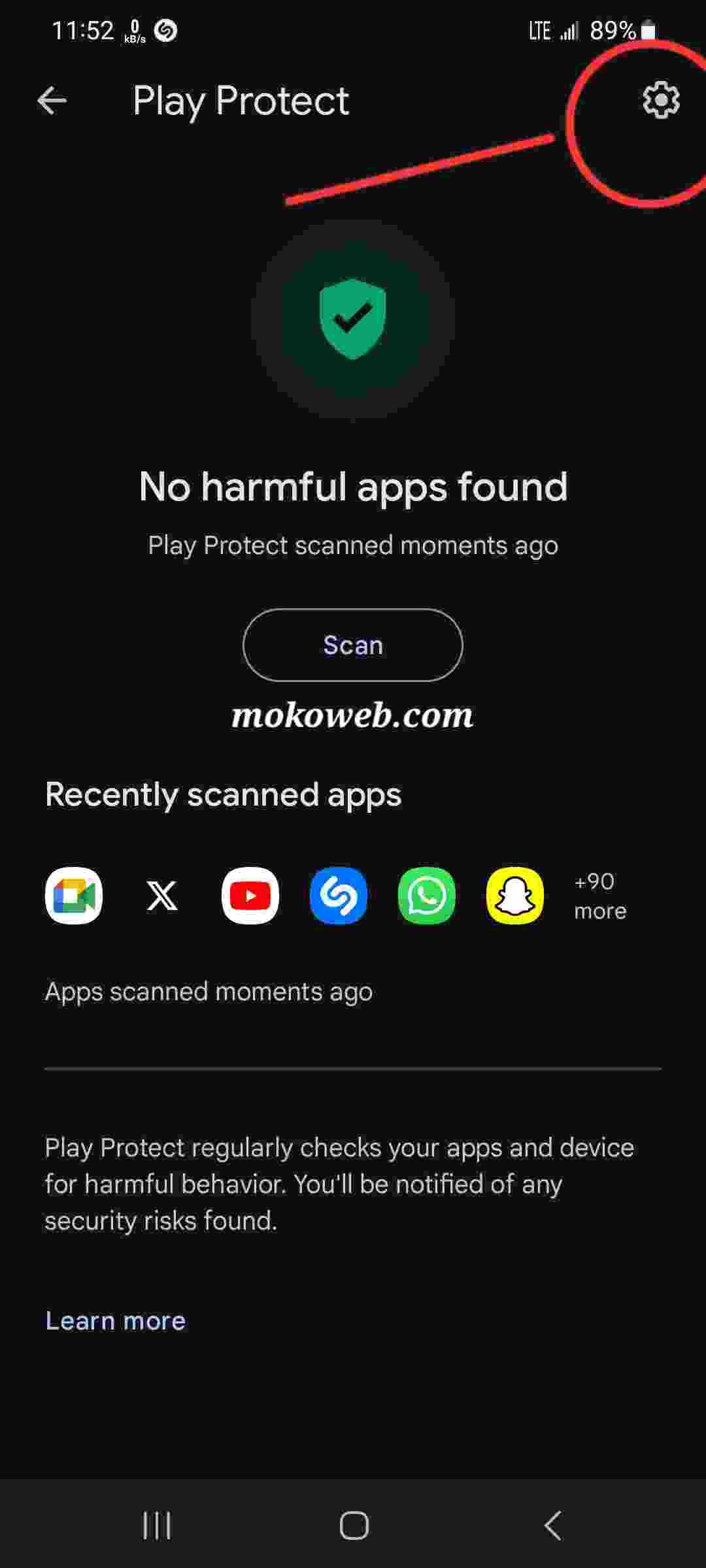
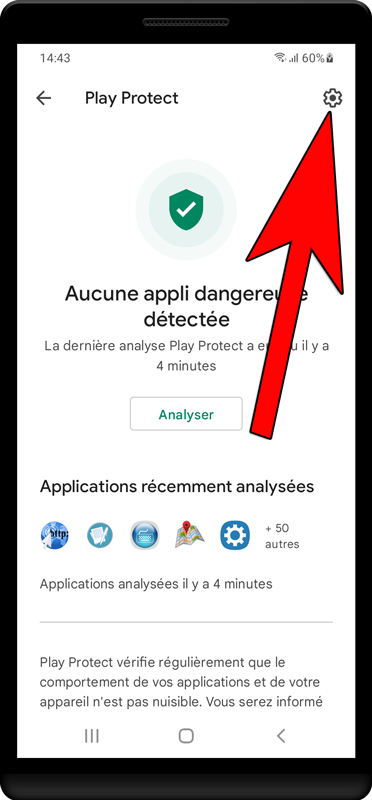
- Open Settings: Look for the gear icon (Settings) in the top-right corner of the Play Protect screen.
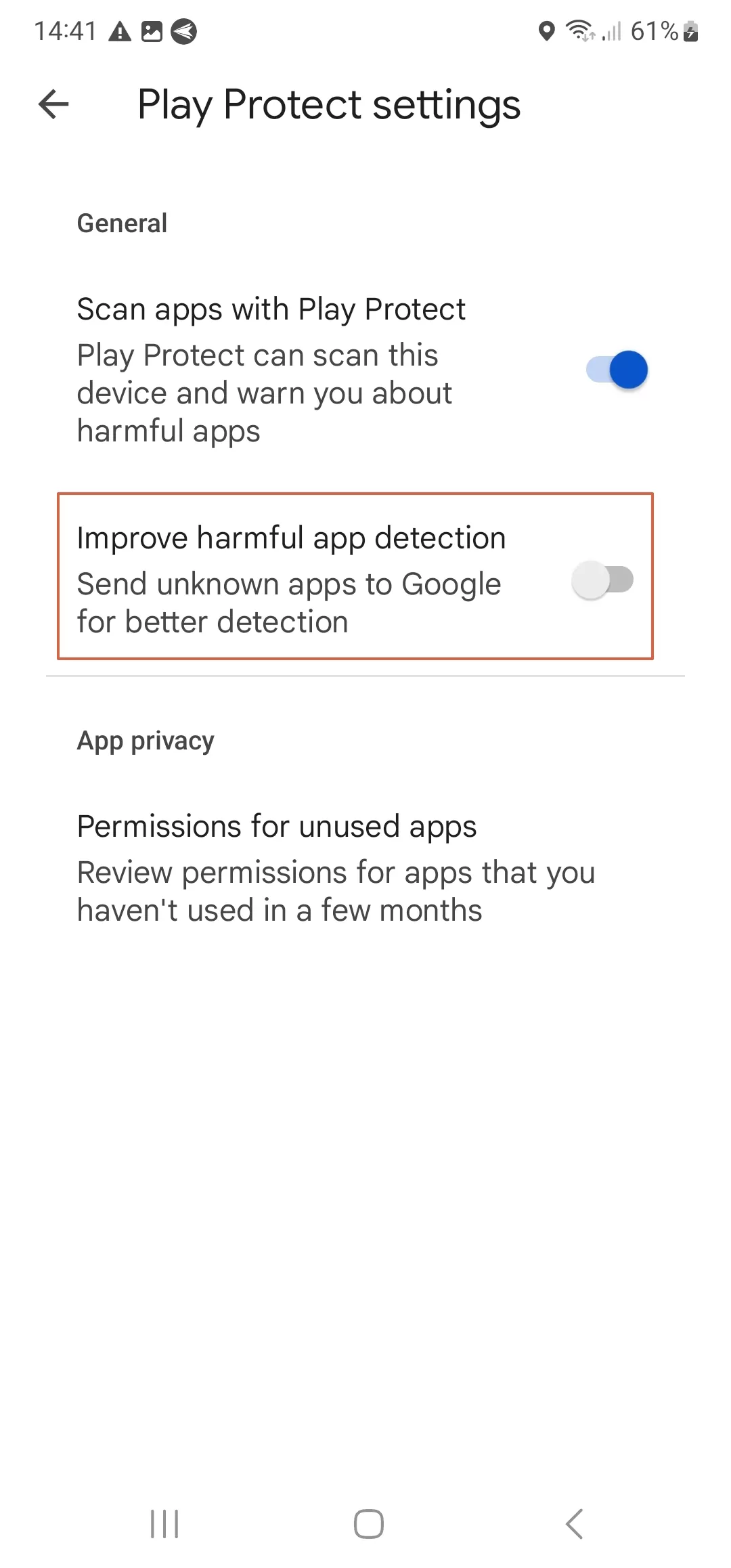
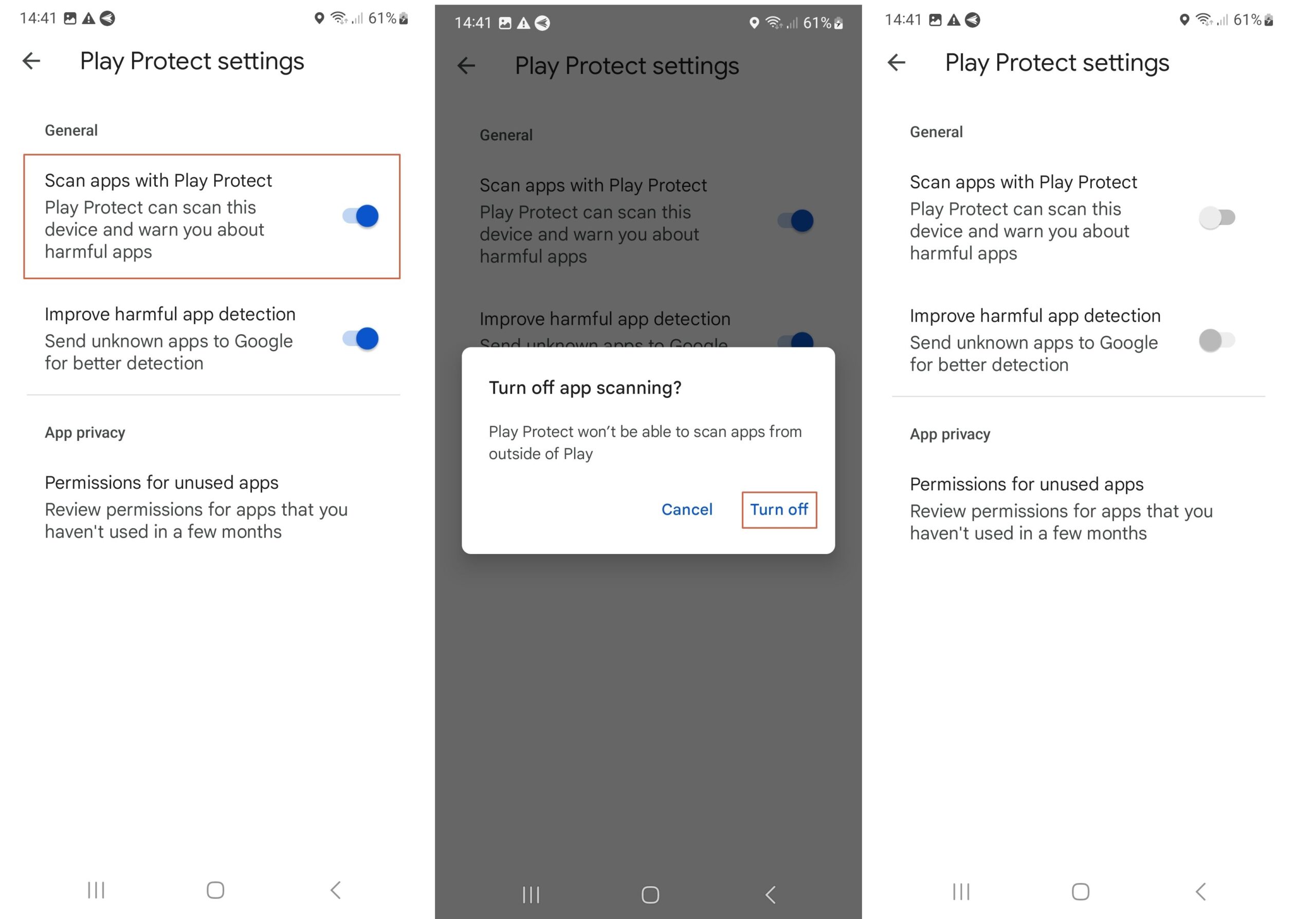
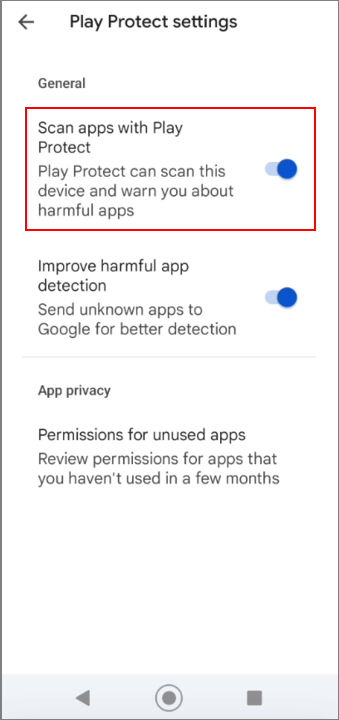
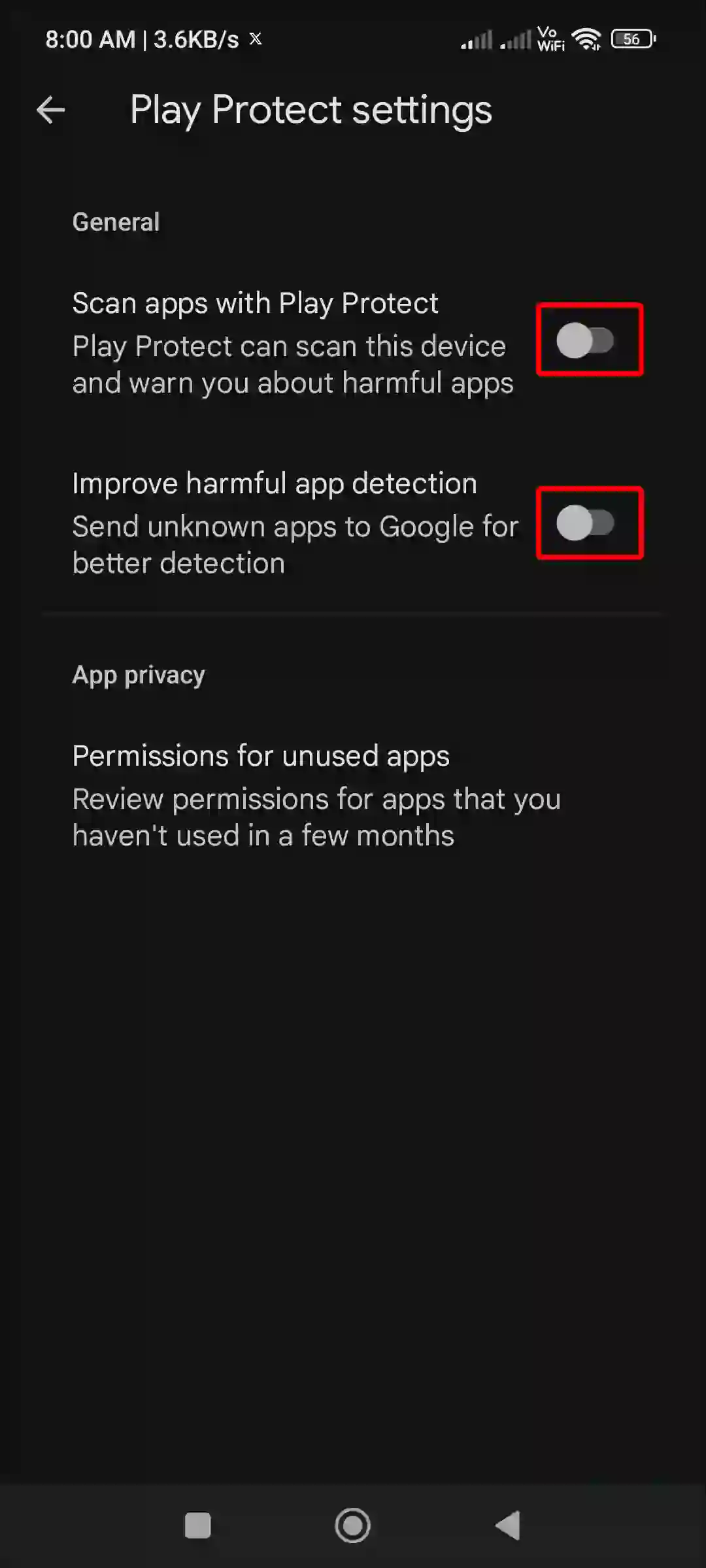
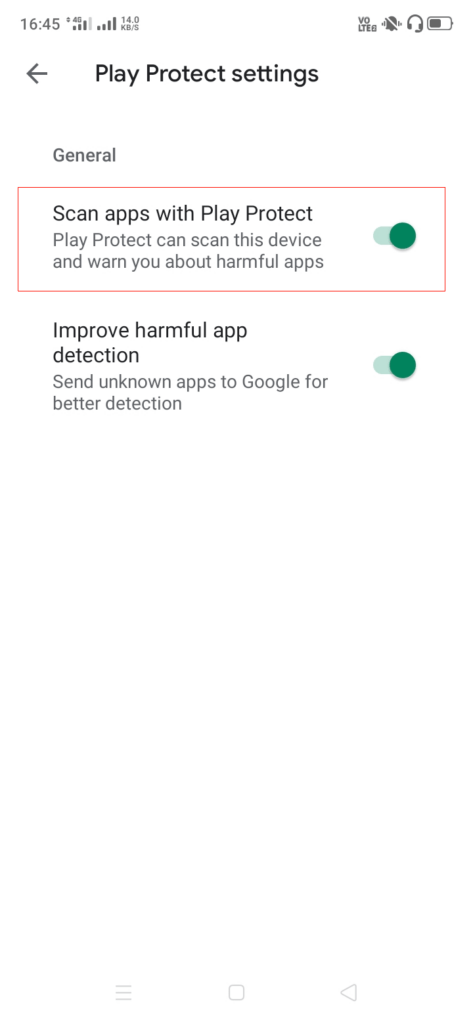
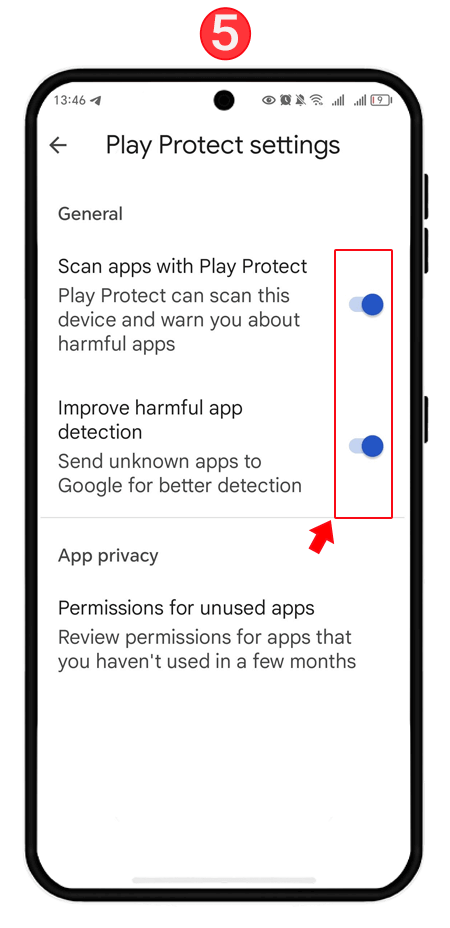
- Toggle Off Scanning: You will see two options: "Scan apps with Play Protect" and "Improve harmful app detection." Toggle off the switch for "Scan apps with Play Protect."
- Confirm Your Choice: A pop-up warning will appear explaining the risks. Tap "Turn off" to confirm.
Method 2: Through Android System Settings
- Navigate to your phone's Settings menu.
- Scroll down and tap on Security or Biometrics and Security.
- Tap on Google Play Protect. This will redirect you to the same Play Protect interface found in the Store app.
- Follow steps 4 through 6 from Method 1 to disable the feature.
Key Features of Google Play Protect
To help you weigh the pros and cons of disabling this service, we have summarized the primary aspects of Google Play Protect in the table below:
| Fitur/Aspek | Deskripsi |
|---|---|
| Real-time Threat Detection | Uses cloud-based intelligence to identify new malware variants as they emerge. |
| Automatic App Removal | Can automatically disable or remove known malicious apps from your device without user intervention. |
| Sideload Protection | Scans APK files installed from third-party websites or file managers. |
| Privacy Alerts | Notifies users if an app is accessing sensitive data (like contacts or location) unnecessarily. |
| Find My Device Integration | Works alongside the device recovery system to ensure lost phones are protected from unauthorized access. |
Why Users Choose to Turn Off Play Protect
While it may seem counterintuitive to lower your security, there are legitimate reasons why a user or developer might choose to disable Google Play Protect scan temporarily or permanently:
1. Installing Specialized Software
Some advanced tools, such as network auditing apps, rooting utilities, or certain "cheat" engines for games, use methods that appear suspicious to standard security algorithms. Play Protect may block these apps entirely, preventing them from functioning.
2. App Development and Testing
Developers creating Android applications often sideload "debug" versions of their apps. Occasionally, these unfinished builds lack the proper signatures recognized by Google, leading Play Protect to flag them as "Unknown Apps" or potential threats.
3. Avoiding "False Positives"
No security system is perfect. Sometimes, Play Protect identifies a perfectly safe app as harmful simply because it uses an unusual encryption method or requests high-level permissions. If a user is 100% certain of the app's source, they may disable the scan to stop the annoying "Harmful app detected" notifications.
The Risks: What Happens When the Shield is Down?
It is crucial to emphasize that disabling Play Protect leaves your device vulnerable. Without the scan, your phone will not check for malicious code within new installations. This increases the risk of:
- Data Theft: Spyware can record your keystrokes, access your camera, or steal your banking credentials.
- Ransomware: Malicious apps can lock your files and demand payment for their release.
- System Instability: Unvetted apps can cause crashes, battery drain, and overheating.
Professional Tip: If you must disable Play Protect to install a specific app, remember to re-enable it immediately after the installation is complete and you have verified the app is working as intended.
Frequently Asked Questions (FAQ)
1. Is it safe to disable Google Play Protect?
Generally, no. It is only safe if you are an advanced user who understands the risks and is installing an app from a highly trusted source that is being blocked erroneously. For most users, keeping it enabled is essential for device health.
2. Can Play Protect be disabled for just one specific app?
Currently, Google does not offer an "exception list" or "whitelist" feature. You must disable the entire scanning service to allow a flagged app to run, or ignore the warning specifically for that app if the system allows you to "Install anyway."
3. Will disabling Play Protect speed up my phone?
The performance gain is negligible. Play Protect runs efficiently in the background. If your phone is slow, it is more likely due to background apps, full storage, or an aging battery rather than Play Protect's security scans.
4. Does disabling Play Protect void my warranty?
No, toggling a software setting within the Android OS does not void your hardware warranty. However, if you download a virus that damages your software/OS after disabling it, the manufacturer might charge for a software reflash.
Conclusion
Learning how to disable Google Play Protect scan is a useful skill for Android power users and developers who need full control over their hardware. While the process is straightforward—accessible via the Play Store settings—it should never be done lightly. The security framework provided by Google is a robust defense against an ever-evolving landscape of mobile threats.
If you find yourself needing to bypass these protections, always ensure you are sourcing your APKs from reputable repositories and consider using a secondary antivirus scanner as a backup. Ultimately, the best practice is to keep Google Play Protect active to ensure your personal data, privacy, and device integrity remain uncompromised in an increasingly digital world.
Disable Google Play Protect Scan
Disable Google Play Protect Scan Wallpapers
Collection of disable google play protect scan wallpapers for your desktop and mobile devices.
Gorgeous Disable Google Play Protect Scan Landscape Collection
Find inspiration with this unique disable google play protect scan illustration, crafted to provide a fresh look for your background.
Artistic Disable Google Play Protect Scan Moment for Desktop
This gorgeous disable google play protect scan photo offers a breathtaking view, making it a perfect choice for your next wallpaper.
Artistic Disable Google Play Protect Scan Photo in 4K
Find inspiration with this unique disable google play protect scan illustration, crafted to provide a fresh look for your background.
Mesmerizing Disable Google Play Protect Scan Background in 4K
Transform your screen with this vivid disable google play protect scan artwork, a true masterpiece of digital design.
Stunning Disable Google Play Protect Scan Picture Nature
A captivating disable google play protect scan scene that brings tranquility and beauty to any device.
Beautiful Disable Google Play Protect Scan Moment Nature
Experience the crisp clarity of this stunning disable google play protect scan image, available in high resolution for all your screens.
Stunning Disable Google Play Protect Scan View Concept
A captivating disable google play protect scan scene that brings tranquility and beauty to any device.

Vivid Disable Google Play Protect Scan Moment Art
Discover an amazing disable google play protect scan background image, ideal for personalizing your devices with vibrant colors and intricate designs.

Serene Disable Google Play Protect Scan Background Photography
Discover an amazing disable google play protect scan background image, ideal for personalizing your devices with vibrant colors and intricate designs.
Breathtaking Disable Google Play Protect Scan Landscape for Desktop
Discover an amazing disable google play protect scan background image, ideal for personalizing your devices with vibrant colors and intricate designs.
Stunning Disable Google Play Protect Scan Image Concept
Find inspiration with this unique disable google play protect scan illustration, crafted to provide a fresh look for your background.

High-Quality Disable Google Play Protect Scan Picture Nature
Experience the crisp clarity of this stunning disable google play protect scan image, available in high resolution for all your screens.
Spectacular Disable Google Play Protect Scan Scene Nature
Immerse yourself in the stunning details of this beautiful disable google play protect scan wallpaper, designed for a captivating visual experience.
High-Quality Disable Google Play Protect Scan Scene for Desktop
Transform your screen with this vivid disable google play protect scan artwork, a true masterpiece of digital design.
Detailed Disable Google Play Protect Scan Design Illustration
Discover an amazing disable google play protect scan background image, ideal for personalizing your devices with vibrant colors and intricate designs.
Detailed Disable Google Play Protect Scan Capture for Mobile
Discover an amazing disable google play protect scan background image, ideal for personalizing your devices with vibrant colors and intricate designs.
Exquisite Disable Google Play Protect Scan Landscape Nature
This gorgeous disable google play protect scan photo offers a breathtaking view, making it a perfect choice for your next wallpaper.
Amazing Disable Google Play Protect Scan Scene Nature
Experience the crisp clarity of this stunning disable google play protect scan image, available in high resolution for all your screens.
Artistic Disable Google Play Protect Scan Scene Art
A captivating disable google play protect scan scene that brings tranquility and beauty to any device.

Vibrant Disable Google Play Protect Scan Scene Nature
Experience the crisp clarity of this stunning disable google play protect scan image, available in high resolution for all your screens.
Download these disable google play protect scan wallpapers for free and use them on your desktop or mobile devices.