How To Compress A Pdf File Size In Bluebeam
How to Compress a PDF File Size in Bluebeam: The Ultimate Professional Guide
In the world of architecture, engineering, and construction (AEC), Bluebeam Revu stands as the industry standard for document management and markup. However, high-quality blueprints and complex project manuals often result in massive file sizes that are difficult to share via email or upload to project management portals. Learning how to compress a PDF file size in Bluebeam is an essential skill for ensuring your documents remain portable without sacrificing the clarity required for technical review.
Compressing files in Bluebeam isn't just about making them smaller; it’s about optimization. Whether you are dealing with high-resolution images, intricate vector data, or hundreds of markups, Bluebeam Revu offers powerful tools to strip away unnecessary metadata and downsample images to a manageable size. This guide will walk you through the various methods of compression, from the quick "Reduce File Size" feature to advanced batch processing for large-scale projects.
Why Optimizing PDF Size in Bluebeam is Crucial
Large PDF files can be a significant bottleneck in professional workflows. When a single set of drawings exceeds 100MB, it can cause lag during viewing on mobile devices in the field, fail to send through standard email servers, and consume excessive cloud storage space. By utilizing Bluebeam’s compression algorithms, you can significantly reduce the "weight" of the document while maintaining the legibility of text and fine lines.
The primary goal is to find the "sweet spot" between file size and image quality. In professional settings, a document that is too compressed may lose critical detail in the fine print or architectural symbols, while a document that is too large becomes a logistical nightmare. Bluebeam provides the granular control needed to manage this balance effectively.
Method 1: Using the "Reduce File Size" Tool
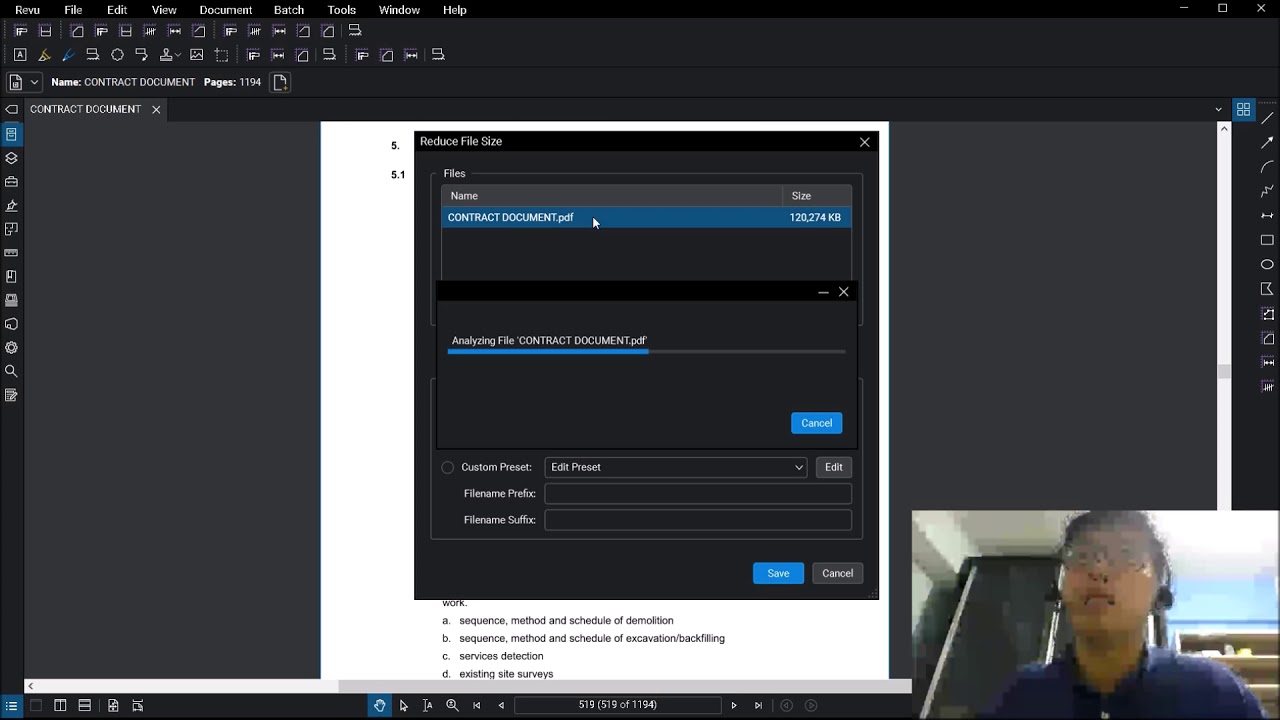
The most straightforward way to compress a PDF in Bluebeam Revu is through the built-in Reduce File Size feature. This tool is designed for users who want a quick solution with presets that cater to different needs.
Steps to Reduce File Size:
- Open the PDF file you wish to compress in Bluebeam Revu.
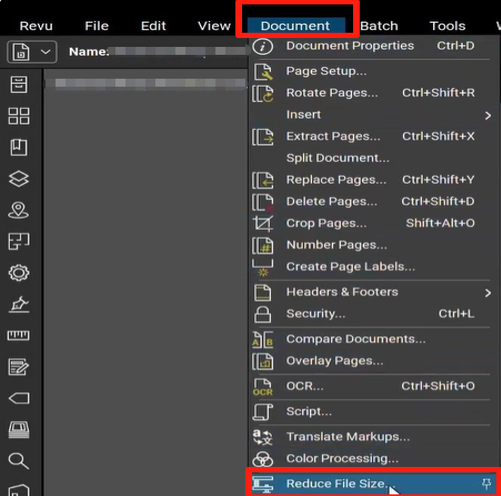
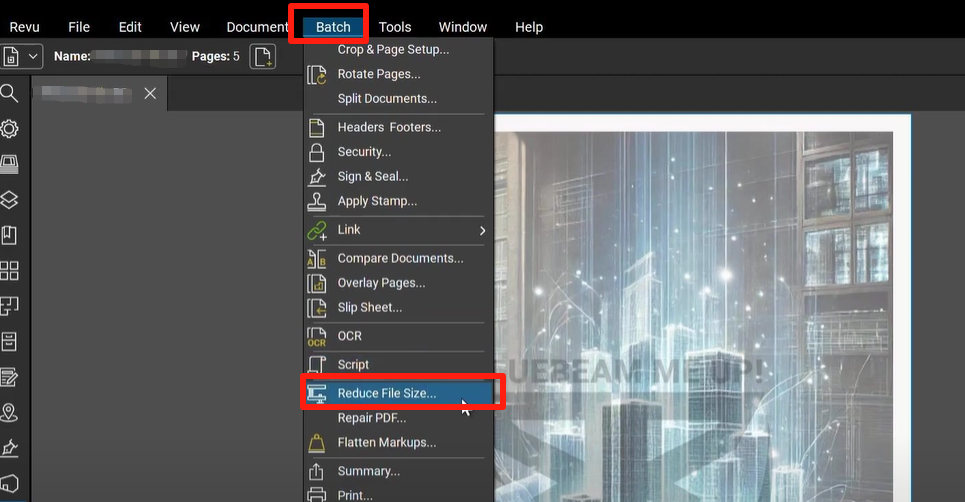
- Go to the Document menu in the top toolbar.
- Select Reduce File Size from the dropdown list.
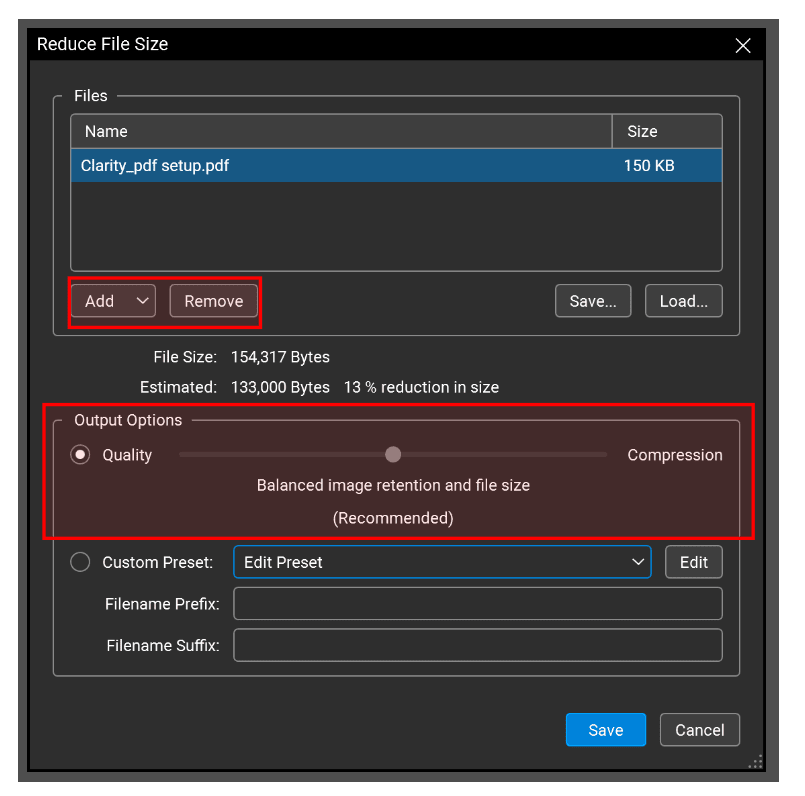
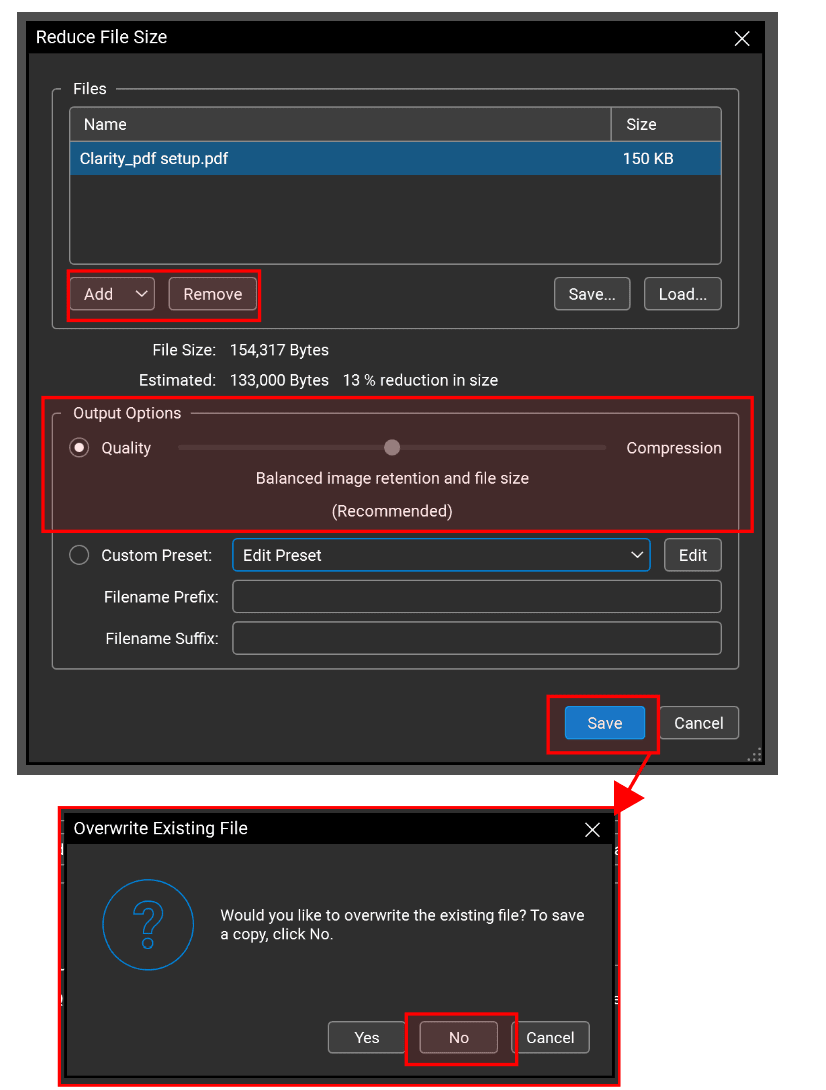
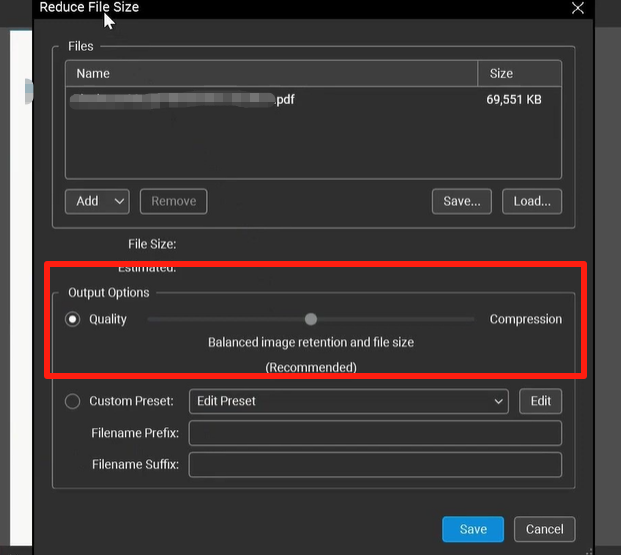
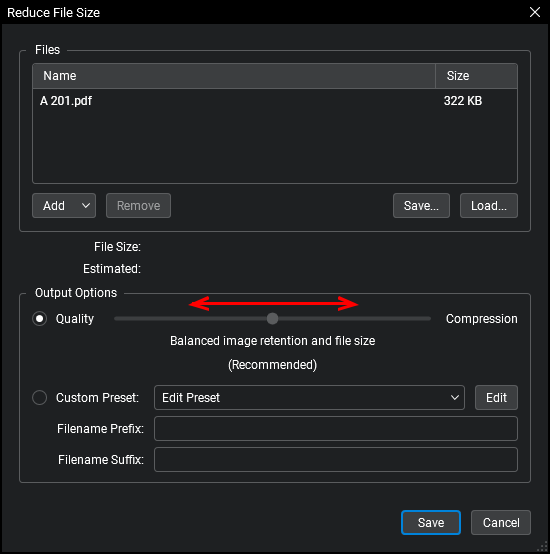
- A dialog box will appear with a slider ranging from "Quality" to "Compression."
- Move the slider to your desired level. For most professional submissions, keeping the slider in the middle or slightly toward "Quality" is recommended.
- Click OK. Bluebeam will then process the file and provide a summary of how much space was saved.
This method is excellent for individual files where you don't need to dive deep into technical settings like DPI (Dots Per Inch) or specific image encoding. It automates the removal of redundant data and optimizes internal structures with just a few clicks.
Method 2: Advanced Compression with Custom Settings
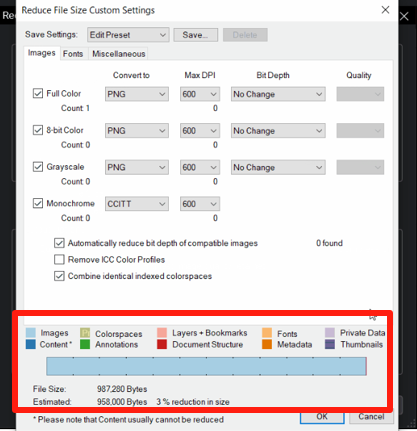
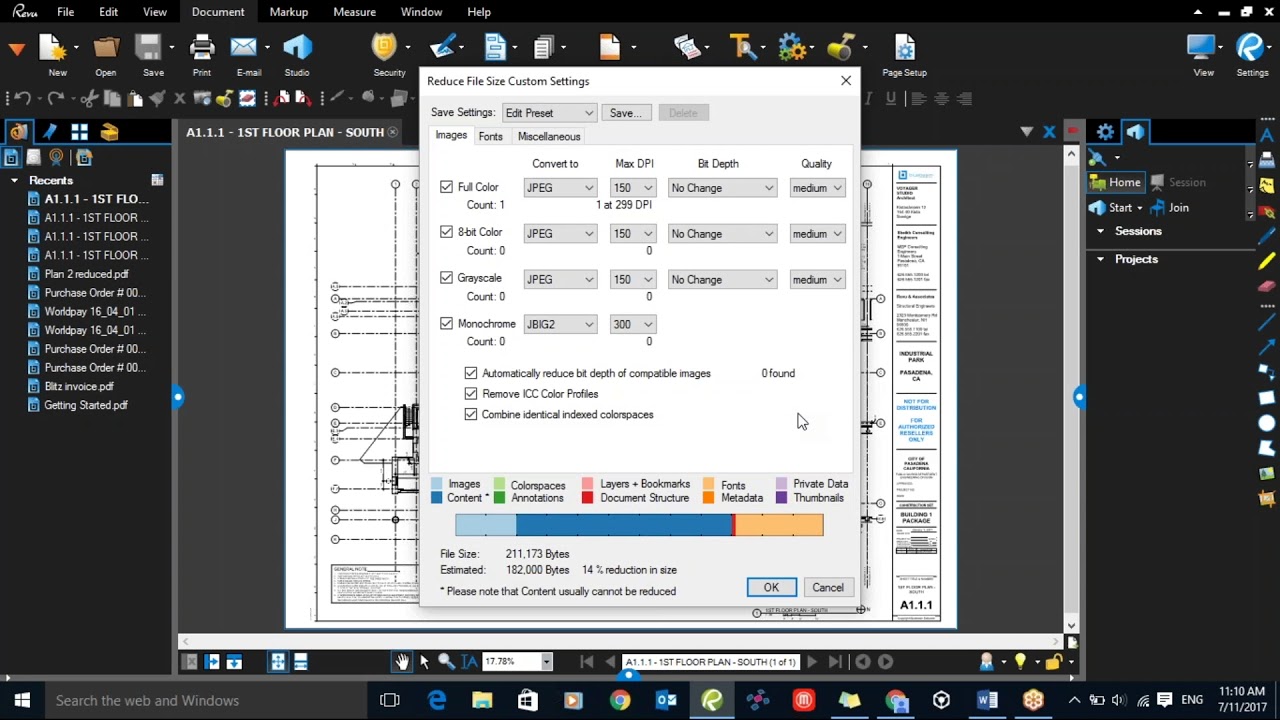
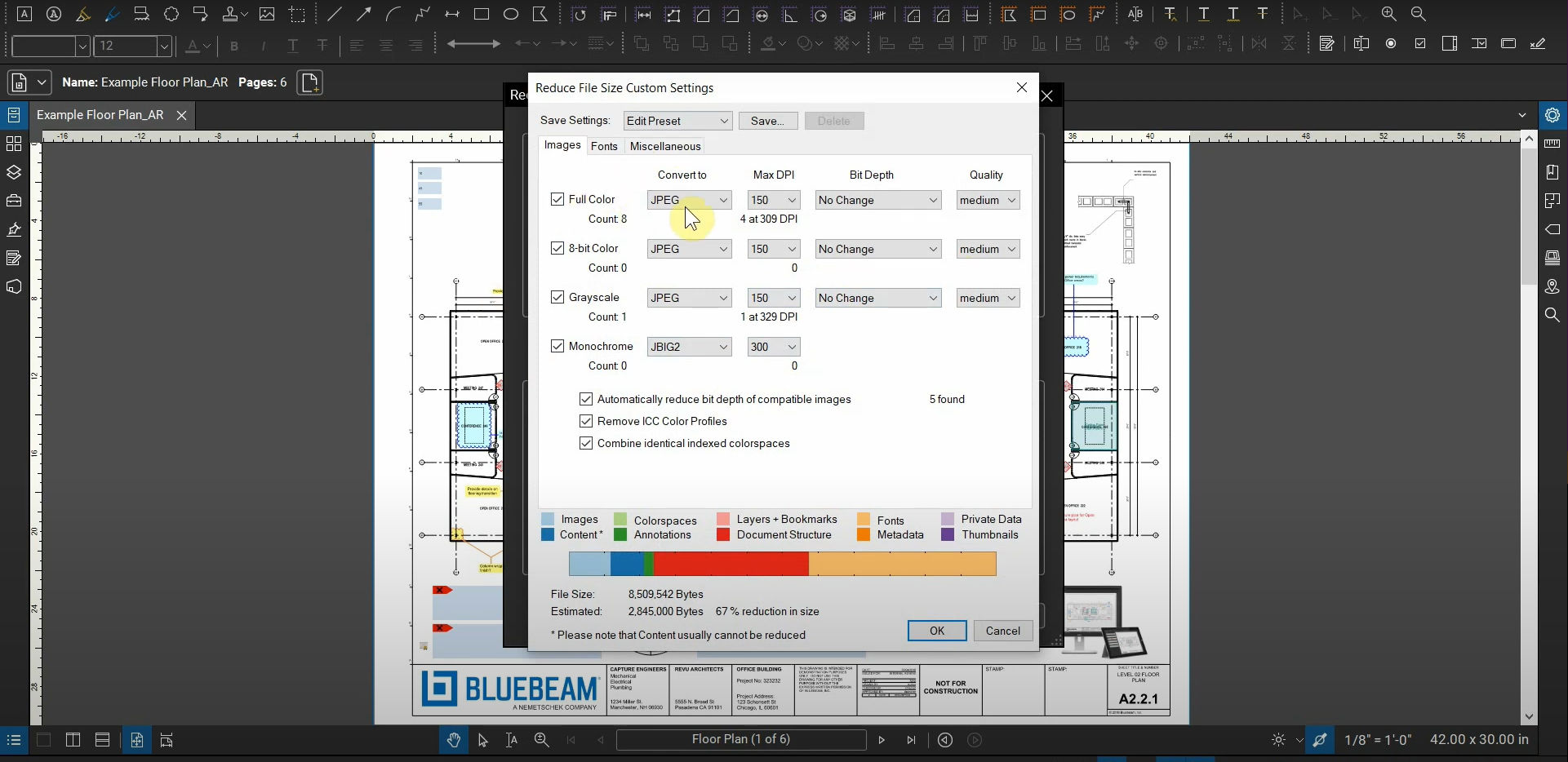
For those who need more control—specifically when dealing with documents containing high-resolution photography or complex gradients—the Custom settings within the Reduce File Size tool are invaluable. This allows you to target specific elements of the PDF that are bloating the file size.
Fine-Tuning Image Compression
Images are often the largest contributors to PDF file size. In the advanced settings, you can choose to downsample images. For example, if a photo is 600 DPI but only needs to be viewed on a screen, you can downsample it to 150 DPI. You can also choose between JPEG and CCITT compression types. JPEG is better for photographs, while CCITT is optimized for black-and-white scanned documents.
Removing Unused Metadata and Embedded Fonts
PDFs often carry "hidden" data, such as old thumbnails, metadata from other software, and embedded fonts that aren't actually being used. By checking the boxes to "Discard Unused Data" and "Unembed Fonts," you can shave off extra kilobytes or even megabytes without changing the visual appearance of the document at all.
| Feature/Aspect | Description |
|---|---|
| Reduce File Size Slider | Quickly balance between visual quality and file storage size using a simple interface. |
| Image Downsampling | Reduces the resolution (DPI) of images to decrease file weight. |
| Discard Metadata | Removes non-essential hidden information like author details and document history. |
| Batch Processing | Apply compression settings to hundreds of files simultaneously (Revu eXtreme/Complete). |
| Font Unembedding | Removes embedded font files to save space, relying on system fonts instead. |
How to Batch Compress Multiple PDF Files
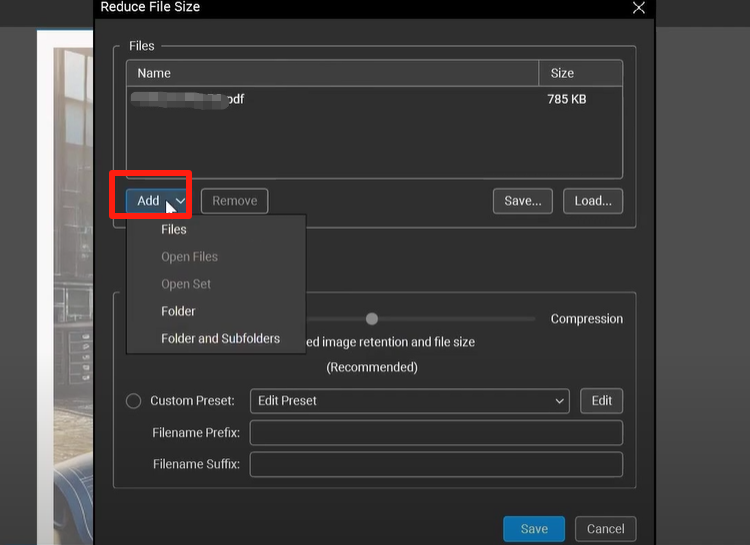
If you are managing an entire project directory with hundreds of files, compressing them one by one is inefficient. Bluebeam Revu eXtreme (and the newer Bluebeam Complete) offers a Batch Reduce File Size feature.
To access this, navigate to File > Batch > Reduce File Size. You can then add entire folders or specific files to a list. Once the files are selected, you can apply a single compression profile to all of them. This ensures consistency across your project submittals and saves hours of manual work. It is highly recommended to save the output files into a new folder so you don't accidentally overwrite your high-resolution originals.
Tips for Maintaining Quality During Compression
While the goal is to reduce size, you must ensure the document remains functional. Here are a few professional tips:
- Flatten Markups First: Before compressing, consider flattening your markups (Document > Flatten). This integrates the markups into the page content, which can sometimes help the compression engine work more efficiently.
- Test the Text: After compression, zoom in on the smallest text in your document. If it looks "fuzzy" or pixelated, your compression settings are too aggressive.
- Check Hyperlinks: Occasionally, extreme compression can break internal or external hyperlinks. Always do a quick spot-check of your digital navigation after processing.
- Avoid Double Compression: If a file has already been compressed by another software, compressing it again in Bluebeam may lead to significant artifacts and loss of quality.
Frequently Asked Questions (FAQ)
1. Does compressing a PDF in Bluebeam delete my markups?
No, compressing a PDF does not delete your markups. However, if you choose to "Flatten" the document as part of your optimization workflow, the markups will no longer be editable as individual elements. They will become part of the background content.
2. What is the best DPI setting for construction drawings?
For digital viewing on tablets and laptops, 150 DPI is usually sufficient. If the drawings are intended to be printed on large-format plotters, 300 DPI is recommended to maintain sharp lines and legible text.
3. Can I undo a "Reduce File Size" action?
Once you save the document after compression, you cannot "un-compress" it to regain the original quality. It is always best practice to use "Save As" or "Batch" to create a compressed copy while keeping the original high-resolution file as a backup.
Conclusion
Mastering how to compress a PDF file size in Bluebeam is a vital skill for any modern professional. By utilizing the "Reduce File Size" tool, fine-tuning image settings, and leveraging batch processing, you can ensure your project documents are optimized for speed, storage, and shareability. Remember that the ultimate goal is not just the smallest file possible, but the smallest file that still conveys every detail of your professional work with clarity. Start with the slider presets, but don't be afraid to dive into the custom settings to achieve the perfect balance for your specific project needs.
How To Compress A Pdf File Size In Bluebeam
How To Compress A Pdf File Size In Bluebeam Wallpapers
Collection of how to compress a pdf file size in bluebeam wallpapers for your desktop and mobile devices.
Crisp How To Compress A Pdf File Size In Bluebeam Design Art
Find inspiration with this unique how to compress a pdf file size in bluebeam illustration, crafted to provide a fresh look for your background.
Beautiful How To Compress A Pdf File Size In Bluebeam Image Art
Transform your screen with this vivid how to compress a pdf file size in bluebeam artwork, a true masterpiece of digital design.
Amazing How To Compress A Pdf File Size In Bluebeam Abstract in 4K
Explore this high-quality how to compress a pdf file size in bluebeam image, perfect for enhancing your desktop or mobile wallpaper.
Lush How To Compress A Pdf File Size In Bluebeam Abstract in 4K
Immerse yourself in the stunning details of this beautiful how to compress a pdf file size in bluebeam wallpaper, designed for a captivating visual experience.

Artistic How To Compress A Pdf File Size In Bluebeam Artwork Photography
A captivating how to compress a pdf file size in bluebeam scene that brings tranquility and beauty to any device.
Crisp How To Compress A Pdf File Size In Bluebeam Design Art
A captivating how to compress a pdf file size in bluebeam scene that brings tranquility and beauty to any device.
Breathtaking How To Compress A Pdf File Size In Bluebeam Landscape for Your Screen
Transform your screen with this vivid how to compress a pdf file size in bluebeam artwork, a true masterpiece of digital design.

Amazing How To Compress A Pdf File Size In Bluebeam Image Digital Art
Experience the crisp clarity of this stunning how to compress a pdf file size in bluebeam image, available in high resolution for all your screens.

Captivating How To Compress A Pdf File Size In Bluebeam Landscape in 4K
Find inspiration with this unique how to compress a pdf file size in bluebeam illustration, crafted to provide a fresh look for your background.
Spectacular How To Compress A Pdf File Size In Bluebeam Scene Illustration
Find inspiration with this unique how to compress a pdf file size in bluebeam illustration, crafted to provide a fresh look for your background.
Captivating How To Compress A Pdf File Size In Bluebeam Background Illustration
A captivating how to compress a pdf file size in bluebeam scene that brings tranquility and beauty to any device.
High-Quality How To Compress A Pdf File Size In Bluebeam Abstract in HD
Experience the crisp clarity of this stunning how to compress a pdf file size in bluebeam image, available in high resolution for all your screens.

Mesmerizing How To Compress A Pdf File Size In Bluebeam Picture Nature
Transform your screen with this vivid how to compress a pdf file size in bluebeam artwork, a true masterpiece of digital design.
Serene How To Compress A Pdf File Size In Bluebeam Design Art
Transform your screen with this vivid how to compress a pdf file size in bluebeam artwork, a true masterpiece of digital design.
Crisp How To Compress A Pdf File Size In Bluebeam Scene Art
Immerse yourself in the stunning details of this beautiful how to compress a pdf file size in bluebeam wallpaper, designed for a captivating visual experience.
Breathtaking How To Compress A Pdf File Size In Bluebeam Photo for Your Screen
Explore this high-quality how to compress a pdf file size in bluebeam image, perfect for enhancing your desktop or mobile wallpaper.

Gorgeous How To Compress A Pdf File Size In Bluebeam Picture in 4K
Find inspiration with this unique how to compress a pdf file size in bluebeam illustration, crafted to provide a fresh look for your background.
Breathtaking How To Compress A Pdf File Size In Bluebeam Moment Collection
Explore this high-quality how to compress a pdf file size in bluebeam image, perfect for enhancing your desktop or mobile wallpaper.

Crisp How To Compress A Pdf File Size In Bluebeam Background for Your Screen
This gorgeous how to compress a pdf file size in bluebeam photo offers a breathtaking view, making it a perfect choice for your next wallpaper.

Gorgeous How To Compress A Pdf File Size In Bluebeam Capture Collection
A captivating how to compress a pdf file size in bluebeam scene that brings tranquility and beauty to any device.
Download these how to compress a pdf file size in bluebeam wallpapers for free and use them on your desktop or mobile devices.