How To Make Pdf A Smaller File Size On Mac
Mastering Efficiency: How To Make PDF A Smaller File Size On Mac Without Losing Quality
In today's digital era, PDF files are the gold standard for sharing documents, whether for professional reports, academic papers, or creative portfolios. However, these files can often become unwieldy due to high-resolution images, complex formatting, and embedded fonts. If you have ever tried to email a document only to be met with a "file too large" error, you know how frustrating it can be. Fortunately, macOS offers several built-in and third-party solutions to handle this. Learning how to make PDF a smaller file size on Mac is an essential skill that saves storage space and ensures smooth digital communication.
This comprehensive guide will walk you through the most effective methods to compress your PDF files on a Mac, ranging from using the native Preview app to utilizing professional software and online tools. We will also explore the pros and cons of each method to help you choose the best one for your specific needs.
1. Using the Built-in Preview App (The Easiest Way)
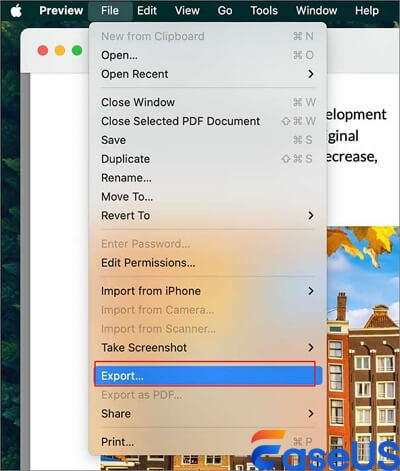
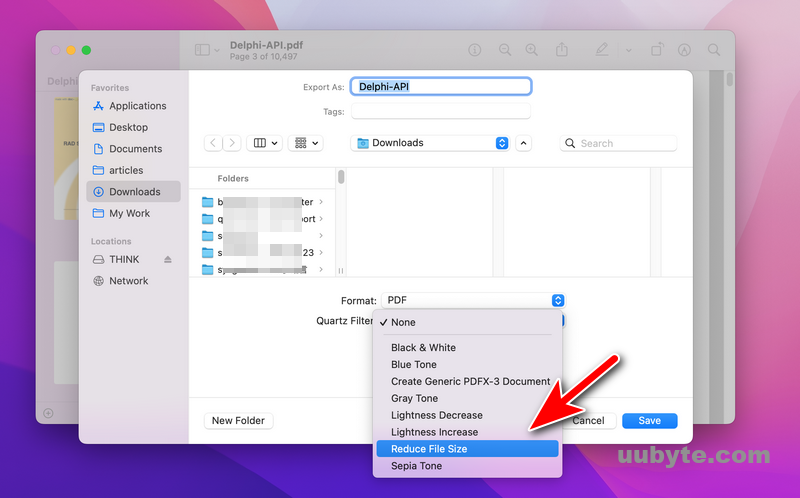
Most Mac users are unaware that the most powerful tool for basic PDF compression is already installed on their system. The Preview app is more than just a viewer; it is a versatile editor that includes a "Quartz Filter" specifically designed to reduce file sizes.
Step-by-Step Guide to Compression in Preview:
- Right-click on the PDF you wish to shrink and select Open With > Preview.
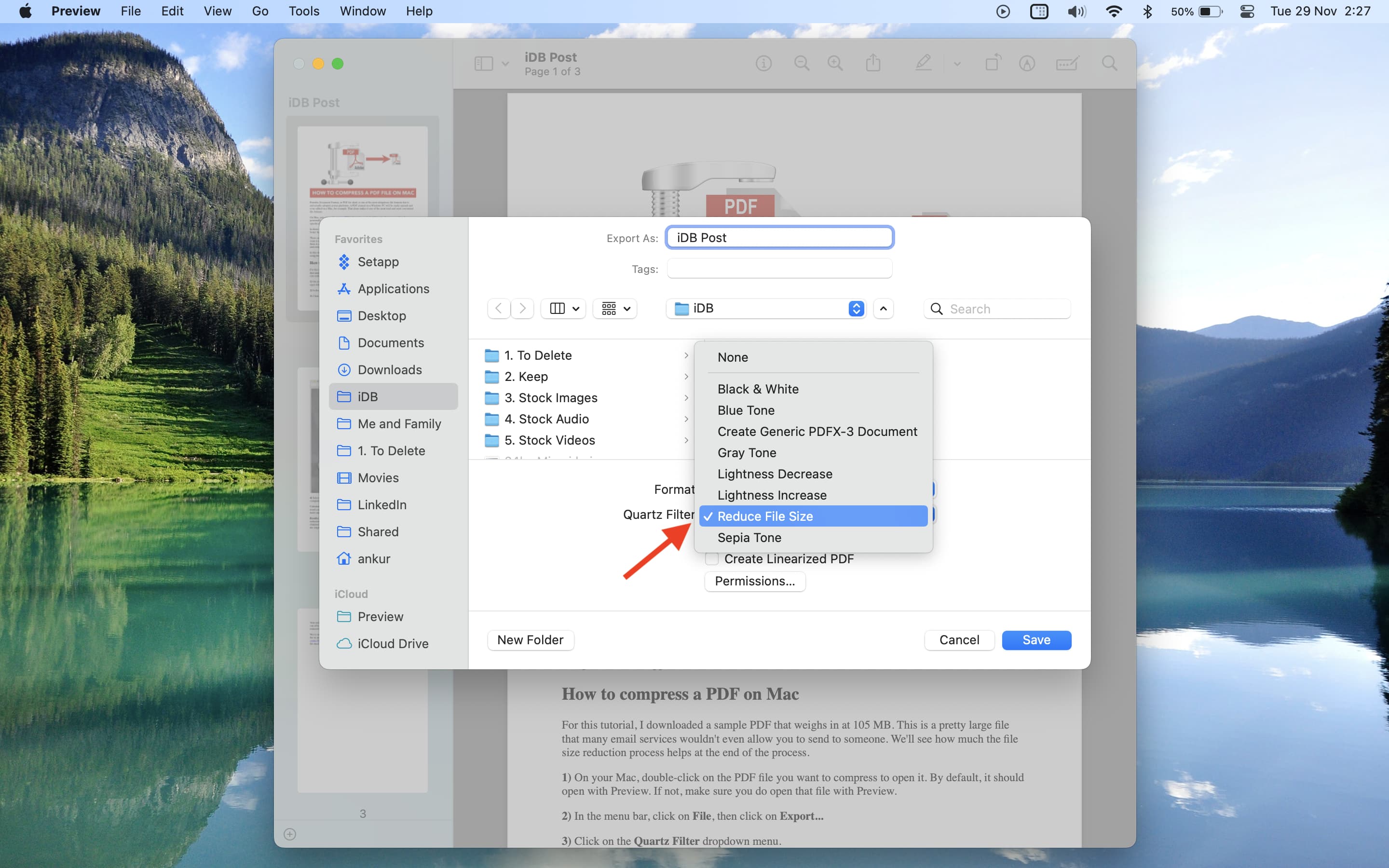
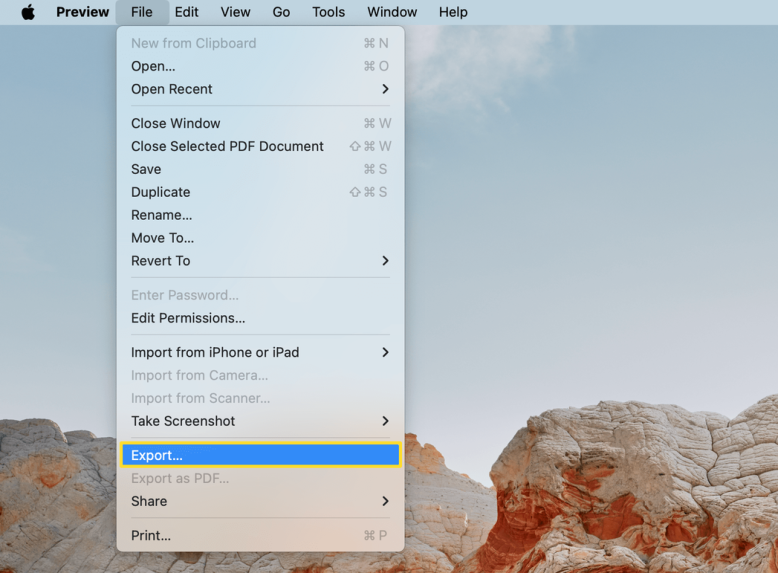
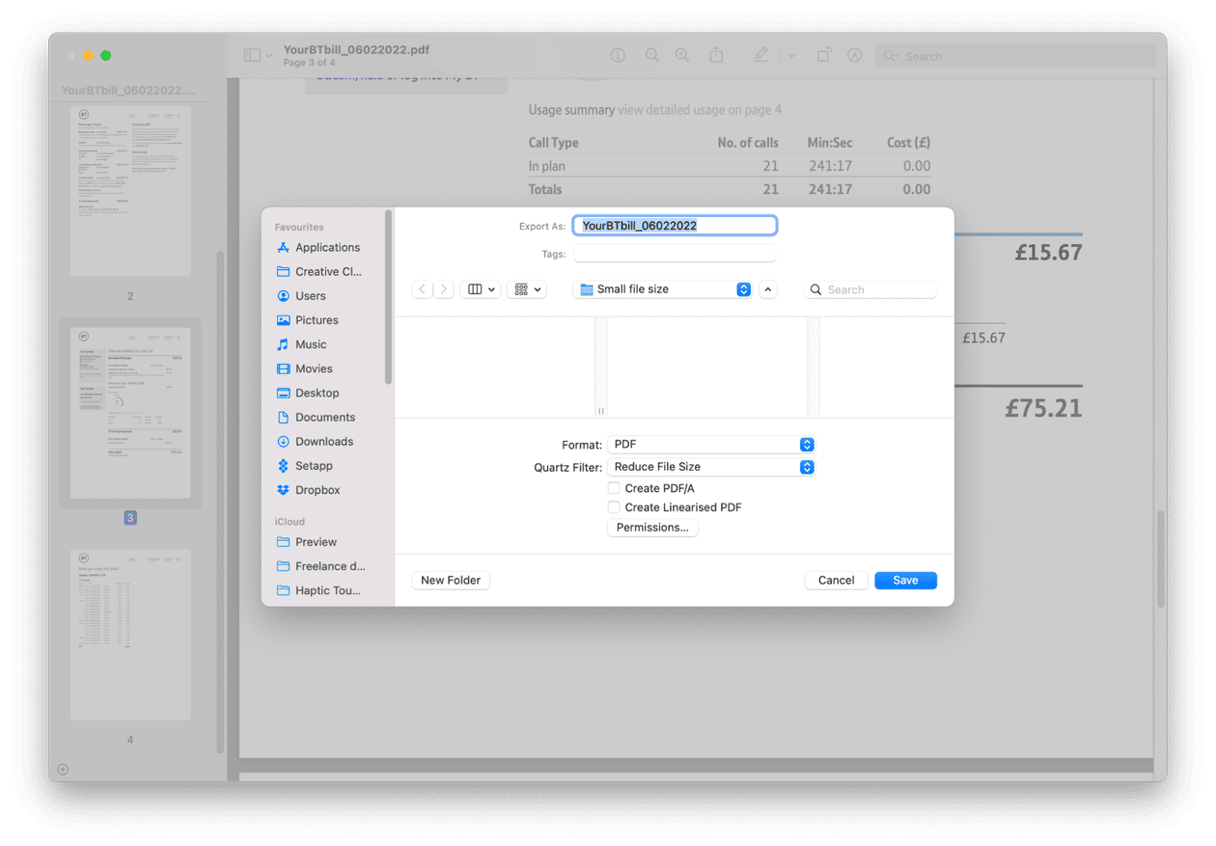
- Once the document is open, navigate to the top menu and click on File, then select Export... (Note: Do not choose 'Export as PDF').
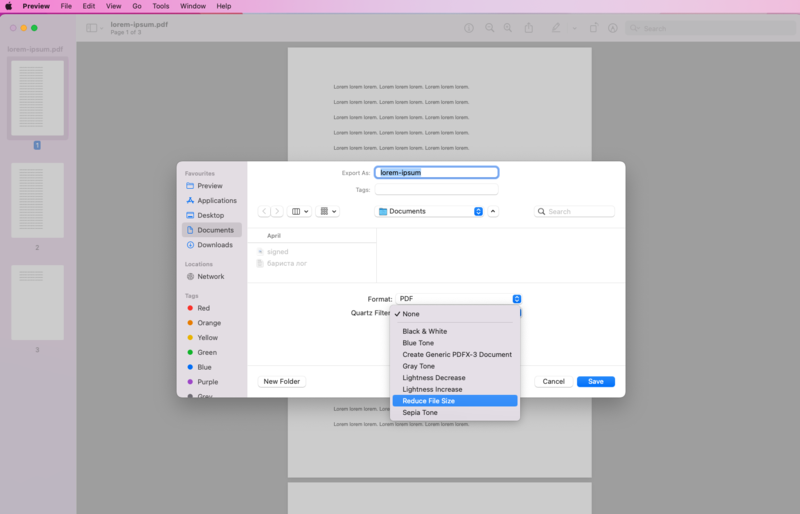
- A pop-up window will appear. Look for the dropdown menu next to Quartz Filter.
- Select Reduce File Size from the list.
- Choose a location to save your file and click Save.
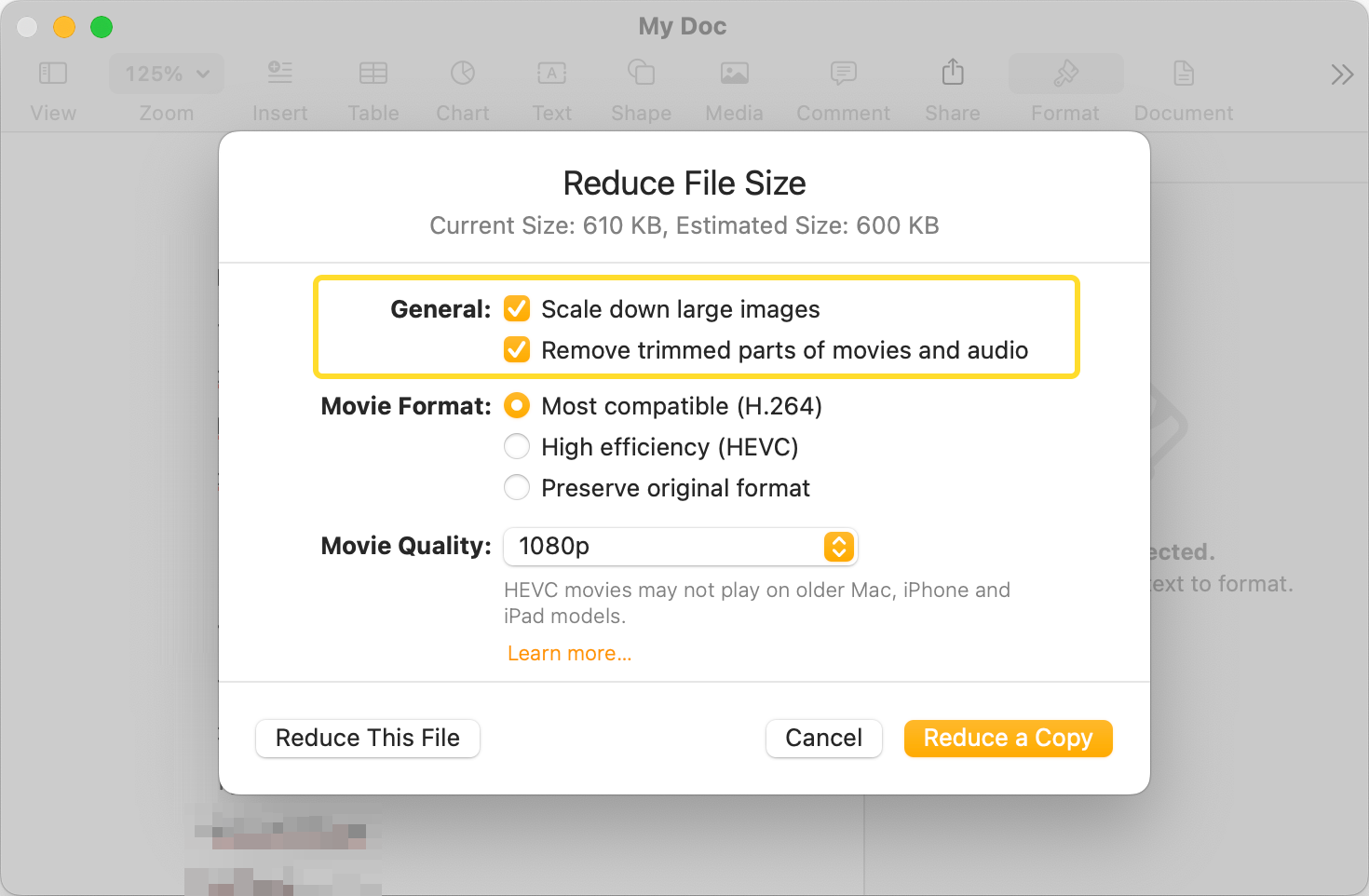
While this method is incredibly fast, it is worth noting that the "Reduce File Size" filter can sometimes be too aggressive, resulting in blurry images or unreadable small text. If the quality drops too much, advanced users can modify the Quartz filters via the ColorSync Utility app to create a custom balance between size and quality.
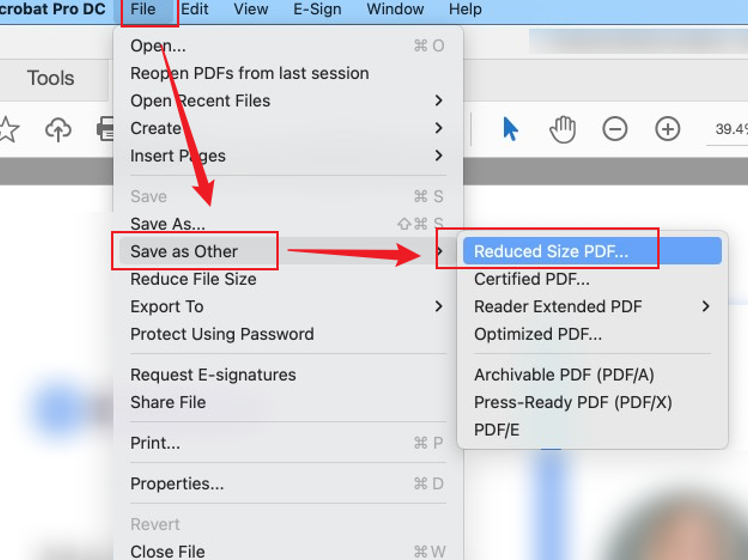
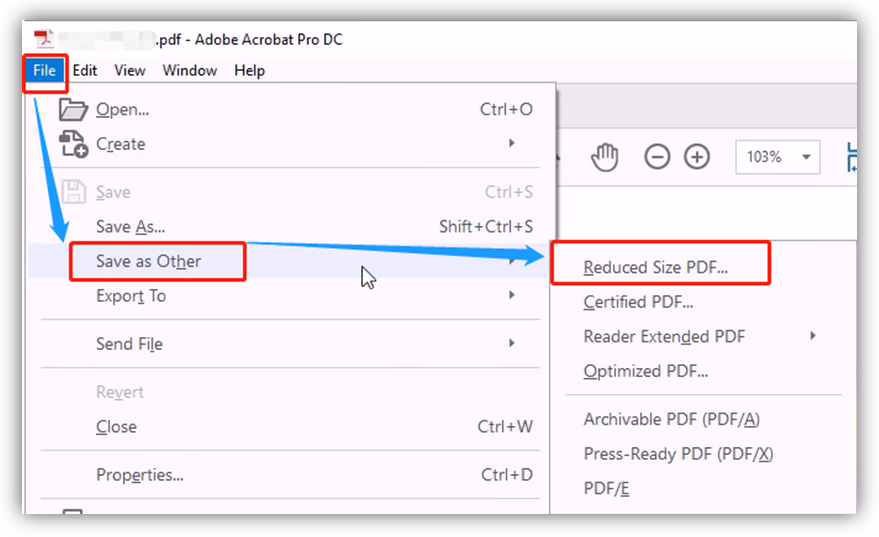
2. Leveraging Adobe Acrobat Pro for Professional Results
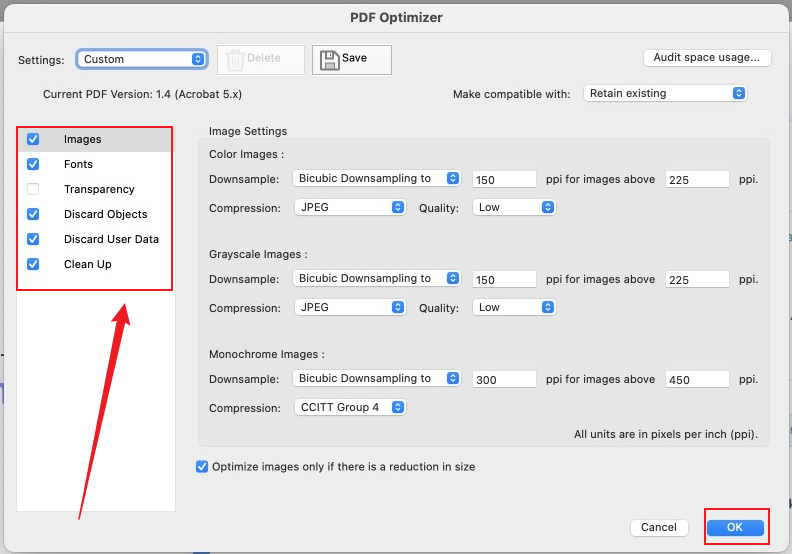
If you are a professional who handles high-stakes documents, you might require more control over the compression process. Adobe Acrobat Pro offers the most sophisticated tools for managing PDF assets. Unlike the basic Preview tool, Acrobat allows you to choose exactly which elements to downsample.
How to Use Acrobat's PDF Optimizer:
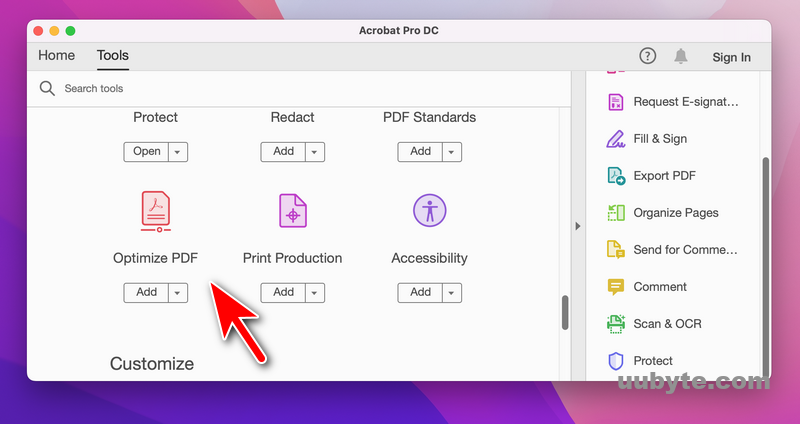
- Open your PDF in Adobe Acrobat Pro.
- Go to the Tools tab and select Optimize PDF.
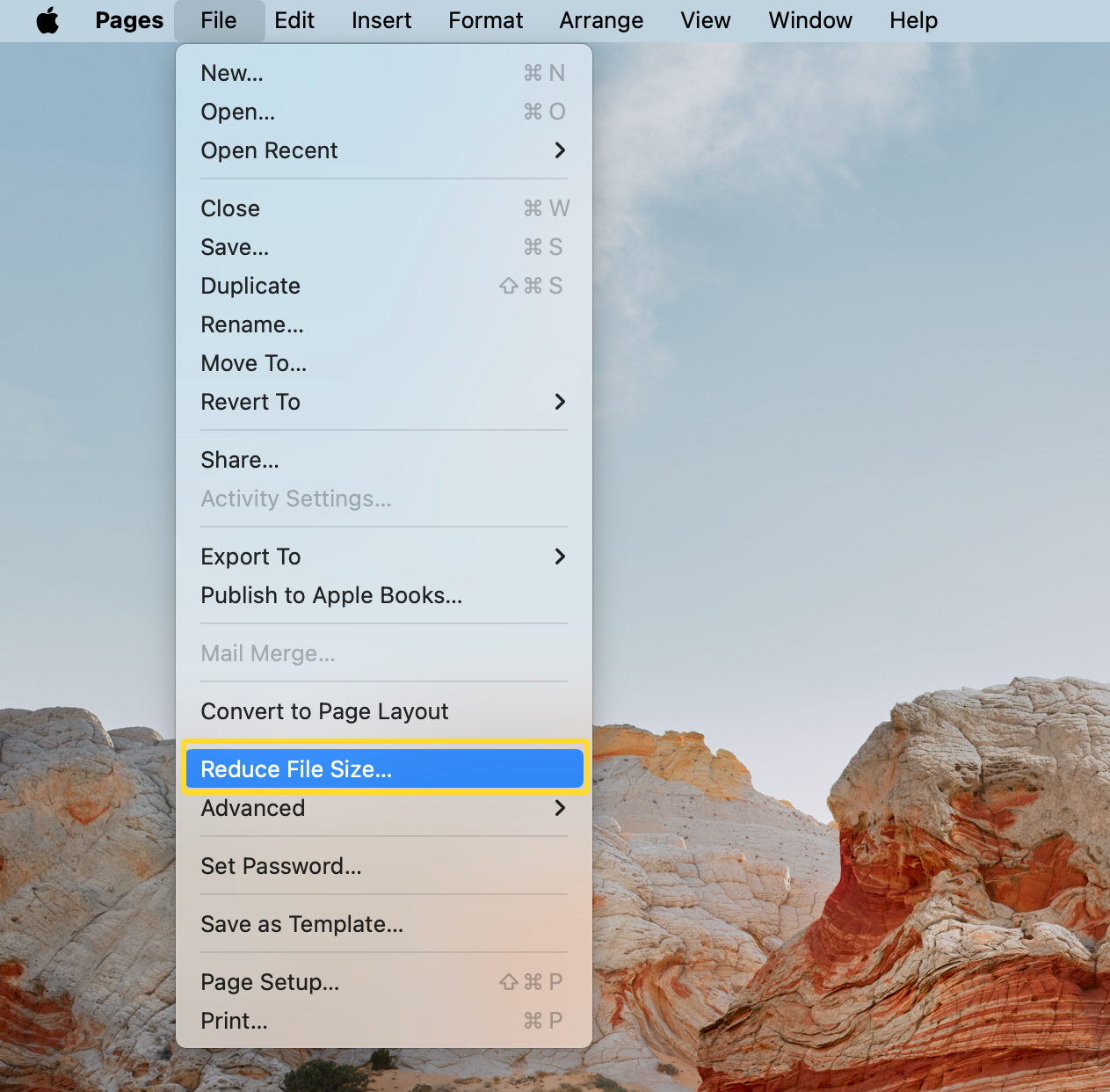
- In the toolbar that appears, click Reduce File Size. This provides a quick automated compression.
- For more control, click Advanced Optimization. Here, you can manually adjust the DPI (dots per inch) for color, grayscale, and monochrome images. You can also un-embed fonts that are commonly available on most systems to save extra kilobytes.
The primary advantage of using Adobe is the "Audit Space Usage" feature. This tells you exactly what is making the file large—whether it's the images, the fonts, or the document structure—allowing you to target the problem areas specifically.
3. Quick Online PDF Compression Tools
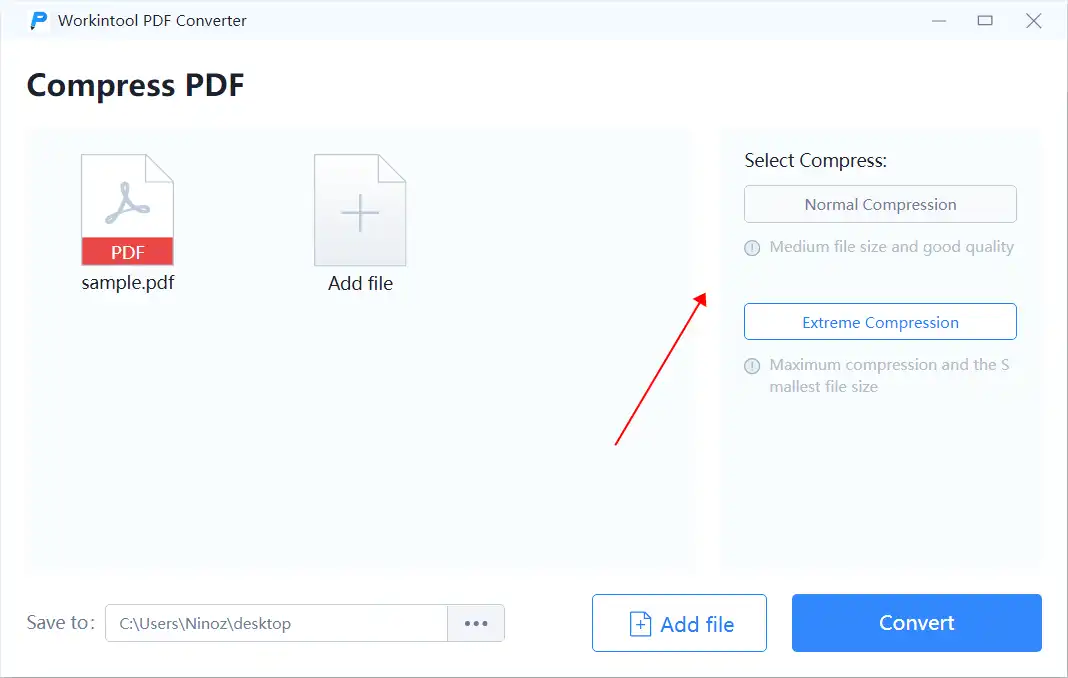
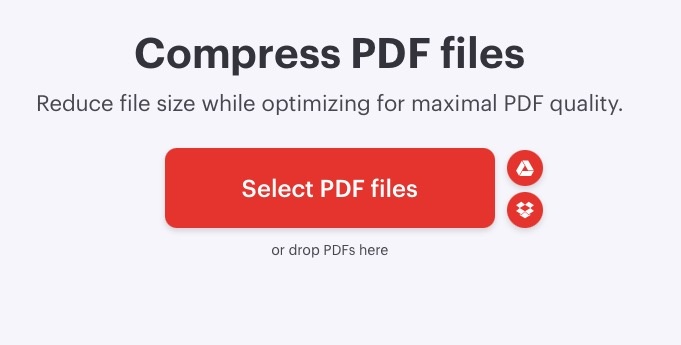
If you are in a rush and don't want to fiddle with system settings or expensive software, online tools are a fantastic alternative. Websites like SmallPDF, iLovePDF, and Adobe’s own online compressor are highly optimized for speed and efficiency.
Pros and Cons of Online Tools:
- Pros: No installation required, extremely user-friendly, and often use advanced algorithms that maintain better text clarity than the Mac Preview app.
- Cons: Privacy concerns (you are uploading your data to a third-party server) and file size limits on free versions.
When using these services, simply drag and drop your file, wait for the processing to finish, and download the compressed version. Always ensure you are using a reputable site with SSL encryption if the document contains sensitive information.
4. Automating the Process with macOS Shortcuts
For users who frequently need to shrink PDFs, manually going through the Preview menus can become tedious. macOS Monterey and later versions include the Shortcuts app, which allows you to create a "Quick Action" for PDF compression.
Creating a Compression Shortcut:
- Open the Shortcuts app on your Mac.
- Click the + icon to create a new shortcut.
- In the search bar on the right, type "Optimize PDF" or "Set PDF Metadata." However, the most effective way is to search for "Choose from Menu" combined with the "Filter" actions.
- Alternatively, you can find many pre-made "Compress PDF" shortcuts in the Shortcut Gallery or online communities.
- Once set up, you can simply right-click any PDF in Finder, go to Quick Actions, and run your compression script.
| Method | Best For |
|---|---|
| Preview (Quartz Filter) | Quick, free, and built-in compression for everyday use. |
| Adobe Acrobat Pro | Professional quality control and granular image optimization. |
| Online Converters | Users who want the smallest size without technical tweaking. |
| ColorSync Utility | Power users who want to create custom compression profiles. |
Why Are My PDF Files So Large?
Understanding why a file is large can help you prevent the issue during the creation phase. Usually, the culprits are:
- High DPI Images: Images intended for print (300 DPI or higher) are much larger than those intended for screens (72-150 DPI).
- Embedded Fonts: To ensure a PDF looks the same on every device, the file often includes the entire font library used in the document.
- Unused Objects: Metadata, hidden layers, and old revision histories can add "ghost" weight to your file.
Frequently Asked Questions (FAQ)
1. Will compressing a PDF make the text blurry?
If you use high-level compression (like the default "Reduce File Size" in Preview), images will definitely lose quality. However, since text is usually vector-based, it should remain sharp. If the text becomes blurry, it usually means the PDF was originally a scanned image rather than a text document.
2. Is it safe to use online PDF compressors for sensitive documents?
While many sites claim to delete files after an hour, there is always a residual risk. For bank statements, legal contracts, or medical records, it is highly recommended to use the offline Preview or Adobe Acrobat methods on your Mac.
3. Can I compress a password-protected PDF?
Generally, you must unlock the PDF first. Most compression tools cannot process the internal data of a file if it is encrypted. Open the file, enter the password, save it as an unencrypted version (if permitted), and then apply compression.
Conclusion
Knowing how to make PDF a smaller file size on Mac is a vital skill for maximizing productivity and maintaining an organized digital workspace. For most users, the built-in Preview app provides a quick and efficient solution. However, for those requiring a perfect balance between clarity and size, Adobe Acrobat Pro or specialized Online Tools offer more refined options. By following the steps outlined in this guide, you can ensure your documents are perfectly optimized for sharing, uploading, and archiving without the headache of file size limitations. Experiment with these methods today to find the workflow that fits your needs best!
How To Make Pdf A Smaller File Size On Mac
How To Make Pdf A Smaller File Size On Mac Wallpapers
Collection of how to make pdf a smaller file size on mac wallpapers for your desktop and mobile devices.
Dynamic How To Make Pdf A Smaller File Size On Mac Photo Art
Immerse yourself in the stunning details of this beautiful how to make pdf a smaller file size on mac wallpaper, designed for a captivating visual experience.
Lush How To Make Pdf A Smaller File Size On Mac Photo Art
Immerse yourself in the stunning details of this beautiful how to make pdf a smaller file size on mac wallpaper, designed for a captivating visual experience.
Lush How To Make Pdf A Smaller File Size On Mac View Digital Art
Find inspiration with this unique how to make pdf a smaller file size on mac illustration, crafted to provide a fresh look for your background.

Crisp How To Make Pdf A Smaller File Size On Mac Capture Digital Art
A captivating how to make pdf a smaller file size on mac scene that brings tranquility and beauty to any device.

Dynamic How To Make Pdf A Smaller File Size On Mac Capture Photography
This gorgeous how to make pdf a smaller file size on mac photo offers a breathtaking view, making it a perfect choice for your next wallpaper.
:max_bytes(150000):strip_icc()/how-to-make-a-file-smaller-on-mac-52109196-fdec2bc83f1e476fbc39de21929d8d80.jpg "Stunning How To Make Pdf A Smaller File Size On Mac Photo Nature")
Stunning How To Make Pdf A Smaller File Size On Mac Photo Nature
This gorgeous how to make pdf a smaller file size on mac photo offers a breathtaking view, making it a perfect choice for your next wallpaper.
Vivid How To Make Pdf A Smaller File Size On Mac Scene Collection
Explore this high-quality how to make pdf a smaller file size on mac image, perfect for enhancing your desktop or mobile wallpaper.
Artistic How To Make Pdf A Smaller File Size On Mac View for Desktop
This gorgeous how to make pdf a smaller file size on mac photo offers a breathtaking view, making it a perfect choice for your next wallpaper.
Detailed How To Make Pdf A Smaller File Size On Mac Wallpaper for Desktop
Transform your screen with this vivid how to make pdf a smaller file size on mac artwork, a true masterpiece of digital design.
Spectacular How To Make Pdf A Smaller File Size On Mac Image Concept
A captivating how to make pdf a smaller file size on mac scene that brings tranquility and beauty to any device.
Lush How To Make Pdf A Smaller File Size On Mac Scene Art
This gorgeous how to make pdf a smaller file size on mac photo offers a breathtaking view, making it a perfect choice for your next wallpaper.
Artistic How To Make Pdf A Smaller File Size On Mac Photo Photography
Find inspiration with this unique how to make pdf a smaller file size on mac illustration, crafted to provide a fresh look for your background.
Amazing How To Make Pdf A Smaller File Size On Mac Artwork Concept
Transform your screen with this vivid how to make pdf a smaller file size on mac artwork, a true masterpiece of digital design.
Dynamic How To Make Pdf A Smaller File Size On Mac Abstract for Desktop
Immerse yourself in the stunning details of this beautiful how to make pdf a smaller file size on mac wallpaper, designed for a captivating visual experience.

Dynamic How To Make Pdf A Smaller File Size On Mac Image Collection
A captivating how to make pdf a smaller file size on mac scene that brings tranquility and beauty to any device.
Serene How To Make Pdf A Smaller File Size On Mac Image for Desktop
Explore this high-quality how to make pdf a smaller file size on mac image, perfect for enhancing your desktop or mobile wallpaper.
:max_bytes(150000):strip_icc()/how-to-make-a-file-smaller-on-mac-52109195-1220015ec8cf49b98b8ce692a7562a90.jpg "Exquisite How To Make Pdf A Smaller File Size On Mac Background in 4K")
Exquisite How To Make Pdf A Smaller File Size On Mac Background in 4K
Immerse yourself in the stunning details of this beautiful how to make pdf a smaller file size on mac wallpaper, designed for a captivating visual experience.
Breathtaking How To Make Pdf A Smaller File Size On Mac View for Desktop
Discover an amazing how to make pdf a smaller file size on mac background image, ideal for personalizing your devices with vibrant colors and intricate designs.
Amazing How To Make Pdf A Smaller File Size On Mac Abstract in HD
Transform your screen with this vivid how to make pdf a smaller file size on mac artwork, a true masterpiece of digital design.
Mesmerizing How To Make Pdf A Smaller File Size On Mac Landscape in HD
Experience the crisp clarity of this stunning how to make pdf a smaller file size on mac image, available in high resolution for all your screens.
Download these how to make pdf a smaller file size on mac wallpapers for free and use them on your desktop or mobile devices.