How To Reduce Size Of A Pdf In Bluebeam
How to Reduce Size of a PDF in Bluebeam: A Master Guide for Professionals
In the world of architecture, engineering, and construction (AEC), Bluebeam Revu has established itself as the industry standard for PDF markup and management. However, as projects grow in complexity, so do the file sizes. Large PDF files can be a nightmare to share via email, slow down mobile viewing on job sites, and consume excessive server storage. Learning how to reduce size of a PDF in Bluebeam is not just a technical skill; it is a necessity for maintaining project efficiency and ensuring smooth collaboration among stakeholders.
Why Do Bluebeam PDF Files Become So Large?
Before diving into the "how-to," it is important to understand why these files bloat in the first place. Bluebeam documents are often more than just flat images; they contain layers, metadata, hyperlinks, complex vector paths, and high-resolution raster images. Every markup, stamp, and embedded photo adds to the total kilobyte or megabyte count. If you are working with scanned drawings, the file size can skyrocket because every page is essentially a high-resolution photograph. By identifying the culprits—usually high-DPI images and unoptimized metadata—you can apply the right reduction strategy without sacrificing the legibility of your blueprints.
Method 1: Using the 'Reduce File Size' Feature
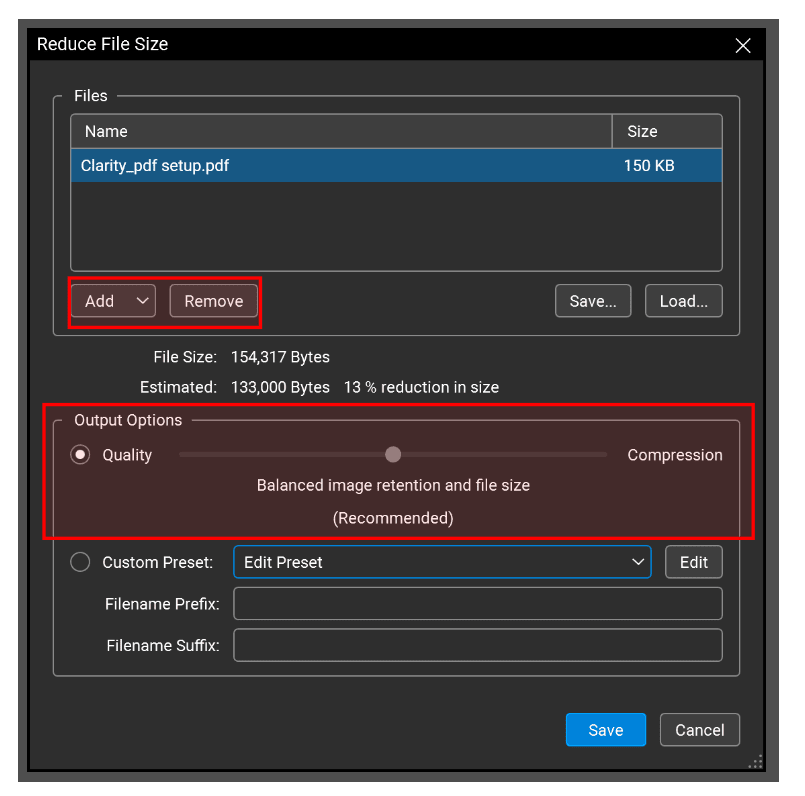
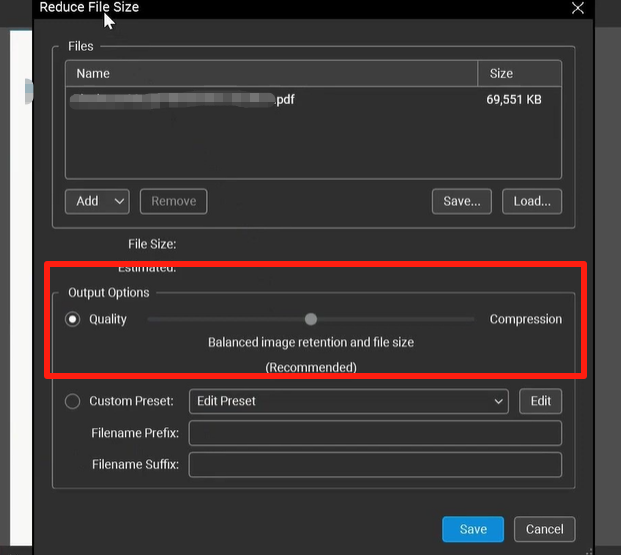
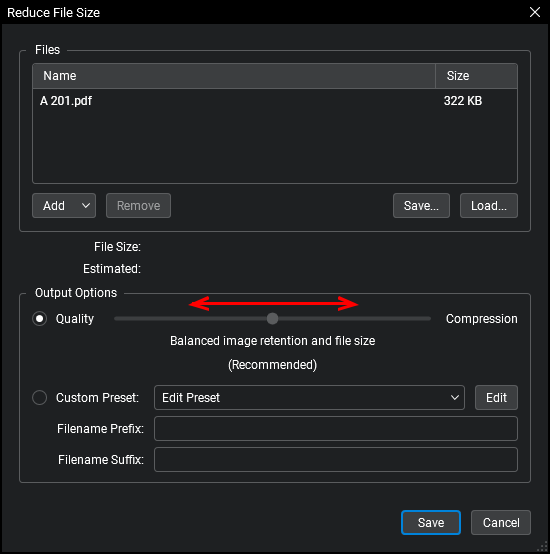
The quickest and most common way to shrink your documents is through the built-in "Reduce File Size" tool. This feature is designed for users who need a fast result without manually tweaking every technical setting. It provides a simple slider interface that balances quality against file size.
Step-by-Step Execution:
- Open the Document: Launch Bluebeam Revu and open the PDF you wish to compress.
- Access the Tool: Navigate to the Document menu and select Reduce File Size.
- Adjust the Slider: A dialog box will appear with a slider ranging from "Low Quality/Small Size" to "High Quality/Large Size." For most digital sharing, the middle setting is ideal.
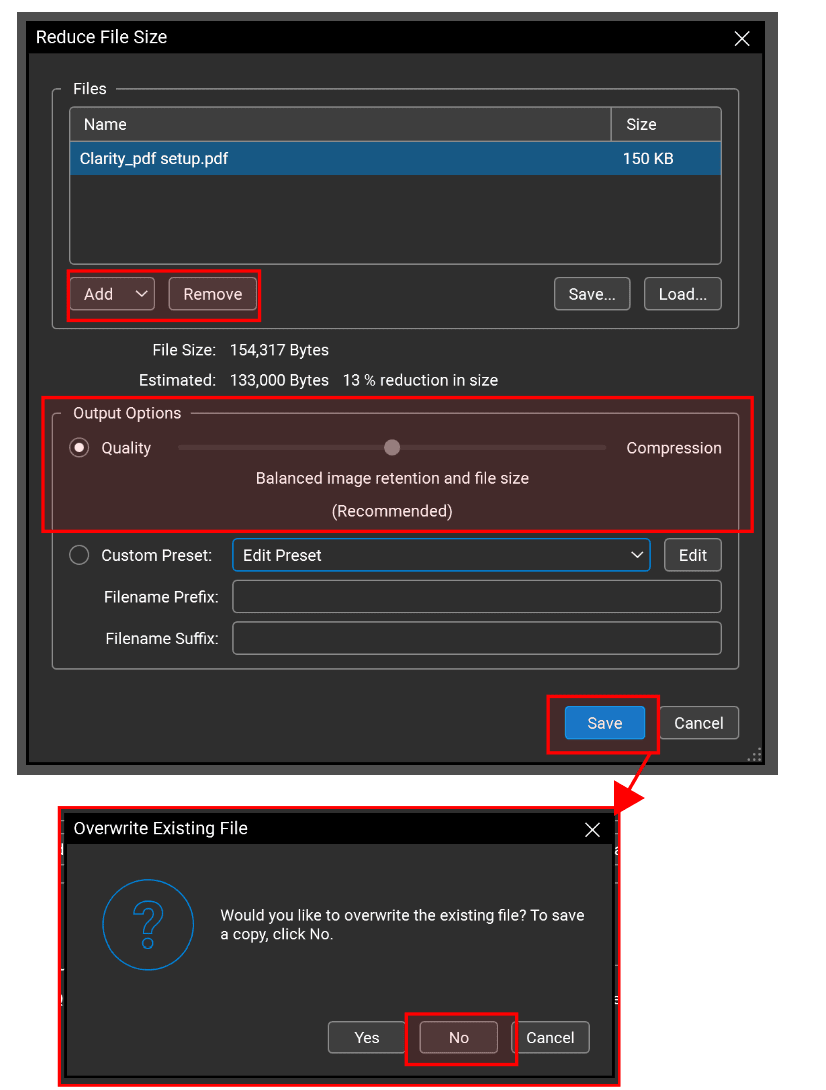
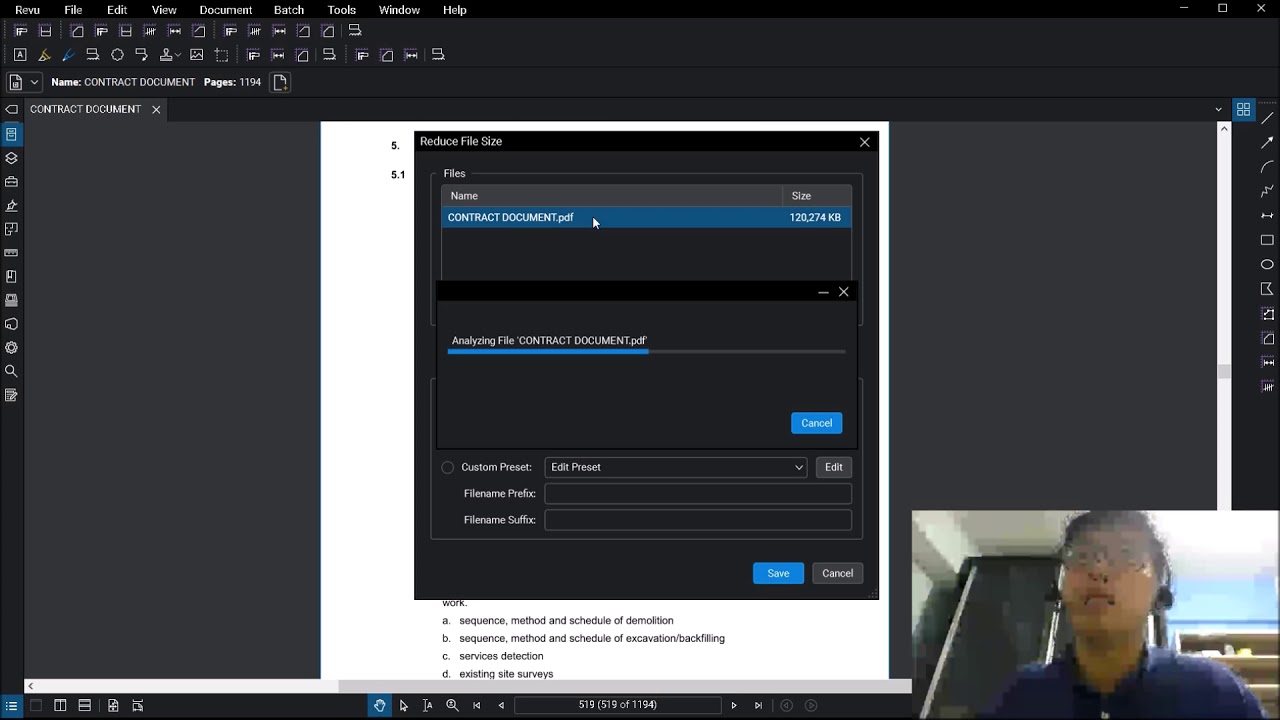
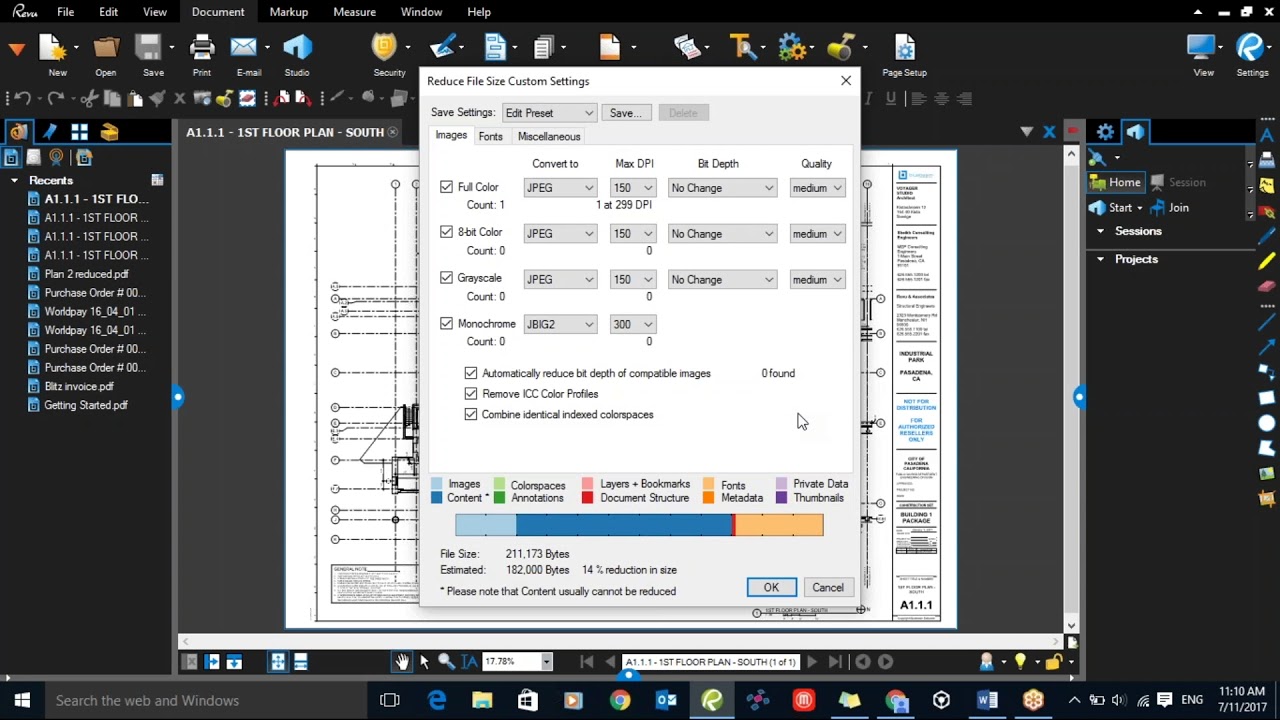
- Analyze the Reduction: Bluebeam will calculate the estimated savings. If the reduction meets your needs, click OK.
- Save As: It is highly recommended to save the reduced file as a new version (e.g., "Drawing_v2_Compressed.pdf") to keep your original high-resolution master file intact.
| Feature/Aspect | Description |
|---|---|
| Reduce File Size Tool | A simple, slider-based automated tool for quick compression. |
| PDF Optimizer | An advanced feature allowing granular control over images, fonts, and metadata. |
| Batch Processing | The ability to apply size reduction to hundreds of files simultaneously. |
| Image Downsampling | Reducing the DPI (dots per inch) of embedded images to save space. |
| Metadata Stripping | Removing invisible data like thumbnails, bookmarks, and private creator info. |
Method 2: Leveraging the PDF Optimizer for Advanced Control
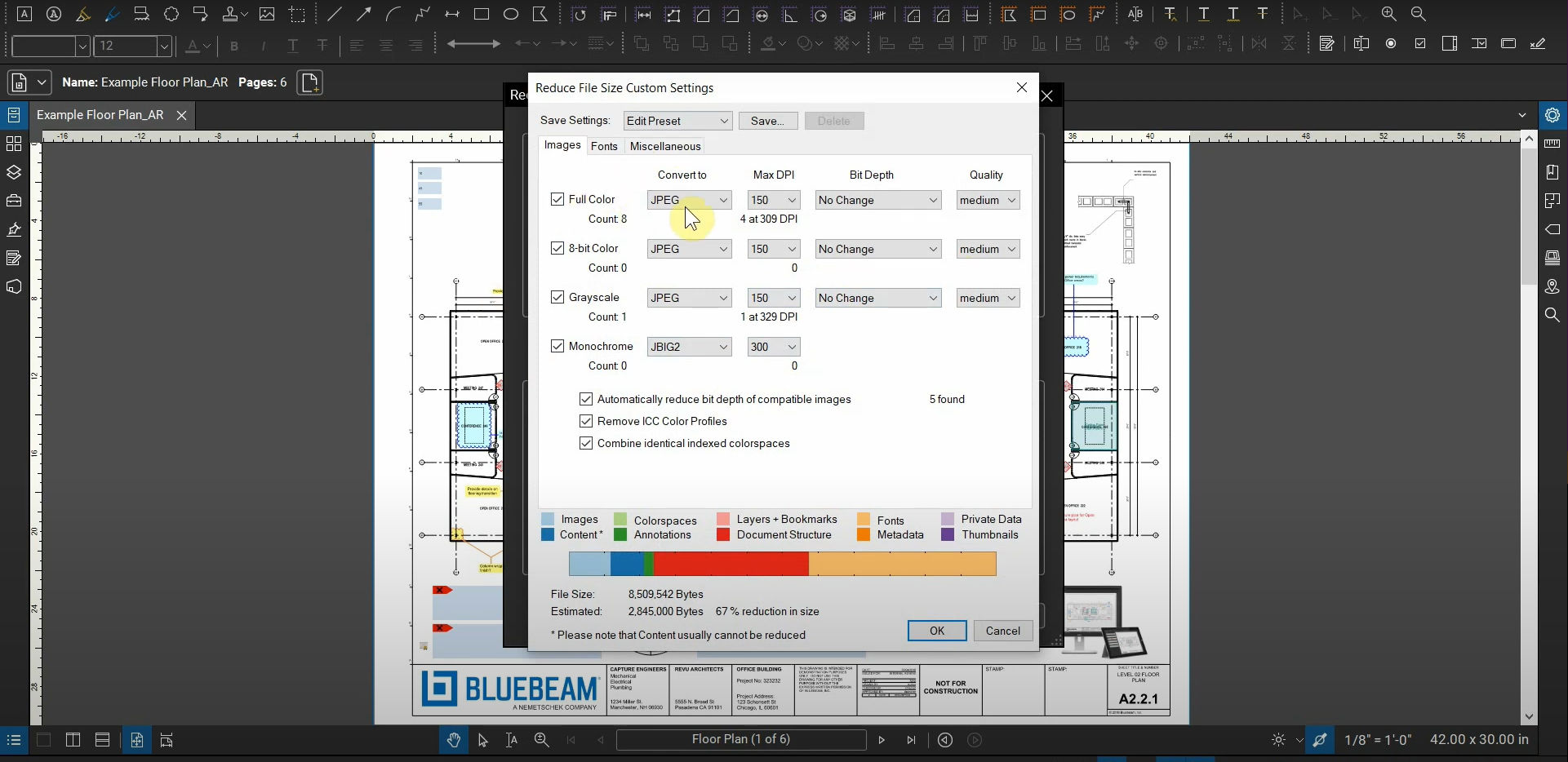
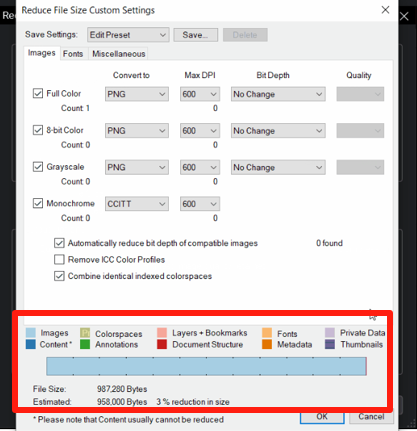
If the standard "Reduce File Size" tool doesn't give you the results you need, or if the quality drops too much, the PDF Optimizer is your best friend. This tool allows you to go "under the hood" and choose exactly what data to strip away and how much to compress specific image types.
Customizing Image Compression
Images (raster data) are usually the biggest space-hogs. Within the PDF Optimizer, you can set specific compression types for color, grayscale, and monochrome images. For construction drawings, changing color images to "JPEG" compression and reducing the DPI to 150 can significantly drop the file size while remaining perfectly readable on a tablet or laptop.
Discarding Unused Data
Bluebeam files often carry "baggage" that isn't visible on the page. The PDF Optimizer allows you to check boxes for:
- Discarding unused resources and embedded thumbnails.
- Removing invalid bookmarks and links.
- Stripping "User Data" which includes non-essential metadata.
- Removing "Embedded Fonts" (though be careful with this, as it may change the look of the text if the recipient doesn't have the font installed).
Method 3: Reducing Size via Batch Processing
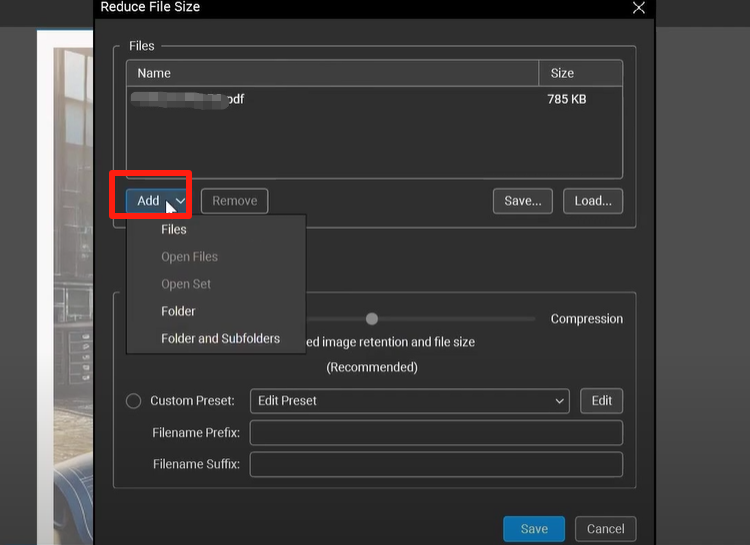
In large-scale projects, you might have a folder containing 500 individual PDF sheets. Optimizing these one by one is an inefficient use of time. Bluebeam Revu eXtreme users have access to Batch Processing, which allows the "Reduce File Size" command to be applied to an entire directory at once.
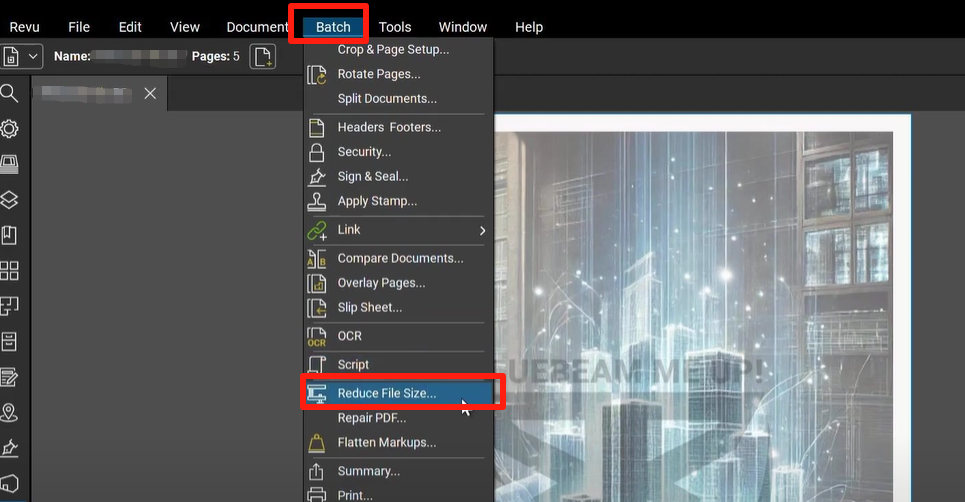
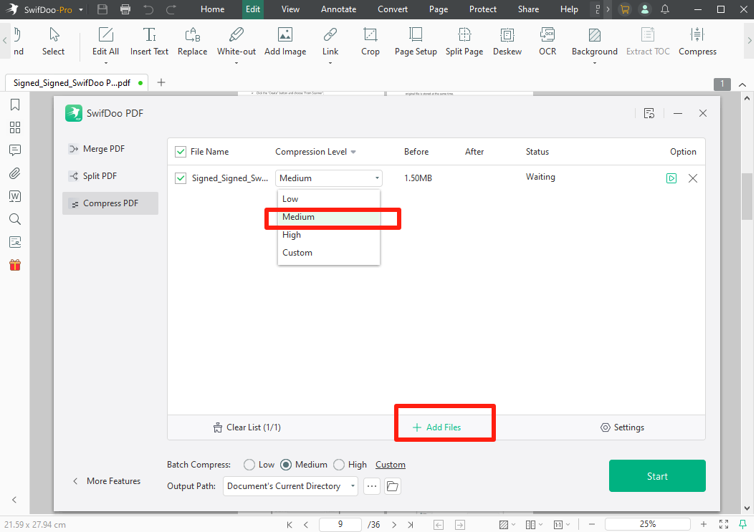
To use this, go to Batch > Reduce File Size. From here, you can add all the files in your project folder, select your desired compression level, and let Bluebeam work in the background. This ensures consistency across the entire document set, making the total project package much easier to upload to platforms like Procore, Autodesk Construction Cloud, or PlanGrid.
Pro Tips for Keeping PDFs Small from the Start
While knowing how to reduce size is important, preventing bloat in the first place is even better. Here are a few professional tips:
- Flatten Your Markups: If you no longer need to edit your markups (clouds, callouts, measurements), use the Flatten tool. This merges the markups into the content layer, often reducing the complexity of the file.
- Avoid "Print to PDF": Instead of printing from CAD software to a PDF driver, use the Bluebeam plugin for AutoCAD or Revit. The plugin is optimized to create smaller, "smarter" files compared to generic print drivers.
- Limit High-Res Photos: When using the "Camera" tool to embed site photos into your markups, lower the resolution of the photos before importing them, or use Bluebeam's "Capture" feature which manages these images more efficiently.
Frequently Asked Questions (FAQ)
1. Does reducing the file size in Bluebeam affect the accuracy of measurements?
No, reducing the file size primarily affects image resolution and metadata. The vector data used for measurements remains accurate. However, if you downsample images too much, it might be harder to see fine details where you need to snap your cursor.
2. What is the difference between 'Reduce File Size' and 'PDF Optimizer'?
'Reduce File Size' is a simplified version with a single slider for ease of use. 'PDF Optimizer' provides manual control over specific categories like image types, font embedding, and metadata removal for more precise results.
3. Can I undo a file size reduction?
Once a file is saved after reduction, you cannot "un-compress" it to regain the lost resolution. This is why it is vital to always save the reduced version as a copy rather than overwriting your original source file.
Conclusion
Mastering how to reduce size of a PDF in Bluebeam is a critical skill for any professional working with digital documents. By utilizing the 'Reduce File Size' tool for quick fixes and the 'PDF Optimizer' for technical precision, you can ensure that your files are lean, fast, and professional. Not only does this save storage space, but it also improves the user experience for everyone on your team—from the office engineer to the superintendent in the field. Start implementing these compression strategies today to keep your digital workflow running at peak performance.
How To Reduce Size Of A Pdf In Bluebeam
How To Reduce Size Of A Pdf In Bluebeam Wallpapers
Collection of how to reduce size of a pdf in bluebeam wallpapers for your desktop and mobile devices.
Crisp How To Reduce Size Of A Pdf In Bluebeam Design Art
Find inspiration with this unique how to reduce size of a pdf in bluebeam illustration, crafted to provide a fresh look for your background.

Artistic How To Reduce Size Of A Pdf In Bluebeam Artwork Photography
A captivating how to reduce size of a pdf in bluebeam scene that brings tranquility and beauty to any device.

Captivating How To Reduce Size Of A Pdf In Bluebeam Landscape in 4K
Find inspiration with this unique how to reduce size of a pdf in bluebeam illustration, crafted to provide a fresh look for your background.
Beautiful How To Reduce Size Of A Pdf In Bluebeam Image Art
Transform your screen with this vivid how to reduce size of a pdf in bluebeam artwork, a true masterpiece of digital design.
Lush How To Reduce Size Of A Pdf In Bluebeam Abstract in 4K
Immerse yourself in the stunning details of this beautiful how to reduce size of a pdf in bluebeam wallpaper, designed for a captivating visual experience.

Captivating How To Reduce Size Of A Pdf In Bluebeam Design for Desktop
This gorgeous how to reduce size of a pdf in bluebeam photo offers a breathtaking view, making it a perfect choice for your next wallpaper.
Captivating How To Reduce Size Of A Pdf In Bluebeam Background Illustration
A captivating how to reduce size of a pdf in bluebeam scene that brings tranquility and beauty to any device.

Amazing How To Reduce Size Of A Pdf In Bluebeam Image Digital Art
Experience the crisp clarity of this stunning how to reduce size of a pdf in bluebeam image, available in high resolution for all your screens.
Crisp How To Reduce Size Of A Pdf In Bluebeam Design Art
A captivating how to reduce size of a pdf in bluebeam scene that brings tranquility and beauty to any device.
Breathtaking How To Reduce Size Of A Pdf In Bluebeam Photo for Your Screen
Explore this high-quality how to reduce size of a pdf in bluebeam image, perfect for enhancing your desktop or mobile wallpaper.
High-Quality How To Reduce Size Of A Pdf In Bluebeam Abstract in HD
Experience the crisp clarity of this stunning how to reduce size of a pdf in bluebeam image, available in high resolution for all your screens.
Serene How To Reduce Size Of A Pdf In Bluebeam Design Art
Transform your screen with this vivid how to reduce size of a pdf in bluebeam artwork, a true masterpiece of digital design.
Lush How To Reduce Size Of A Pdf In Bluebeam Artwork Photography
This gorgeous how to reduce size of a pdf in bluebeam photo offers a breathtaking view, making it a perfect choice for your next wallpaper.

Breathtaking How To Reduce Size Of A Pdf In Bluebeam Capture for Desktop
Experience the crisp clarity of this stunning how to reduce size of a pdf in bluebeam image, available in high resolution for all your screens.

Mesmerizing How To Reduce Size Of A Pdf In Bluebeam Picture Nature
Transform your screen with this vivid how to reduce size of a pdf in bluebeam artwork, a true masterpiece of digital design.
Spectacular How To Reduce Size Of A Pdf In Bluebeam Scene Illustration
Find inspiration with this unique how to reduce size of a pdf in bluebeam illustration, crafted to provide a fresh look for your background.
Breathtaking How To Reduce Size Of A Pdf In Bluebeam Landscape for Your Screen
Transform your screen with this vivid how to reduce size of a pdf in bluebeam artwork, a true masterpiece of digital design.
Crisp How To Reduce Size Of A Pdf In Bluebeam Scene Art
Immerse yourself in the stunning details of this beautiful how to reduce size of a pdf in bluebeam wallpaper, designed for a captivating visual experience.

Crisp How To Reduce Size Of A Pdf In Bluebeam Background for Your Screen
This gorgeous how to reduce size of a pdf in bluebeam photo offers a breathtaking view, making it a perfect choice for your next wallpaper.

Gorgeous How To Reduce Size Of A Pdf In Bluebeam Picture in 4K
Find inspiration with this unique how to reduce size of a pdf in bluebeam illustration, crafted to provide a fresh look for your background.
Download these how to reduce size of a pdf in bluebeam wallpapers for free and use them on your desktop or mobile devices.